VectorStyler
    • Categories
    • Unread
    • Recent
    • Tags
    • Popular
    • Register
    • Login

    How to get displacement effect?

    Scheduled Pinned Locked Moved Questions and Support
    13 Posts 5 Posters 12.3k Views 5 Watching
    Loading More Posts
    • Oldest to Newest
    • Newest to Oldest
    • Most Votes
    Reply
    • Reply as topic
    Log in to reply
    This topic has been deleted. Only users with topic management privileges can see it.
    • ianrobertdouglasI Offline
      ianrobertdouglas
      last edited by

      @VectorStyler @b77 Thank you both very much!

      1 Reply Last reply Reply Quote 0
      • S Offline
        Subpath
        last edited by Subpath

        @ianrobertdouglas

        Hi and welcome to VectorStyler

        I made some experiments with Strokes a while a go
        wich may be helpful too

        See here:
        https://www.vectorstyler.com/forum/topic/2307/attempts-of-a-kind-of-halftone-lines-in-vs

        Win 11
        CPU: AMD Ryzen 5 9600X, 6-core.
        GPU: Nvidia Geforce RTX 5070.

        J 1 Reply Last reply Reply Quote 1
        • J Offline
          jroth @Subpath
          last edited by

          @Subpath
          Hi there, I want to combine the two above workflows and add more stroke width to the top of the displacement effect as shown below on the letter "T" example .
          To do so I 've tried to add to the displacement text object the transparency content role, yet I struggle to get it to work properly.
          Can anyone assist here please ?
          Many thanks!
          J
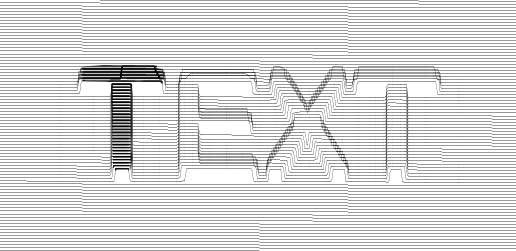
          0_1673103801249_Text.jpg

          b77B VectorStylerV S 3 Replies Last reply Reply Quote 0
          • b77B Offline
            b77 @jroth
            last edited by b77

            @jroth If there is no effect or role to do this, you can simply duplicate the object exactly on top (with copy & paste),
            then increase/decrease the Amount value of its Displacement effect with 1 pt (if the line width is 1 pt).

            See the attached file: 0_1673106539290_Displacement example.vstyler

            MacBook Pro (Intel) running Monterey 12.6.4

            J 1 Reply Last reply Reply Quote 1
            • VectorStylerV Offline
              VectorStyler @jroth
              last edited by

              @jroth Currently there is no feature to change the stroke width with a non-destructive filter.

              But it is possible to make an adjustment in a destructive way, by using the Stroke Width panel and the "Adjust Profile with Mask" from the panel menu.

              J 1 Reply Last reply Reply Quote 0
              • J Offline
                jroth @b77
                last edited by

                @b77 That's a nice and simple way around the issue. I 've just tried and it works. Many thanks for your quick reply.

                1 Reply Last reply Reply Quote 2
                • J Offline
                  jroth @VectorStyler
                  last edited by

                  @VectorStyler I see, I will add the stroke width as a last step (either using the object duplication or break the object). Many thanks!

                  1 Reply Last reply Reply Quote 0
                  • S Offline
                    Subpath @jroth
                    last edited by Subpath

                    Hi @jroth

                    I used a copy of the Text as a clipping Object
                    and put a copy of the displacment strokes in
                    the clipping object

                    This way you can control the Stroke width
                    on the Text the way you liked

                    Here how to do it
                    create a copy of your displacement strokes
                    use Break apart to get rid of the Shape Effect
                    Object > Break apart

                    i converted a copy of the Text to curves
                    and did a Combine Boolean on it

                    then i placed the copy of the displacement strokes
                    over the Text copy and put that strokes in the Clipboard

                    then select the Text copy and do a "past inside"

                    to edit the strokes inside the Text just
                    double click on the Text

                    i used the File from @b77 my font is different but
                    i think you get it

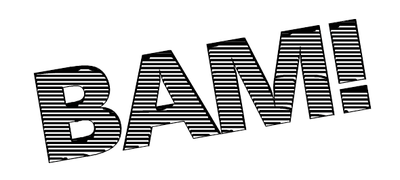
                    the clipping Object
                    0_1673110784377_BAM-2.png

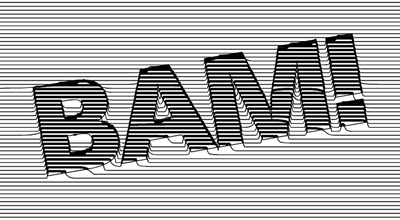
                    the Result
                    0_1673110816336_BAM-1.png

                    Win 11
                    CPU: AMD Ryzen 5 9600X, 6-core.
                    GPU: Nvidia Geforce RTX 5070.

                    J 1 Reply Last reply Reply Quote 2
                    • J Offline
                      jroth @Subpath
                      last edited by

                      @Subpath Looks great! I did not know that a boolean combination can be done with strokes only. That"s very helpful. Many thanks ! J

                      S 1 Reply Last reply Reply Quote 1
                      • S Offline
                        Subpath @jroth
                        last edited by Subpath

                        @jroth

                        you are welcome, nice that is helpful

                        Boolean combining is exactly the same thing
                        as combining in other vector programs.
                        So it is nothing special.
                        In VS you can find Combine under
                        the Boolean operations.

                        And of course you can also combine strokes

                        Win 11
                        CPU: AMD Ryzen 5 9600X, 6-core.
                        GPU: Nvidia Geforce RTX 5070.

                        1 Reply Last reply Reply Quote 0
                        • First post
                          Last post