VectorStyler
    • Categories
    • Unread
    • Recent
    • Tags
    • Popular
    • Register
    • Login

    Scale Strokes and Effects

    Scheduled Pinned Locked Moved Questions and Support
    63 Posts 12 Posters 158.2k Views 9 Watching
    Loading More Posts
    • Oldest to Newest
    • Newest to Oldest
    • Most Votes
    Reply
    • Reply as topic
    Log in to reply
    This topic has been deleted. Only users with topic management privileges can see it.
    • J Offline
      Jayanta Das
      last edited by

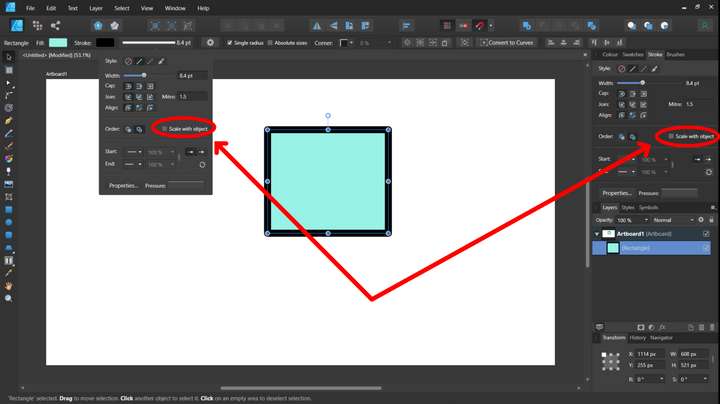
      I will love to see this. @VectorStyler if you could add this.😎

      0_1666273440142_Screenshot 2022-10-20 190611.png
      And also in all the effects respective windows applied from appearance panel
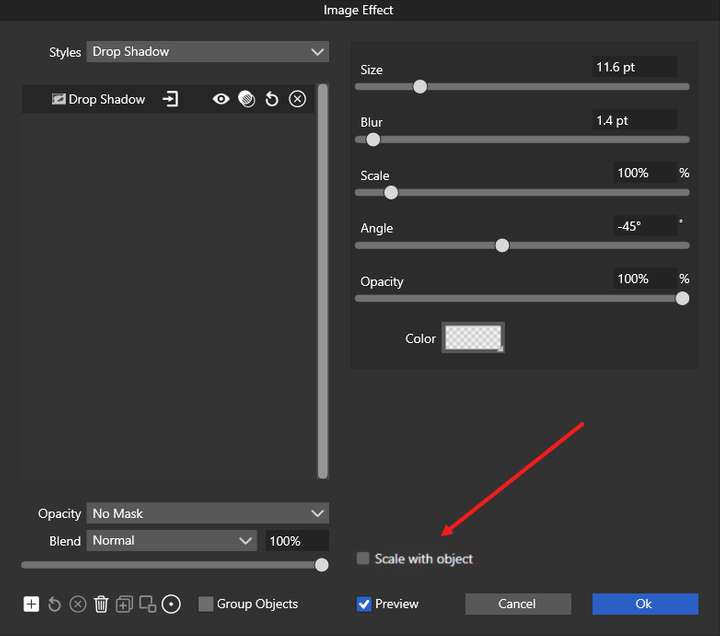
      0_1666274452318_Screenshot 2022-10-20 191833.png

      Mac Mini M4 Pro | 24Gb
      WIndows 11 | Intel i5 11Gen
      Wacom Intuos Pro

      VectorStylerV 1 Reply Last reply Reply Quote 1
      • VectorStylerV Offline
        VectorStyler @Jayanta Das
        last edited by

        @Jayanta-Das For the stroke there is a "Transformed Stroke" in the Stroke panel menu.

        BoldlineB J 2 Replies Last reply Reply Quote 0
        • BoldlineB Offline
          Boldline @VectorStyler
          last edited by

          @VectorStyler said in Scale Strokes and Effects:

          @Jayanta-Das For the stroke there is a "Transformed Stroke" in the Stroke panel menu.

          I'm not seeing a difference in how the stroke is treated whether the "transformed stroke" is toggled on or off. Is there something I need to do differently?
          Here is a video of this

          🍎 macOS Tahoe 26.2, Mac mini (M1, 2020), Chip Apple M1, Memory 16 GB
          Cintiq 27QHD Display and LG Ultra HD Display

          J 1 Reply Last reply Reply Quote 0
          • J Offline
            Jayanta Das @Boldline
            last edited by

            @Boldline What I do is with the object selected, in the appearance panel go to hamburger menu and from there enable both scale image effect and transformed stroke.

            Video

            Mac Mini M4 Pro | 24Gb
            WIndows 11 | Intel i5 11Gen
            Wacom Intuos Pro

            BoldlineB 1 Reply Last reply Reply Quote 0
            • J Offline
              Jayanta Das @VectorStyler
              last edited by

              @VectorStyler It Stroke doesn't scale with the object if only transformed stroke is enabled.

              Mac Mini M4 Pro | 24Gb
              WIndows 11 | Intel i5 11Gen
              Wacom Intuos Pro

              J VectorStylerV 2 Replies Last reply Reply Quote 0
              • BoldlineB Offline
                Boldline @Jayanta Das
                last edited by b77

                @Jayanta-Das said in Scale Strokes and Effects:

                @Boldline What I do is with the object selected, in the appearance panel go to hamburger menu and from there enable both scale image effect and transformed stroke.

                Video

                thank you - it's still not working for me, even when I edit the appearance panel settings.
                This whole thing seems way more complicated than it needs to be. I'm confused why there are multiple places this needs to be adjusted each time for each document. I understand and like the idea that I can individually choose to have strokes scale or not, but for me 95% of the time, I want the stroke to always scale with the object.
                I wish there was a way to set the default for this either way in the document creation and then just be able to leave it and have it work that way going forward for all scaling - and leave the settings for appearance and stroke panel for individual objects I choose to have the stroke maintain the same size despite shrinking or enlarging the accompanying shape.

                🍎 macOS Tahoe 26.2, Mac mini (M1, 2020), Chip Apple M1, Memory 16 GB
                Cintiq 27QHD Display and LG Ultra HD Display

                VectorStylerV 1 Reply Last reply Reply Quote 0
                • VectorStylerV Offline
                  VectorStyler @Boldline
                  last edited by

                  @Boldline said in Scale Strokes and Effects:

                  set the default for this either way in the document creation and then just be able to leave it and have it work that way going

                  There is a "Transformed Stroke" option in the document setup view.

                  BoldlineB 1 Reply Last reply Reply Quote 1
                  • encartE Offline
                    encart
                    last edited by

                    In my case stroke is scaling proportionaly only if I first use' Convert to curves' . Possibly a bug.

                    Windows 11 Home 10.0.22621

                    VectorStylerV 1 Reply Last reply Reply Quote 0
                    • VectorStylerV Offline
                      VectorStyler @encart
                      last edited by

                      @encart said in Scale Strokes and Effects:

                      In my case stroke is scaling proportionaly only if I first use' Convert to curves' . Possibly a bug.

                      Not really a bug, it is a feature of the Rectangle and Ellipse shapes only (and maybe text shape). These are scaled by adjusting the shape parameters.

                      Disabling the "Direct Shape Transformation" in Preferences->Editing Options 2 fixes this.

                      1 Reply Last reply Reply Quote 0
                      • BoldlineB Offline
                        Boldline @VectorStyler
                        last edited by

                        @VectorStyler said in Scale Strokes and Effects:

                        There is a "Transformed Stroke" option in the document setup view.

                        Awesome! thank you for reminding me of that. Not sure how I missed it

                        🍎 macOS Tahoe 26.2, Mac mini (M1, 2020), Chip Apple M1, Memory 16 GB
                        Cintiq 27QHD Display and LG Ultra HD Display

                        1 Reply Last reply Reply Quote 0
                        • J Offline
                          Jayanta Das @Jayanta Das
                          last edited by

                          @VectorStyler It Stroke doesn't scale with the object if only transformed stroke is enabled.

                          Is this a bug?

                          Mac Mini M4 Pro | 24Gb
                          WIndows 11 | Intel i5 11Gen
                          Wacom Intuos Pro

                          VectorStylerV 1 Reply Last reply Reply Quote 0
                          • VectorStylerV Offline
                            VectorStyler @Jayanta Das
                            last edited by

                            @Jayanta-Das said in Scale Strokes and Effects:

                            Is this a bug?

                            I will try to replicate

                            1 Reply Last reply Reply Quote 1
                            • VectorStylerV Offline
                              VectorStyler @Jayanta Das
                              last edited by

                              @Jayanta-Das said in Scale Strokes and Effects:

                              @VectorStyler It Stroke doesn't scale with the object if only transformed stroke is enabled.

                              The "Transformed Stroke", in the document setup refers only to shapes that are created after the option was enabled (and of course in new documents, that was created with this option enabled).

                              One more place where this option can be changed for existing objects is the Layer Options, this also has a "Transformed Stroke" option that enables it on all objects inside the layer.

                              1 Reply Last reply Reply Quote 0
                              • G Offline
                                gotanidea
                                last edited by

                                In Adobe Illustrator, there is an option to scale strokes and effects (Preferences > General > Scale Strokes & Effects), which is very useful because sometimes we have to turn that feature on or off.

                                Is there such option in VectorStyler?

                                I tried to turn on the Transformed Stroke checkbox in File > Document Setup > General and scaled an object using Transform Tool, but the stroke width of object didn't get increased. Here is the file:

                                0_1672763982080_Stroke_Scaling.vstyler

                                syllieS 1 Reply Last reply Reply Quote 0
                                • B Offline
                                  B-Vs-V
                                  last edited by

                                  @VectorStyler is it possible for blended strokes ? I can't get it whatever I activate in the appearance and stroke menus... Thanks

                                  W11 Pro 25H2 - 12th Gen Intel(R) i7-12700K 3.61 GHz - RAM 64 Go - NVIDIA GF GTX 4070 Ti - Intuos - Dell UP3216Q / Eizo ColorEdge
                                  W11 Pro 25H2 - 12th Gen Intel(R) i7-12700KF 3.60 GHz -RAM 64 Go - NVIDIA GF GTX 3080 - IntuosPro- ProArt PA329C

                                  VectorStylerV 1 Reply Last reply Reply Quote 0
                                  • VectorStylerV Offline
                                    VectorStyler @B-Vs-V
                                    last edited by

                                    @Pat Group the blend object (the source, target shapes and the blend).
                                    Then select the group and enable the "Transformed Stroke" option in the Object Options.
                                    This should scale all strokes inside the blend.

                                    1 Reply Last reply Reply Quote 1
                                    • syllieS Offline
                                      syllie @gotanidea
                                      last edited by

                                      @gotanidea said in Scale Strokes and Effects:

                                      In Adobe Illustrator, there is an option to scale strokes and effects (Preferences > General > Scale Strokes & Effects), which is very useful because sometimes we have to turn that feature on or off.

                                      Is there such option in VectorStyler?

                                      I tried to turn on the Transformed Stroke checkbox in File > Document Setup > General and scaled an object using Transform Tool, but the stroke width of object didn't get increased. Here is the file:

                                      0_1672763982080_Stroke_Scaling.vstyler

                                      I was not sure where to tune in myself as I was looking for this setting too. I've done a search on the forums and read through all information that I could find. I do understand the implementation, and how it affects things before/after turning the option on, and that stroke-scaling is non-destructive. I also understand that if the option is enabled on an already transformed object it is applied retroactively.

                                      Like some others in this thread and elsewhere:

                                      • The option is hard to find
                                      • In general (like @Boldline) I design my objects and stroke proportionally and if I need to adjust size, I would like to scale them both (unless I set the size explicitly)

                                      I really appreciate how in Inkscape this is solved by a toggle at the top of the screen. In this post https://www.vectorstyler.com/forum/post/17146 @VectorStyler indicated that it was added to the backlog, and as it may need a different option, for your consideration (these are toggles, all related to scaling, they appear super conveniently in the select & transform context menu, and of course not all are applicable to VS):
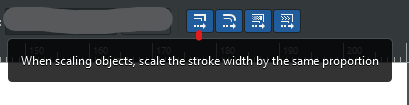
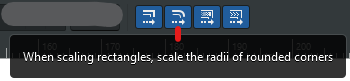
                                      0_1679545247017_37d989f6-8500-497b-9c55-1ee5d557cb69-image.png
                                      0_1679545264006_22f349d3-0fe1-4e5e-a8df-aa6ca41a1793-image.png
                                      0_1679545285448_cf4befc5-0c59-447d-b3a4-0abe8dc6ecea-image.png
                                      0_1679545300895_1e263179-1ccc-45ff-8e6e-cee22ca5ae9f-image.png

                                      Windows 10 Pro | 22H2

                                      G VectorStylerV 2 Replies Last reply Reply Quote 2
                                      • G Offline
                                        gotanidea @syllie
                                        last edited by

                                        @syllie I made a new thread for this problem:

                                        https://www.vectorstyler.com/forum/topic/2830/transformed-stroke-option-automatically-scales-stroke-width

                                        syllieS 1 Reply Last reply Reply Quote 1
                                        • syllieS Offline
                                          syllie @gotanidea
                                          last edited by

                                          @gotanidea I found that and linked that in my post, but it looks like there are some other views in this thread too so it seemed more appropriate.

                                          Windows 10 Pro | 22H2

                                          1 Reply Last reply Reply Quote 2
                                          • VectorStylerV Offline
                                            VectorStyler @syllie
                                            last edited by

                                            @syllie said in Scale Strokes and Effects:

                                            I really appreciate how in Inkscape this is solved by a toggle at the top of the screen.

                                            Yes, this is in the backlog for version 1.2

                                            G 1 Reply Last reply Reply Quote 4
                                            • First post
                                              Last post