Scale Strokes and Effects
-
@Boldline said in Scale Strokes and Effects:
@vectoradmin this works well for customizing it on an individual file and individual object level, but is there a way to make scaling stroke size with object the default so that we're not having to go in to change the setting with every be document?
No such feature now, but I think one could be made for new objects.
-
@vectoradmin Only speaking for myself, I rarely want to stroke to stay the same size when I am scaling things - typically I design with the stroke being sized in relation to the fill object it's attached to. So selfishly, I'd prefer VS default to scaling strokes and effects and let the new option in the appearance panel allow that selected object and future objects on that document be the opposite.
To appease all, I'd love to see it as a new document setup/document setup toggle. and the opposite takes affect if you go in and manually modify the setting in the appearance panel
I don't know if that's feasible -
@Boldline said in Scale Strokes and Effects:
@vectoradmin Only speaking for myself, I rarely want to stroke to stay the same size when I am scaling things - typically I design with the stroke being sized in relation to the fill object it's attached to. So selfishly, I'd prefer VS default to scaling strokes and effects and let the new option in the appearance panel allow that selected object and future objects on that document be the opposite.
To appease all, I'd love to see it as a new document setup/document setup toggle. and the opposite takes affect if you go in and manually modify the setting in the appearance panel
I don't know if that's feasibleI too would prefer the stroke to be scalable by default, and yes, having an option in the "New Document Setup" and/or in "Preferences", for the users to decide how they would like to roll, is a nice way to handle this. I think AI had this in their preferences, but I cannot remember as it was a long time ago, haha.
I still think Transformed Stroke (scale stroke with object) needs to be more accessible rather than in a panel menu. Would it be helpful to also have it in the Stroke panel, next to the Width field?
-
Is scale stroke with object works for you guys? It is not working here.
-
@Jayanta-Das It looks like 'Scale Image Filters' needs to be enabled as well.
@VectorStyler Is this by design?
-
@b77 Doesnot work here. I enabled both Scale Stroke and Scale Image Filters. Scale Image Filter stays selected but Scale Stroke disable (in panel menu) once I deselect the object
-
@Jayanta-Das It works here, at least on the Mac: https://recordit.co/YXpYX5IyfR
-
@b77 I think its Windows only issue.
-
Is working here (win 10) even that image filter and Stroke scaling
are not enabled when I duplicate a shape with both enabled.
Strange its all ok in the video.Could also deselect and select the Shape, is still fine.
But, with no offense. I find this a very curious way to
enable a simply stroke scaling and (sorry) very cumbersome.
And you have to do this for every new Shape.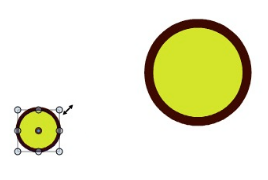
-
@Subpath Thanks.
I think I got the reason for the issue. I was selecting the stroke in appearance panel and then in the menu enabling Scale Stroke. That gives me the issue. Without selecting the
Stroke in the appearance panel It works. In this thread @VectorStyler said to select Stroke in the appeance panel so I was doing that.
Here is the recording of two shape. On the other one I select Stroke in appeance and then enable Scale Stroke which doesn't work.Mac Mini M4 Pro | 24Gb
WIndows 11 | Intel i5 11Gen
Wacom Intuos Pro -
@Jayanta-Das , glady
nice that it was helpful and thanks for your info too
-
@Jayanta-Das said in Scale Strokes and Effects:
Stroke in the appearance panel It works. In this thread @VectorStyler said to select Stroke in the appeance panel so I was doing that.
Yes, the "Transform Stroke" works when the Object row is selected in the Appearance panel. Should be grayed out when the style is selected (or should fall back to the object automatically). Will fix this.
-
@VectorStyler
I agree with others that the Transform Stroke should be available per object or per stroke and visible as an icon for a single click.
"Per object" could override the "per stroke" or reset it.In the panel menu I see "Transformed stroke" not "Transform stroke", is that something else?
Is there a PROPORTIONAL STROKE SCALING available? Like, I select 3 objects with a different stroke and want all of strokes to scale proportionally? I think currently all of these gonna get the same width.
Keeping the stroke size while scaling an object and the proportional stroke scaling is useful for cartooning or text based designs. I use the 1st one a lot in Affinity to keep the stroke consistent, it's a one click icon. The second one is not available.
-
@plrang said in Scale Strokes and Effects:
@VectorStyler
I agree with others that the Transform Stroke should be available per object or per stroke and visible as an icon for a single click.This is available now, but it is a non-destructive option.
"Per object" could override the "per stroke" or reset it.
Yes, it can be set per object, but if it is set for a Layer or Group, then it will be enabled for all members.
In the panel menu I see "Transformed stroke" not "Transform stroke", is that something else?
Yes, it is "Transformed Stroke", and the reason for this name is that instead "transforming" the stroke, it just enables a flag, that the object (or member objects) stroke should be "transformed", whenever the object (or parent) is transformed. Turning it off, will return to the original stroke width.
Is there a PROPORTIONAL STROKE SCALING available? Like, I select 3 objects with a different stroke and want all of strokes to scale proportionally? I think currently all of these gonna get the same width.
Since it is a non-destructive option, scaling the object proportionally will scale all strokes proportionally. But when changing the stroke width (setting it from the panel), it will set the same width.
Keeping the stroke size while scaling an object and the proportional stroke scaling is useful for cartooning or text based designs. I use the 1st one a lot in Affinity to keep the stroke consistent, it's a one click icon. The second one is not available.
Both the first and the second mode should work in VS. But it is important to know, that when the object is scaled, the stroke width value will never be scaled. Instead, the stroke is displayed using all the transforms on the object and its parent objects.
I think an icon in the stroke panel could help. Also, maybe VS should have destructive stroke scaling? changing the actual stroke width values, instead of just "virtually" adjusting them?
-
@VectorStyler I know it's available.
I just wanted to address the availability of a permanent button in the view since it's one of the main and fundamental properties of the stroke IMO.I have no idea how it's organized in VectorStyler, but if that proportional stroke scaling (without scaling shapes containing it) would need those actual stroke values, seems like something I had in mind while asking.
Say I have a head, eyes, nose etc, and I want to make their strokes proportionally thicker, is that available?
If not, that's what I am talking about. -
@plrang said in Scale Strokes and Effects:
Say I have a head, eyes, nose etc, and I want to make their strokes proportionally thicker, is that available?
This is not available, added it to the backlog.
-
@VectorStyler Cool, one of the dozens of features unavailable in Affinity.
-
I will love to see this. @VectorStyler if you could add this.

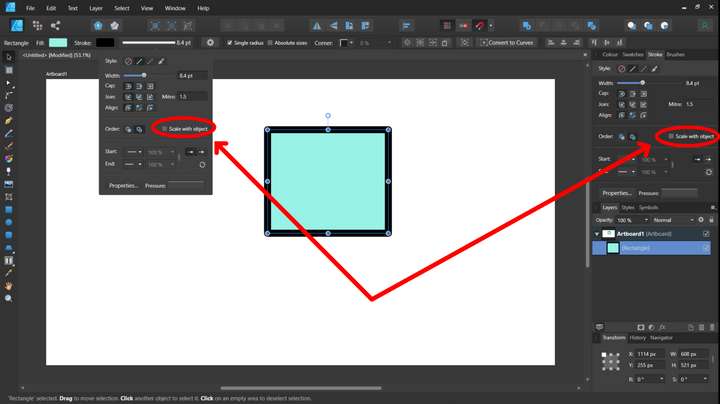
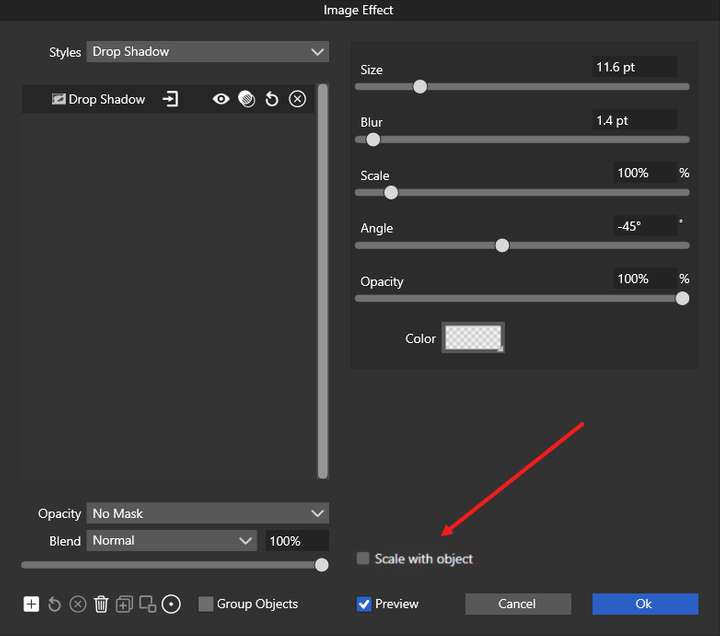
And also in all the effects respective windows applied from appearance panel
-
@Jayanta-Das For the stroke there is a "Transformed Stroke" in the Stroke panel menu.
-
@VectorStyler said in Scale Strokes and Effects:
@Jayanta-Das For the stroke there is a "Transformed Stroke" in the Stroke panel menu.
I'm not seeing a difference in how the stroke is treated whether the "transformed stroke" is toggled on or off. Is there something I need to do differently?
Here is a video of this



