VectorStyler
    • Categories
    • Unread
    • Recent
    • Tags
    • Popular
    • Register
    • Login

    Regression in document tab Windows 10

    Scheduled Pinned Locked Moved Resolved Issues
    regression
    7 Posts 3 Posters 10.3k Views 2 Watching
    Loading More Posts
    • Oldest to Newest
    • Newest to Oldest
    • Most Votes
    Reply
    • Reply as topic
    Log in to reply
    This topic has been deleted. Only users with topic management privileges can see it.
    • W Offline
      William Kansepa
      last edited by William Kansepa

      When I set and create an RGB document, on the document tab it will indicate "CMYK" instead of "RGB".
      This regression also occurred in VS 1.1.054 but was corrected in VS 1.1.058. It is now back in VS 1.1.059.

      HP•Windows 11 Pro•11th Gen Intel(R) Core(TM) i7-1165G7 @ 2.80GHz 2.70 GHz• RAM: 16.0 GB (DDR4)

      VectorStylerV 2 Replies Last reply Reply Quote 0
      • VectorStylerV Offline
        VectorStyler @William Kansepa
        last edited by

        @William-Kansepa One thing to check first: select "New Document Setup" and in the "Color" tab look at what is selected in the Color drop down.
        Select the color mode you need and confirm.
        What is showing now in the document tab?

        When a document setup view is confirmed (New or just Setup), the settings are stored for the next new document. This could cause issues.

        I will try to investigate more on Windows.

        b77B W 2 Replies Last reply Reply Quote 0
        • b77B Offline
          b77 @VectorStyler
          last edited by

          @VectorStyler Btw, in Document Setup > Color tab the 'Color Palette' menu is placed before the 'Color Mode' menu:
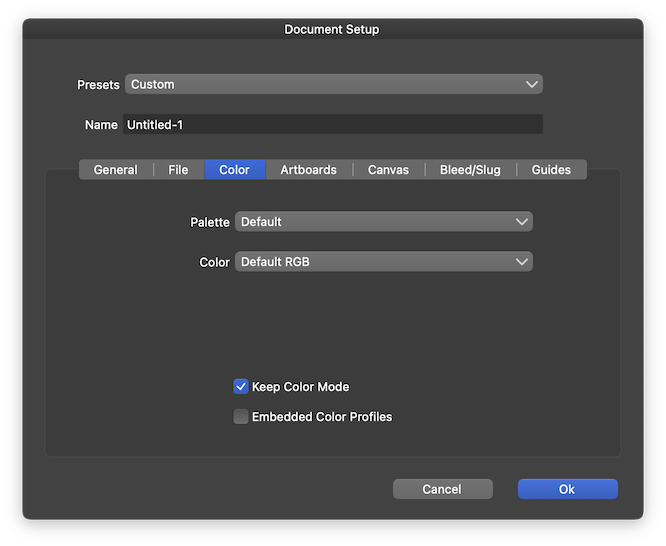
          0_1661849553104_ds.png

          MacBook Pro (Intel) running Monterey 12.6.4

          1 Reply Last reply Reply Quote 1
          • W Offline
            William Kansepa @VectorStyler
            last edited by

            @VectorStyler Thank you, but I had already done that prior to posting on the forum. Something is definitely amiss.

            HP•Windows 11 Pro•11th Gen Intel(R) Core(TM) i7-1165G7 @ 2.80GHz 2.70 GHz• RAM: 16.0 GB (DDR4)

            VectorStylerV 1 Reply Last reply Reply Quote 0
            • VectorStylerV Offline
              VectorStyler @William Kansepa
              last edited by

              @William-Kansepa said in Regression in document tab Windows 10:

              @VectorStyler Thank you, but I had already done that prior to posting on the forum. Something is definitely amiss.

              Opened a bug on this one.

              1 Reply Last reply Reply Quote 1
              • VectorStylerV Offline
                VectorStyler @William Kansepa
                last edited by

                @William-Kansepa Found the reason for the document tab color mode: it shows the current rendering color mode, not the document color mode.
                The rendering color mode is set in View -> Display -> Display Options.

                W 1 Reply Last reply Reply Quote 1
                • W Offline
                  William Kansepa @VectorStyler
                  last edited by

                  @VectorStyler Ooh, that explains it! Thank you so much.

                  HP•Windows 11 Pro•11th Gen Intel(R) Core(TM) i7-1165G7 @ 2.80GHz 2.70 GHz• RAM: 16.0 GB (DDR4)

                  1 Reply Last reply Reply Quote 0
                  • First post
                    Last post