VectorStyler
    • Categories
    • Unread
    • Recent
    • Tags
    • Popular
    • Register
    • Login

    Node Alignment Broken

    Scheduled Pinned Locked Moved Resolved Issues
    11 Posts 3 Posters 9.9k Views 3 Watching
    Loading More Posts
    • Oldest to Newest
    • Newest to Oldest
    • Most Votes
    Reply
    • Reply as topic
    Log in to reply
    This topic has been deleted. Only users with topic management privileges can see it.
    • b77B Offline
      b77 @Igull
      last edited by

      @Igull I can't replicate the issue here β€” aligning nodes is working as it should: https://recordit.co/t7iiVVljtX

      Can you record the screen and/or attach a file with the shape?

      MacBook Pro (Intel) running Monterey 12.6.4

      IgullI 2 Replies Last reply Reply Quote 0
      • IgullI Offline
        Igull
        last edited by Igull

        Yep, vid attached ...
        link text
        Strange πŸ™‚
        Does it with any old shape πŸ™‚
        Neil

        iMac 27" 2015 Catalina 32Gb, MacBook Pro 13" 2016 Monterey 8Gb, Mac Mini M2 2023 8Gb

        1 Reply Last reply Reply Quote 0
        • IgullI Offline
          Igull @b77
          last edited by

          @b77
          I see what it is, you're in Australia πŸ™‚ πŸ™‚

          iMac 27" 2015 Catalina 32Gb, MacBook Pro 13" 2016 Monterey 8Gb, Mac Mini M2 2023 8Gb

          b77B 1 Reply Last reply Reply Quote 1
          • IgullI Offline
            Igull @b77
            last edited by

            @b77
            Just in case, here's the test file ...

            0_1657398363246_Node Tester.vstyler

            iMac 27" 2015 Catalina 32Gb, MacBook Pro 13" 2016 Monterey 8Gb, Mac Mini M2 2023 8Gb

            b77B 1 Reply Last reply Reply Quote 0
            • b77B Offline
              b77 @Igull
              last edited by b77

              Hmm… it's working here as it should with your file…

              Maybe is something related to your Preferences. I would try a reset of the app by starting it while holding Shift+Option+Command, maybe it solves the glitch.

              But before doing that, send the settings.xml and workspace.xml files from the
              ~/Library/Application Support/NumericPath/VectorStyler1.0/vector/data/resources/ folder
              to the developer (csraba at …)

              @b77 I see what it is, you're in Australia πŸ™‚ πŸ™‚

              Ha ha! πŸ˜‚

              MacBook Pro (Intel) running Monterey 12.6.4

              IgullI 1 Reply Last reply Reply Quote 0
              • b77B Offline
                b77 @Igull
                last edited by b77

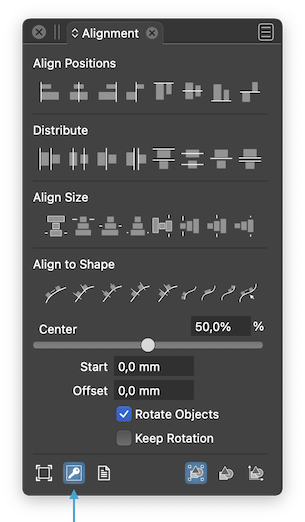
                @Igull Is 'Align to key object' enabled here?
                0_1657400139631_Al2KO.png

                MacBook Pro (Intel) running Monterey 12.6.4

                1 Reply Last reply Reply Quote 0
                • VectorStylerV Offline
                  VectorStyler @Igull
                  last edited by

                  @Igull Alignment of nodes is done relative to the bounding box of the selected nodes.

                  IgullI 2 Replies Last reply Reply Quote 0
                  • IgullI Offline
                    Igull @b77
                    last edited by

                    @b77 said in Node Alignment Broken:

                    Maybe is something related to your Preferences. I would try a reset of the app by starting it while holding Shift+Option+Command, maybe it solves the glitch.

                    Yes, that cured it - wasting all my carefully produced settings in the process 'though ☺

                    However, having saved my settings previously, I reloaded them and the issue returned.

                    I have the previously saved resources folder, should I send that AND the settings file ?

                    Neil

                    iMac 27" 2015 Catalina 32Gb, MacBook Pro 13" 2016 Monterey 8Gb, Mac Mini M2 2023 8Gb

                    1 Reply Last reply Reply Quote 0
                    • IgullI Offline
                      Igull @VectorStyler
                      last edited by

                      @b77

                      @Igull Is 'Align to key object' enabled here?

                      Yes.

                      @VectorStyler

                      @Igull Alignment of nodes is done relative to the bounding box of the selected nodes.

                      OK, perhaps I'm not understanding that, up is up according to the screen surely - whether the object has been rotated or not (the bounding box reference)??
                      Or am I missing something ?

                      Neil

                      iMac 27" 2015 Catalina 32Gb, MacBook Pro 13" 2016 Monterey 8Gb, Mac Mini M2 2023 8Gb

                      1 Reply Last reply Reply Quote 0
                      • IgullI Offline
                        Igull @VectorStyler
                        last edited by Igull

                        @VectorStyler said in Node Alignment Broken:

                        @Igull Alignment of nodes is done relative to the bounding box of the selected nodes.

                        Ahhh, the penny drops πŸ™‚

                        Now I get it, the reference to the key in the alignment panel - carefully hidden to trap the unwary LOL
                        I'm sure those three options must be extremely useful to someone, just not to me LOL.

                        I think that explains my issue, the bounding box is selected from reset, I must have clicked the key at some point down the testing path and my settings would have been saved too - mea culpa πŸ™‚

                        Thanks

                        Neil

                        iMac 27" 2015 Catalina 32Gb, MacBook Pro 13" 2016 Monterey 8Gb, Mac Mini M2 2023 8Gb

                        1 Reply Last reply Reply Quote 0
                        • First post
                          Last post
