VectorStyler
    • Categories
    • Unread
    • Recent
    • Tags
    • Popular
    • Register
    • Login

    Node Alignment Broken

    Scheduled Pinned Locked Moved Resolved Issues
    11 Posts 3 Posters 9.9k Views 3 Watching
    Loading More Posts
    • Oldest to Newest
    • Newest to Oldest
    • Most Votes
    Reply
    • Reply as topic
    Log in to reply
    This topic has been deleted. Only users with topic management privileges can see it.
    • IgullI Offline
      Igull
      last edited by

      When aligning a pair of nodes, using say align tops, alignment to top is dependent on which node is selected first. If the first node is lower than the second node, they align to the lower node. If the first node is the upper node, they align to that.
      The opposite happens with align bottoms. Ditto align left/right.
      That's not the way I think it should work ?
      My understanding is that for align tops, they should all align to the topmost node - ditto bottoms/left/right.

      Neil

      iMac 27" 2015 Catalina 32Gb, MacBook Pro 13" 2016 Monterey 8Gb, Mac Mini M2 2023 8Gb

      b77B VectorStylerV 2 Replies Last reply Reply Quote 0
      • b77B Offline
        b77 @Igull
        last edited by

        @Igull I can't replicate the issue here — aligning nodes is working as it should: https://recordit.co/t7iiVVljtX

        Can you record the screen and/or attach a file with the shape?

        MacBook Pro (Intel) running Monterey 12.6.4

        IgullI 2 Replies Last reply Reply Quote 0
        • IgullI Offline
          Igull
          last edited by Igull

          Yep, vid attached ...
          link text
          Strange 🙂
          Does it with any old shape 🙂
          Neil

          iMac 27" 2015 Catalina 32Gb, MacBook Pro 13" 2016 Monterey 8Gb, Mac Mini M2 2023 8Gb

          1 Reply Last reply Reply Quote 0
          • IgullI Offline
            Igull @b77
            last edited by

            @b77
            I see what it is, you're in Australia 🙂 🙂

            iMac 27" 2015 Catalina 32Gb, MacBook Pro 13" 2016 Monterey 8Gb, Mac Mini M2 2023 8Gb

            b77B 1 Reply Last reply Reply Quote 1
            • IgullI Offline
              Igull @b77
              last edited by

              @b77
              Just in case, here's the test file ...

              0_1657398363246_Node Tester.vstyler

              iMac 27" 2015 Catalina 32Gb, MacBook Pro 13" 2016 Monterey 8Gb, Mac Mini M2 2023 8Gb

              b77B 1 Reply Last reply Reply Quote 0
              • b77B Offline
                b77 @Igull
                last edited by b77

                Hmm… it's working here as it should with your file…

                Maybe is something related to your Preferences. I would try a reset of the app by starting it while holding Shift+Option+Command, maybe it solves the glitch.

                But before doing that, send the settings.xml and workspace.xml files from the
                ~/Library/Application Support/NumericPath/VectorStyler1.0/vector/data/resources/ folder
                to the developer (csraba at …)

                @b77 I see what it is, you're in Australia 🙂 🙂

                Ha ha! 😂

                MacBook Pro (Intel) running Monterey 12.6.4

                IgullI 1 Reply Last reply Reply Quote 0
                • b77B Offline
                  b77 @Igull
                  last edited by b77

                  @Igull Is 'Align to key object' enabled here?
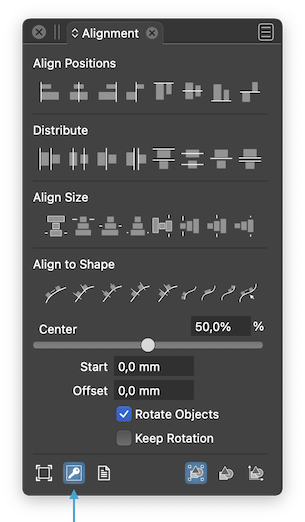
                  0_1657400139631_Al2KO.png

                  MacBook Pro (Intel) running Monterey 12.6.4

                  1 Reply Last reply Reply Quote 0
                  • VectorStylerV Offline
                    VectorStyler @Igull
                    last edited by

                    @Igull Alignment of nodes is done relative to the bounding box of the selected nodes.

                    IgullI 2 Replies Last reply Reply Quote 0
                    • IgullI Offline
                      Igull @b77
                      last edited by

                      @b77 said in Node Alignment Broken:

                      Maybe is something related to your Preferences. I would try a reset of the app by starting it while holding Shift+Option+Command, maybe it solves the glitch.

                      Yes, that cured it - wasting all my carefully produced settings in the process 'though ☺

                      However, having saved my settings previously, I reloaded them and the issue returned.

                      I have the previously saved resources folder, should I send that AND the settings file ?

                      Neil

                      iMac 27" 2015 Catalina 32Gb, MacBook Pro 13" 2016 Monterey 8Gb, Mac Mini M2 2023 8Gb

                      1 Reply Last reply Reply Quote 0
                      • IgullI Offline
                        Igull @VectorStyler
                        last edited by

                        @b77

                        @Igull Is 'Align to key object' enabled here?

                        Yes.

                        @VectorStyler

                        @Igull Alignment of nodes is done relative to the bounding box of the selected nodes.

                        OK, perhaps I'm not understanding that, up is up according to the screen surely - whether the object has been rotated or not (the bounding box reference)??
                        Or am I missing something ?

                        Neil

                        iMac 27" 2015 Catalina 32Gb, MacBook Pro 13" 2016 Monterey 8Gb, Mac Mini M2 2023 8Gb

                        1 Reply Last reply Reply Quote 0
                        • IgullI Offline
                          Igull @VectorStyler
                          last edited by Igull

                          @VectorStyler said in Node Alignment Broken:

                          @Igull Alignment of nodes is done relative to the bounding box of the selected nodes.

                          Ahhh, the penny drops 🙂

                          Now I get it, the reference to the key in the alignment panel - carefully hidden to trap the unwary LOL
                          I'm sure those three options must be extremely useful to someone, just not to me LOL.

                          I think that explains my issue, the bounding box is selected from reset, I must have clicked the key at some point down the testing path and my settings would have been saved too - mea culpa 🙂

                          Thanks

                          Neil

                          iMac 27" 2015 Catalina 32Gb, MacBook Pro 13" 2016 Monterey 8Gb, Mac Mini M2 2023 8Gb

                          1 Reply Last reply Reply Quote 0
                          • First post
                            Last post
