Convert blend to individual objects
-
If this banale example was a blend I was ready to finalize and convert to curves / objects, how would I do that?
-
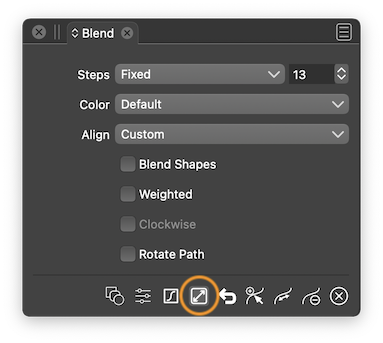
@Ingolf Effects menu > Blend > Expand Blend, or you can click the Expand button here in the Blend panel:
-
@b77 said in Convert blend to individual objects:
@Ingolf Effects menu > Blend > Expand Blend, or you can click the Expand button here in the Blend panel:
Thanks!
@vectoradmin Convert to curves and expand is spread out a bit (Object, styles and locally apparently). I didn't see it amongst the others in the styles menu and didn't expect to find it hidden elsewhere. It is difficult to understand when convert to curves is enough, when styles -> Expand is where to find it and when you have to visit a menu or panel.
This is probably how it works in Illustrator. In Xara I remember convert to curves simply did what expand does on blends here. When convert to curves can do the same on an object as expand, I think it should.
🍏 macOS Sequoia Apple Silicon
-
@Ingolf When 'Convert to Curves' is used to expand a blend object, is Xara converting any initial smart shapes to curves or they are left as smart shapes?
-
@b77 said in Convert blend to individual objects:
@Ingolf When 'Convert to Curves' is used to expand a blend object, is Xara converting any initial smart shapes to curves or they are left as smart shapes?
Everything is converted to regular curves just as I would expect it to. Basicly CTC means just that; convert to regular vector paths and objects that can be exported to files or copied to other programs supporting some or all of the common features.
Sometimes I even just need to do it for further manual manipulations of the object.
Very often it bothers me that Convert to curves and Expand stroke are found in different menus. To me they mean "Finalize and turn into raw vector" for further manipulation or export/copy-paste. Because that is what I am actually doing. Looking in a third menu or panel for something similar is ... more like RTFM.

-
@Ingolf I got into these details by asking what is Xara doing not because I don’t know what ‘Convert to Curves’ generally does
 , but because when VS expands a blend object it doesn’t convert the initial shapes to curves — they are left as smart shapes (if they were parametric to begin with).
So if ‘Convert to Curves’ would also be used to expand blend objects (besides what it normally does), this would be slightly different than the ‘Expand Blend’ command.
-
Yes, "expand whatever" does have their purpose. But with convert to curves I simply need a brutal and predicable convert to regular curves function that is simply there to finish what I did with internal features like blend or outline.
The next step in my workflow is often to export via files or clipboard and in that workflow I just want the regular curves and objects fast and easy - also for verification. I need more than just one step back from ultra advanced to advanced.
So I am more or less requesting a "Sauron's mace based convert to curves"
Like I am used to from other programs.Convert to curves also has a distinct advantage here: one shortcut to rule them all that is always fresh in (muscle) memory.
-
@Ingolf "Sauron's mace based convert to curves" lol
You sound like me as I was asking for "Sauron's mace based boolean operations" -
@Ingolf said in Convert blend to individual objects:
@vectoradmin Convert to curves and expand is spread out a bit (Object, styles and locally apparently).
I tried to join all this into Expand Appearance. But Convert to Curves should be limited to converting parametric shapes to curves. The reason for this is to have the ability to make curves out of the blend (or contour) source shapes so then can be edited as curves.
-
Could the option to expand be added as an icon in the contextual menu the way "convert to curves already is? Even putting it nearby?
Yes we can go open the style>blend> expand blend or use the blend panel - but I ran into a case today opening an older VS file I made last month that had an active blend in it. I no longer have the blend panel open. Yes I can go open it or use the other option - but even for times like that - quick access to expand is really handy in the same way "convert to curves having it's dedicated icon on the contextual menu is super handy



