VectorStyler
    • Categories
    • Unread
    • Recent
    • Tags
    • Popular
    • Register
    • Login

    Exporting Final Art from VS for others including non-VS users

    Scheduled Pinned Locked Moved General Discussion
    50 Posts 4 Posters 134.2k Views 3 Watching
    Loading More Posts
    • Oldest to Newest
    • Newest to Oldest
    • Most Votes
    Reply
    • Reply as topic
    Log in to reply
    This topic has been deleted. Only users with topic management privileges can see it.
    • b77B Offline
      b77 @Boldline
      last edited by

      @Boldline said in Exporting Final Art from VS for others including non-VS users:

      I'm open to alternative ways to fill color in empty vector shapes. That's a part of the design process that overlaps the end process with the finalizing steps and separating colors for screenprint. If @vectoradmin adds an option for that specifically, I'm all for it.

      Great!

      MacBook Pro (Intel) running Monterey 12.6.4

      BoldlineB 1 Reply Last reply Reply Quote 0
      • BoldlineB Offline
        Boldline @b77
        last edited by Boldline

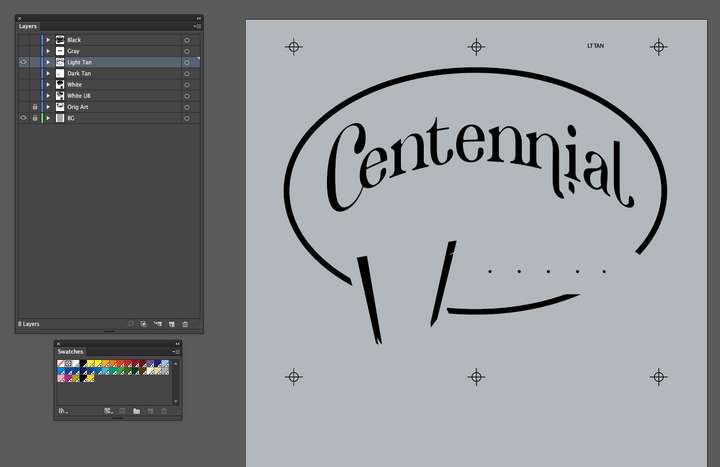
        @b77 This is a screenshot of what a typical separation job looks like for me in Illustrator.
        Every color in the job (this job has five colors and a white base) is on it's own layer.
        The gray background gets turned off, I use that as a standard background color when prepping everything.
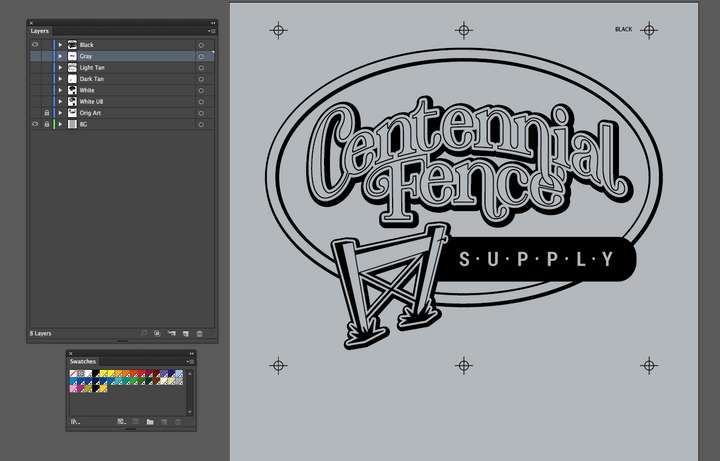
        0_1641164093607_ad1a319e-5313-4744-89a1-b516a1d9db4a-image.png

        I convert each color layer to a dark opaque black. and then when I send this to the client, they will turn off the original art layer and the background layer and then turn on each color layer one by one and print onto films
        0_1641164249063_d49fd263-5557-4024-a533-9a332909d244-image.png

        0_1641164535018_57632d90-504a-4625-b769-43c8c94c5bc2-image.png
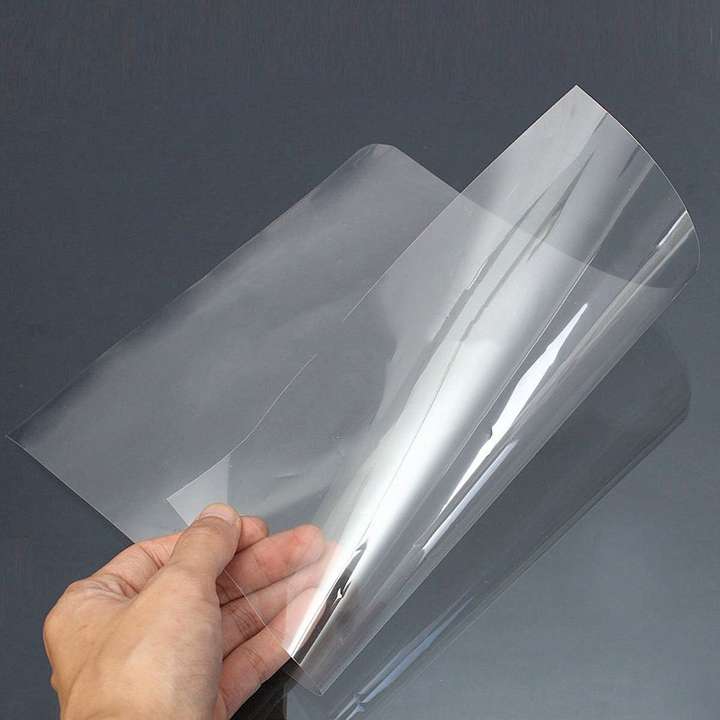
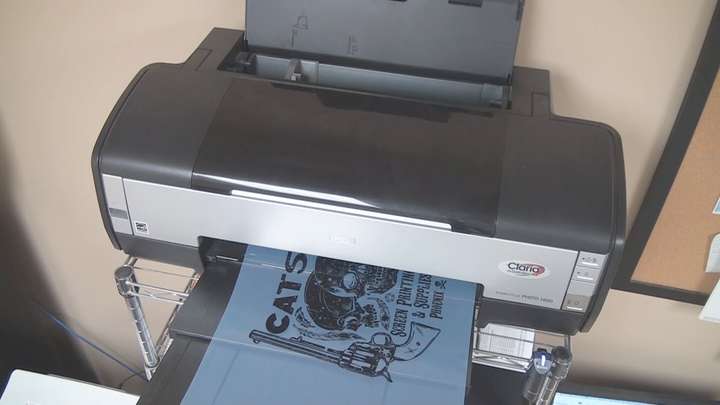
        This is what it looks like when you print films:
        0_1641164454688_bd6dcf2a-8468-4401-be01-38130ce4dafa-image.png
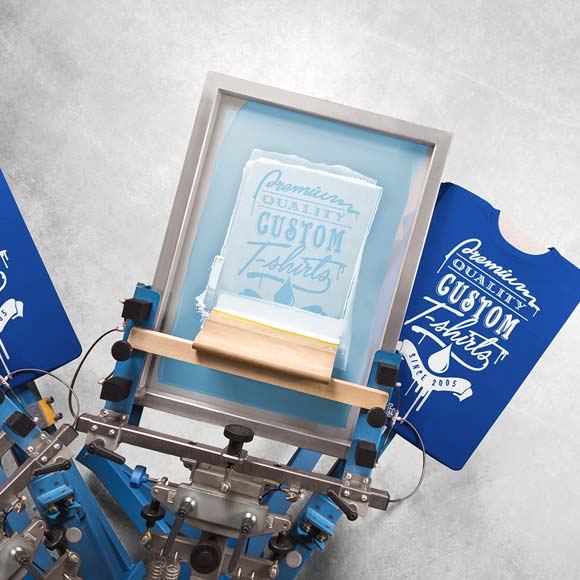
        So the black needs to be super opaque so it can block UV light from exposing that portion of a screen coated in emulsion. The UV light hardens the exposed emulsion and the part covered by the black ink on the film can be washed off easily, creating the stencil used for screen printing
        ![0_1641165049340_d67920ec-4454-4c2f-ab1b-6e6f692533c6-image.png](Uploading 100%)
        0_1641164938419_b04de00d-c043-407d-84ec-efa9e3549d40-image.png

        🍎 macOS Tahoe 26.2, Mac mini (M1, 2020), Chip Apple M1, Memory 16 GB
        Cintiq 27QHD Display and LG Ultra HD Display

        b77B 1 Reply Last reply Reply Quote 1
        • b77B Offline
          b77 @Boldline
          last edited by b77

          @Boldline Yes, it's a CTF (Computer-to-Film) workflow, where a RIP (usually software)…

          • rasterizes the artwork as spot (full opacity) or halftones, then…
          • sends it to the printer (or to an imagesetter), which uses toner or laser to print it on film…
          • which film then gets used directly (or after it gets developed) with the help of UV to…
          • create the stencil for textiles, lithographic plates for offset printing or maybe a flexible relief plate for flexo printing.

          I think separations done in VectorStyler work for what you need β€” if the object has an uniform, opaque black (C0 M0 Y0 K100), or an opaque spot color, exporting the separations to file will result in correct PDFs with 100% opaque colors for each ink used in the drawing.

          You might however want to open each PDF and combine some objects, for complete flattening.

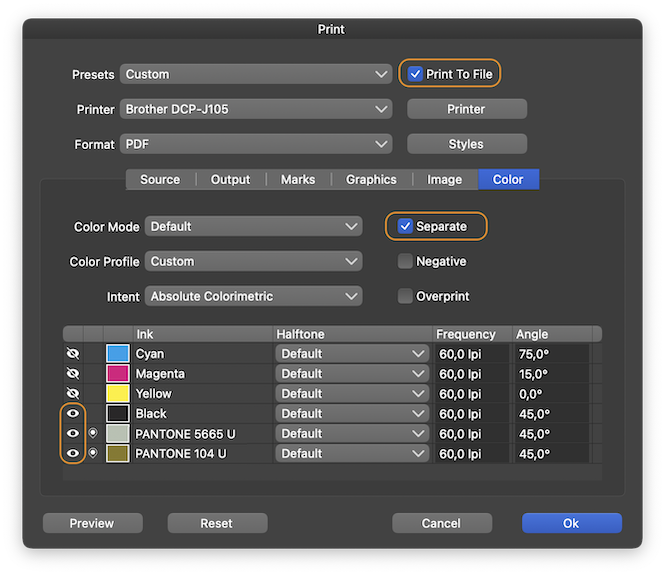
          I'm attaching a simple VS file with black and two spot colors. If you use the settings below when printing, you should get three PDFs for all three inks used in the drawing:

          0_1641215838959_sep.png
          0_1641215535241_spot_colors.vstyler

          MacBook Pro (Intel) running Monterey 12.6.4

          BoldlineB 1 Reply Last reply Reply Quote 2
          • BoldlineB Offline
            Boldline @b77
            last edited by Boldline

            @b77 This is really awesome! Yes this is a CTF (Computer-to-Film) workflow. I did not know the technical names and I wanted to be sure I explained specifically how I export vector designs and for what purpose and on why they need to be opaque, etc...

            I downloaded your file and edited my settings and it produced the three pdfs as you mentioned - this is a lot like what I would do in Illustrator when I printed films while working at a screen print shop (instead of just doing the art in my office working for myself now) so I'm understanding completely what is happening - thank you for showing me. I will be doing this way going forward in VS.

            What I need to figure out still is a working registration black I can use when I do this method of printing... because I will want the registration black to be used for the registration marks on my designs and print on every output no matter what colors are chosen. I will add the name of the color for the film in that same Pantone colors so they print with each color

            @b77 said in Exporting Final Art from VS for others including non-VS users:

            where a RIP (usually software)…

            rasterizes the artwork as spot (full opacity) or halftones, then…

            Is it wishful thinking to get @vectoradmin to add a RIP to VS? πŸ™‚

            🍎 macOS Tahoe 26.2, Mac mini (M1, 2020), Chip Apple M1, Memory 16 GB
            Cintiq 27QHD Display and LG Ultra HD Display

            b77B VectorStylerV 2 Replies Last reply Reply Quote 2
            • b77B Offline
              b77 @Boldline
              last edited by

              @Boldline Is that a regular printer, or one that is specially made to print on film? I guess it has its own driver. If it does, that should do the job. You can try with a gradient that goes from full opacity to full transparency.

              MacBook Pro (Intel) running Monterey 12.6.4

              BoldlineB 1 Reply Last reply Reply Quote 0
              • BoldlineB Offline
                Boldline @b77
                last edited by

                @b77 Standard printers are used - I think there are some that print on film easier than others do. From my experience there's no way to get it to convert something with a lowered opacity to halftones.... many people use RIPs for that... if there was a way for @vectoradmin to add even a simple RIP to VS, I think that would be amazing.

                A long time ago before I worked for myself, one of the Screenprinting shops was just beginning to experiment with halftone printing and we started with an open source RIP called "GhostRip"
                It was a little clunky 10 or so years ago when I used it. It took a number of steps at the time to use and eventually we went to using Accurip.
                Accurip however, has become the bane of many a screen printer due to its excessive cost and licensing.

                🍎 macOS Tahoe 26.2, Mac mini (M1, 2020), Chip Apple M1, Memory 16 GB
                Cintiq 27QHD Display and LG Ultra HD Display

                1 Reply Last reply Reply Quote 0
                • BoldlineB Offline
                  Boldline @VectorStyler
                  last edited by

                  @vectoradmin said in Exporting Final Art from VS for others including non-VS users:

                  One thing to do is to gather (difficult) examples where merge or union is failing, or it is slow. There is no excuse of having VS merge be less usable than AI merge.

                  Awesome! I appreciate that vision! Merge and Union improved a lot in 2021.
                  I'll keep testing things and sending in examples when it happens. I know there were a few examples recently I sent in that you found worked better with union than with merge or vice versa. Are you able to go back and look at those?

                  🍎 macOS Tahoe 26.2, Mac mini (M1, 2020), Chip Apple M1, Memory 16 GB
                  Cintiq 27QHD Display and LG Ultra HD Display

                  1 Reply Last reply Reply Quote 0
                  • VectorStylerV Offline
                    VectorStyler @Boldline
                    last edited by

                    @Boldline said in Exporting Final Art from VS for others including non-VS users:

                    What I need to figure out still is a working registration black I can use when I do this method of printing...

                    Did you try using the Registration color in the VS default palette (should be just after the null color)?
                    That should print on all plates.

                    BoldlineB 1 Reply Last reply Reply Quote 1
                    • S Offline
                      Subpath
                      last edited by Subpath

                      @Boldline

                      Regarding your screen printing photos above.

                      Found it interesting that your designs are screen printed πŸ™‚
                      I was a screen printer for about 12 years mainly printing foils
                      and signs.

                      And after that job I was a screen printer again for about 8 weeks in
                      T-shirt printing and we had the same workflow as you describe with
                      your photos above. Brings back some memories πŸ™‚

                      After that I went into digital printing, and created the vector graphics there.

                      Win 11
                      CPU: AMD Ryzen 5 9600X, 6-core.
                      GPU: Nvidia Geforce RTX 5070.

                      BoldlineB 1 Reply Last reply Reply Quote 1
                      • BoldlineB Offline
                        Boldline @Subpath
                        last edited by

                        @Subpath That's really awesome! Would love to see some of your work, do you have a link? I kind of fell into screen print designing in 2010 and loved it immediately and have done it since. After working for a couple companies I decided to quit and start my own business in 2014 and have done it full time since. I don't do the actual printing myself, I just create the designs and sell them to printers who use them for their clients.
                        What kind of digital printing do you do now?

                        🍎 macOS Tahoe 26.2, Mac mini (M1, 2020), Chip Apple M1, Memory 16 GB
                        Cintiq 27QHD Display and LG Ultra HD Display

                        S 1 Reply Last reply Reply Quote 1
                        • S Offline
                          Subpath @Boldline
                          last edited by Subpath

                          @Boldline, unfortunately can not show anything.
                          Screen printing was a long time ago. And for vector designs,
                          the company owns the rights.

                          In my last job, I was also only doing vector designs, new products
                          with marketing, the Designs were mostly safety signs and labels,
                          custom road signs and so on and Designs on customer request.

                          The digital printers were two "Gerber Edge," if you know them and we
                          also had two vinyl plotters, I forget the name. Later also a large
                          UV ink printer.

                          Btw. like your Designs and must say that you do a really good job.

                          Win 11
                          CPU: AMD Ryzen 5 9600X, 6-core.
                          GPU: Nvidia Geforce RTX 5070.

                          BoldlineB 1 Reply Last reply Reply Quote 1
                          • BoldlineB Offline
                            Boldline @Subpath
                            last edited by

                            @Subpath said in Exporting Final Art from VS for others including non-VS users:

                            Btw. like your Designs and must say that you do a really good job.

                            thank you!

                            Would love to see stuff you do currently, even for yourself

                            🍎 macOS Tahoe 26.2, Mac mini (M1, 2020), Chip Apple M1, Memory 16 GB
                            Cintiq 27QHD Display and LG Ultra HD Display

                            S 2 Replies Last reply Reply Quote 1
                            • S Offline
                              Subpath @Boldline
                              last edited by

                              @Boldline

                              Will look, but do not expect anything special
                              I'm more experimenting at the moment.
                              To find out solutions for some ideas.

                              Win 11
                              CPU: AMD Ryzen 5 9600X, 6-core.
                              GPU: Nvidia Geforce RTX 5070.

                              1 Reply Last reply Reply Quote 1
                              • BoldlineB Offline
                                Boldline @VectorStyler
                                last edited by Boldline

                                @vectoradmin said in Exporting Final Art from VS for others including non-VS users:

                                @Boldline said in Exporting Final Art from VS for others including non-VS users:

                                What I need to figure out still is a working registration black I can use when I do this method of printing...

                                Did you try using the Registration color in the VS default palette (should be just after the null color)?
                                That should print on all plates.

                                I tried using the built in registration black to no avail.... it would not show up on the final output pdf.

                                I've attached the file here in hopes @b77 and @vectoradmin in particular could help me find a solution.
                                0_1641349834100_CC Bulldogs Seps.vstyler

                                🍎 macOS Tahoe 26.2, Mac mini (M1, 2020), Chip Apple M1, Memory 16 GB
                                Cintiq 27QHD Display and LG Ultra HD Display

                                VectorStylerV 1 Reply Last reply Reply Quote 0
                                • VectorStylerV Offline
                                  VectorStyler @Boldline
                                  last edited by

                                  @Boldline said in Exporting Final Art from VS for others including non-VS users:

                                  @vectoradmin said in Exporting Final Art from VS for others including non-VS users:

                                  @Boldline said in Exporting Final Art from VS for others including non-VS users:
                                  I tried using the built in registration black to no avail.... it would not show up on the final output pdf.

                                  Found the issue: it does not show up on the spot plates. This is a bug.

                                  BoldlineB 1 Reply Last reply Reply Quote 1
                                  • S Offline
                                    Subpath @Boldline
                                    last edited by Subpath

                                    @Boldline

                                    " ... What kind of digital printing do you do now? ..."
                                    I don't work anymore πŸ™‚
                                    I do vector graphics only for fun/hobby or friends now.

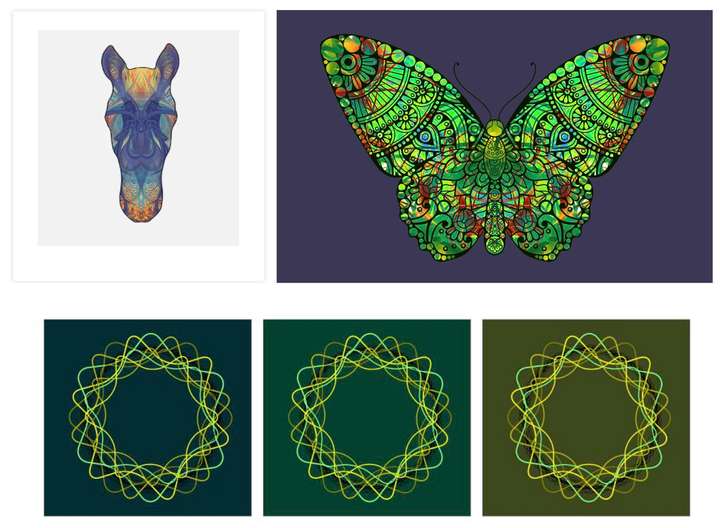
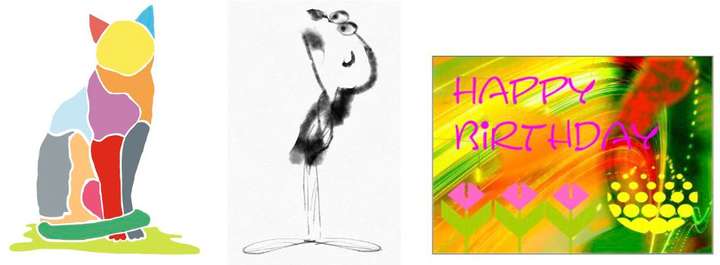
                                    Here a small collection. The first two, are things I have
                                    also done professionally. Whereas I designed "wood saws"
                                    privately for a friend. The other, in my spare time to try
                                    different styles.

                                    0_1641476876870_First.jpg

                                    The rest is private stuff. Lately I like to experiment with
                                    symmetrical designs. I will continue to do so.
                                    0_1641477033824_Second-b.jpg

                                    0_1641477054956_Third.jpg

                                    Btw. if you think the little man in the last line, would not be vector graphics πŸ™‚
                                    Then you are half wrong. Is made in Concepts an app I like to use on my iPad.
                                    It is a vector app but partially with bitmap like brushes. The others are mostly
                                    CorelDraw.

                                    Win 11
                                    CPU: AMD Ryzen 5 9600X, 6-core.
                                    GPU: Nvidia Geforce RTX 5070.

                                    BoldlineB 1 Reply Last reply Reply Quote 2
                                    • BoldlineB Offline
                                      Boldline @VectorStyler
                                      last edited by Boldline

                                      @vectoradmin said in Exporting Final Art from VS for others including non-VS users:

                                      Found the issue: it does not show up on the spot plates. This is a bug.

                                      Awesome! Getting this fixed will be great as I can begin to send out separation files exporting right from VS!

                                      🍎 macOS Tahoe 26.2, Mac mini (M1, 2020), Chip Apple M1, Memory 16 GB
                                      Cintiq 27QHD Display and LG Ultra HD Display

                                      1 Reply Last reply Reply Quote 0
                                      • BoldlineB Offline
                                        Boldline @Subpath
                                        last edited by

                                        @Subpath Thanks for sharing your work! I really love that butterfly and horse in particular. I could see those making really awesome shirts for example. I would have guessed a raster image on that little man, lo. cool stuff. I love the symmetrical design studies - keep experimenting and sharing. If you figure out cool tricks in VS, let me know- share in the forum for sure. πŸ™‚

                                        🍎 macOS Tahoe 26.2, Mac mini (M1, 2020), Chip Apple M1, Memory 16 GB
                                        Cintiq 27QHD Display and LG Ultra HD Display

                                        S 1 Reply Last reply Reply Quote 1
                                        • S Offline
                                          Subpath @Boldline
                                          last edited by

                                          @Boldline

                                          thanks

                                          ... If you figure out cool tricks in VS, let me know- share in the
                                          forum for sure ...

                                          I will definitely do

                                          Win 11
                                          CPU: AMD Ryzen 5 9600X, 6-core.
                                          GPU: Nvidia Geforce RTX 5070.

                                          1 Reply Last reply Reply Quote 0
                                          • S Offline
                                            Subpath
                                            last edited by

                                            @Boldline

                                            Here yet two Videos that shows some Brushes
                                            of the "Concepts" App (iPad) and belive it or not.
                                            It is still vector graphics everything stay editable.

                                            Concepts, draw a shoe

                                            Concepts, draw a perfume bottle

                                            Win 11
                                            CPU: AMD Ryzen 5 9600X, 6-core.
                                            GPU: Nvidia Geforce RTX 5070.

                                            BoldlineB 1 Reply Last reply Reply Quote 1
                                            • First post
                                              Last post