VectorStyler
    • Categories
    • Unread
    • Recent
    • Tags
    • Popular
    • Register
    • Login

    Straight Line Tool

    Scheduled Pinned Locked Moved General Discussion
    6 Posts 3 Posters 7.5k Views 2 Watching
    Loading More Posts
    • Oldest to Newest
    • Newest to Oldest
    • Most Votes
    Reply
    • Reply as topic
    Log in to reply
    This topic has been deleted. Only users with topic management privileges can see it.
    • I Offline
      Inspiredmac
      last edited by

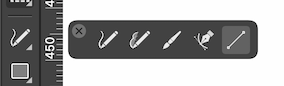
      Is there something as simple as a straight line tool available?

      b77B 1 Reply Last reply Reply Quote 0
      • b77B Offline
        b77 @Inspiredmac
        last edited by b77

        @Inspiredmac Yes, the app has a Line tool, and the shortcut is \ (backslash):
        0_1642110151425_Line.png

        More info here: https://vectorstyler.com/documentation/shapes/drawing/

        MacBook Pro (Intel) running Monterey 12.6.4

        BoldlineB 1 Reply Last reply Reply Quote 1
        • BoldlineB Offline
          Boldline @b77
          last edited by

          @b77 said in Straight Line Tool:

          the shortcut is \ (backslash)

          I'm glad you added the shortcut in. That's not one I knew yet.

          🍎 macOS Tahoe 26.2, Mac mini (M1, 2020), Chip Apple M1, Memory 16 GB
          Cintiq 27QHD Display and LG Ultra HD Display

          b77B 1 Reply Last reply Reply Quote 0
          • b77B Offline
            b77 @Boldline
            last edited by

            @Boldline I almost always do that, for anybody who happens to read. 👍

            MacBook Pro (Intel) running Monterey 12.6.4

            BoldlineB 1 Reply Last reply Reply Quote 0
            • BoldlineB Offline
              Boldline @b77
              last edited by Boldline

              @b77 Speaking of line tools, do you think an "arc" tool would be a worthwhile addition?
              I've seen it in other programs and occasionally I would use it, but I wonder if it's worth adding in VS

              🍎 macOS Tahoe 26.2, Mac mini (M1, 2020), Chip Apple M1, Memory 16 GB
              Cintiq 27QHD Display and LG Ultra HD Display

              b77B 1 Reply Last reply Reply Quote 0
              • b77B Offline
                b77 @Boldline
                last edited by b77

                @Boldline When in shape editing mode (shortcut: A), you can create an arc from a parametric ellipse if you drag the control point on the outside the shape.

                To create a pie shape, drag the control point on the inside of the ellipse.

                Or you can click the canvas and adjust the start and end points of the arc in the properties window.

                (Once a parametric ellipse is converted to curves, the control point that does this is gone).

                MacBook Pro (Intel) running Monterey 12.6.4

                1 Reply Last reply Reply Quote 1
                • First post
                  Last post