VectorStyler
    • Categories
    • Unread
    • Recent
    • Tags
    • Popular
    • Register
    • Login

    Exporting Final Art from VS for others including non-VS users

    Scheduled Pinned Locked Moved General Discussion
    50 Posts 4 Posters 134.2k Views 3 Watching
    Loading More Posts
    • Oldest to Newest
    • Newest to Oldest
    • Most Votes
    Reply
    • Reply as topic
    Log in to reply
    This topic has been deleted. Only users with topic management privileges can see it.
    • BoldlineB Online
      Boldline @VectorStyler
      last edited by Boldline

      @vectoradmin said in Exporting Final Art from VS for others including non-VS users:

      @Boldline said in Exporting Final Art from VS for others including non-VS users:

      What I need to figure out still is a working registration black I can use when I do this method of printing...

      Did you try using the Registration color in the VS default palette (should be just after the null color)?
      That should print on all plates.

      I tried using the built in registration black to no avail.... it would not show up on the final output pdf.

      I've attached the file here in hopes @b77 and @vectoradmin in particular could help me find a solution.
      0_1641349834100_CC Bulldogs Seps.vstyler

      🍎 macOS Tahoe 26.2, Mac mini (M1, 2020), Chip Apple M1, Memory 16 GB
      Cintiq 27QHD Display and LG Ultra HD Display

      VectorStylerV 1 Reply Last reply Reply Quote 0
      • VectorStylerV Offline
        VectorStyler @Boldline
        last edited by

        @Boldline said in Exporting Final Art from VS for others including non-VS users:

        @vectoradmin said in Exporting Final Art from VS for others including non-VS users:

        @Boldline said in Exporting Final Art from VS for others including non-VS users:
        I tried using the built in registration black to no avail.... it would not show up on the final output pdf.

        Found the issue: it does not show up on the spot plates. This is a bug.

        BoldlineB 1 Reply Last reply Reply Quote 1
        • S Offline
          Subpath @Boldline
          last edited by Subpath

          @Boldline

          " ... What kind of digital printing do you do now? ..."
          I don't work anymore 🙂
          I do vector graphics only for fun/hobby or friends now.

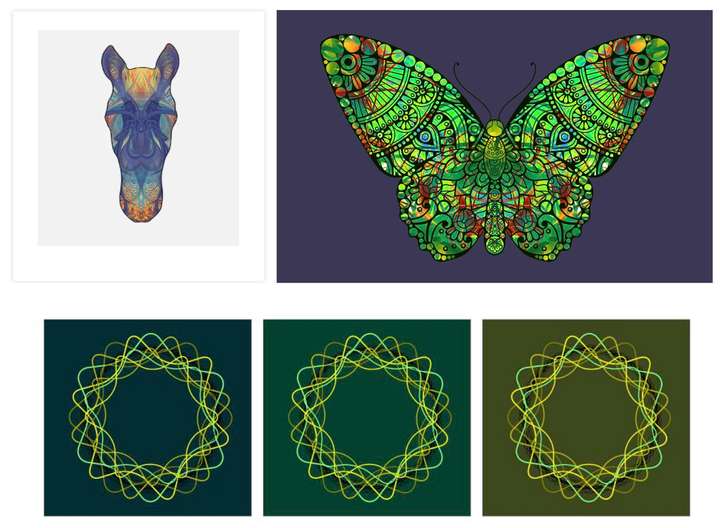
          Here a small collection. The first two, are things I have
          also done professionally. Whereas I designed "wood saws"
          privately for a friend. The other, in my spare time to try
          different styles.

          0_1641476876870_First.jpg

          The rest is private stuff. Lately I like to experiment with
          symmetrical designs. I will continue to do so.
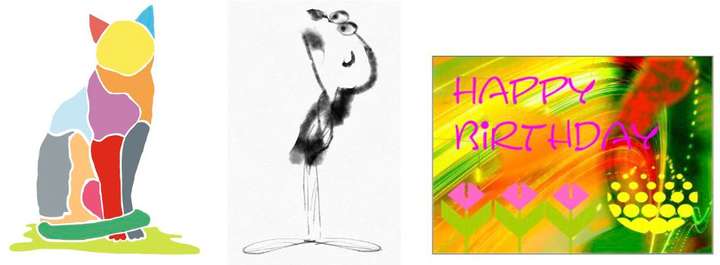
          0_1641477033824_Second-b.jpg

          0_1641477054956_Third.jpg

          Btw. if you think the little man in the last line, would not be vector graphics 🙂
          Then you are half wrong. Is made in Concepts an app I like to use on my iPad.
          It is a vector app but partially with bitmap like brushes. The others are mostly
          CorelDraw.

          Win 11
          CPU: AMD Ryzen 5 9600X, 6-core.
          GPU: Nvidia Geforce RTX 5070.

          BoldlineB 1 Reply Last reply Reply Quote 2
          • BoldlineB Online
            Boldline @VectorStyler
            last edited by Boldline

            @vectoradmin said in Exporting Final Art from VS for others including non-VS users:

            Found the issue: it does not show up on the spot plates. This is a bug.

            Awesome! Getting this fixed will be great as I can begin to send out separation files exporting right from VS!

            🍎 macOS Tahoe 26.2, Mac mini (M1, 2020), Chip Apple M1, Memory 16 GB
            Cintiq 27QHD Display and LG Ultra HD Display

            1 Reply Last reply Reply Quote 0
            • BoldlineB Online
              Boldline @Subpath
              last edited by

              @Subpath Thanks for sharing your work! I really love that butterfly and horse in particular. I could see those making really awesome shirts for example. I would have guessed a raster image on that little man, lo. cool stuff. I love the symmetrical design studies - keep experimenting and sharing. If you figure out cool tricks in VS, let me know- share in the forum for sure. 🙂

              🍎 macOS Tahoe 26.2, Mac mini (M1, 2020), Chip Apple M1, Memory 16 GB
              Cintiq 27QHD Display and LG Ultra HD Display

              S 1 Reply Last reply Reply Quote 1
              • S Offline
                Subpath @Boldline
                last edited by

                @Boldline

                thanks

                ... If you figure out cool tricks in VS, let me know- share in the
                forum for sure ...

                I will definitely do

                Win 11
                CPU: AMD Ryzen 5 9600X, 6-core.
                GPU: Nvidia Geforce RTX 5070.

                1 Reply Last reply Reply Quote 0
                • S Offline
                  Subpath
                  last edited by

                  @Boldline

                  Here yet two Videos that shows some Brushes
                  of the "Concepts" App (iPad) and belive it or not.
                  It is still vector graphics everything stay editable.

                  Concepts, draw a shoe

                  Concepts, draw a perfume bottle

                  Win 11
                  CPU: AMD Ryzen 5 9600X, 6-core.
                  GPU: Nvidia Geforce RTX 5070.

                  BoldlineB 1 Reply Last reply Reply Quote 1
                  • BoldlineB Online
                    Boldline @Subpath
                    last edited by

                    @Subpath Are those brushes bitmap based though? I know that is an issue in the Affinity forum for example, 95% of their "vector" brushes are actually bitmap brushes that can look like vector but cannot be expanded or treated like pure 100% vector

                    🍎 macOS Tahoe 26.2, Mac mini (M1, 2020), Chip Apple M1, Memory 16 GB
                    Cintiq 27QHD Display and LG Ultra HD Display

                    S 1 Reply Last reply Reply Quote 0
                    • S Offline
                      Subpath @Boldline
                      last edited by Subpath

                      @Boldline

                      "...Are those brushes bitmap based though? ..."

                      These brushes are not skeleton brushes like in Affinity Designer, where you move
                      a bitmap virtually on a vector line.

                      In Concepts with the built-in watercolor, airbrush and pencil brush. I can zoom to
                      the maximum (1600%) without it getting pixelated. And also with other built-in brushes.
                      The watercolor brush even mixes the colors a little bit and everything runs smoothly,
                      without any delays. In addition, Concepts has also an infinite canvas.

                      Concepts behaves similarly to a vector application, but uses a different philosophy.
                      Vector lines do not have Nodes, you can move a line into a curve with a Pull-Tool.
                      There are also no Boolean operators to cut objects. You can fake it a bit with the masking tool,
                      and there is a real vector eraser.
                      I think it comes pretty close to a vector paint program.

                      Win 11
                      CPU: AMD Ryzen 5 9600X, 6-core.
                      GPU: Nvidia Geforce RTX 5070.

                      BoldlineB 1 Reply Last reply Reply Quote 0
                      • BoldlineB Online
                        Boldline @Subpath
                        last edited by

                        @Subpath Awesome! I'll have to play around with it. I think I found the website
                        https://concepts.app/en/

                        🍎 macOS Tahoe 26.2, Mac mini (M1, 2020), Chip Apple M1, Memory 16 GB
                        Cintiq 27QHD Display and LG Ultra HD Display

                        S 1 Reply Last reply Reply Quote 0
                        • S Offline
                          Subpath @Boldline
                          last edited by Subpath

                          @Boldline said in Exporting Final Art from VS for others including non-VS users:

                          @Subpath Awesome! I'll have to play around with it. I think I found the website
                          https://concepts.app/en/

                          Yes, that is the Website.
                          Have to say that the Windows Version is a bit limited, no Watercolor Brush
                          and a few other things i dont remember. But has the Airbrush and the Pencil.
                          You could try the free Demo.

                          I own the iPad Version. Also if you deciced to buy the App, look carefully
                          it seems subscription based. But there is also an Non-subscription version
                          (i own this Version).

                          I have this:
                          Essentials 14,99 € (the non Subcription Version)
                          PDF-Essentials 4,99 € ( for PDF Export )
                          Shape Library 1,99 € ( Kind of Clipboard/Asset Browser )

                          Win 11
                          CPU: AMD Ryzen 5 9600X, 6-core.
                          GPU: Nvidia Geforce RTX 5070.

                          1 Reply Last reply Reply Quote 0
                          • First post
                            Last post
