Bezigon Tool
-
@VectorStyler: Please hang on. To spare you some effort, we've worked out every last bit of kink. Would you rather I give you the clean code for just the sharp, cusp and smooth node - ignoring Tangent Node? I have that ready to go. But tangent node conversions are turning into a devilishly tricky problem because converting a smooth/sharp node into a tangent depends very heavily on the neighbouring nodes. And this means, both the sequence of conversion and the type of neighbouring node matters. That is proving difficult. Seriously, I am so tempted to decompile and look into the FreeHand code. But I won't! FUCK ADOBE for not doing the right thing.
-
@VectorStyler What do you mean? FreeHand allows you to set every single point manually.
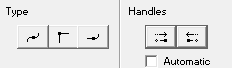
Those are the three types of points. Smooth, Sharp, and Tangent. And on the right you have the option to convert each of the sides a smooth node to a cusp node.
For instance say you have a smooth node, with two symmetric handles. Pressing the left hand side handle button converts that portion of the shape into a straight line. When you press the right hand side handle button, the second handle also collapses, meaning you have a square node.
-
@Daniel said in Bezigon Tool:
What do you mean? FreeHand allows you to set every single point manually.
Yes, with the Node tool.
I meant if there is a way to set handles while drawing with the bezigon tool.
-
@VectorStyler: Yes, FreeHand allows you to set each point manually. Plain click - Square node, Alt click - Smooth node, alt -right click - tangent node. Alternatively you can choose which nodes you want to place from the side panel shown in my previous comemnt.
-
@vectorstyler: Okay, now I have both sets of clean code exhaustively tested.
Bezigon Code without Tangent Node implementation. About 200 lines of CPP code.
Bezigon Code with Tangent Node implementation and non-destructive node conversions - that is, toggling between tangent, cusp, and smooth retains the origin state. For instance, if I create a smooth node, then toggle it to cusp, and tangent, and then to smooth back again, I will return to the original state in which it was created. It is true of all 3 nodes. This is a major draw back in FreeHand too, because there was no way of predicting how changes affected the curve. Now, after 35 bloody years, it is refined. About 500 lines of CPP code. Tangent node handling makes it exponentially complex.
Question for you, dev: How should I hand you this code? What sort of documentation would you like?
We have written the code so that it is easy to integrate into any program without dependencies. But equally, everything - all the rules, conditional statements - are carefully documented within the code itself.
We have also written a test code to check the math of the code too.
What do you need from me? I have the whole history of the project including the permutation tables for all three nodes and click patterns.
Let me know. I'll package it and drop it. I am also giving the code to Inkscape and PhotoLine devs as part of MIT License. Just FYI.
I think if implemented correctly, it will the single most useful step up in the curve handling functionality in all three. The missing piece has always been the tangent node.
-
@Daniel Send me the code and the tables with click patterns
-
@Daniel Sorry i miss a little all the conversation, because my english: Is possible to do this examples with VS now, or it is a suggestion for future development?
I tried with sample 1, i got this:
I used click and alt+click.
-
@marce Should be possible to get those cases from the image.
I tested them, I will retest the final build and see if there might be some bugs.
Is there some reference app I can access to test these?
-
@VectorStyler: https://limewire.com/d/zsIgi#SZatmBEVLR - Here is the permutation table. You can see the exact curve that needs to be produced for all 16 click patterns. I've included screenshots from the algorithm I am working on as well as FreeHand's. You can compare results with VS, too. Code coming through. Just fixing API issues. Sorry for delay.
-
@Daniel Thanks, I will try to use this as a reference.

