"Send into Current Layer" more than once, kills objects
-
VectorStyler 1.3.020 Mac/Win, long standing issue.
I use Layers for visual stacking of course, but as much for organizing objects in categories.
Therefore I routinely select multiple objects on the artboard and move them into a desired Layer by command "Send into Current Layer". (Dragging selected objects in the Layers panel is not always practical or possible.)Condition: Layer Panel Options. Make sure "Select Highlighted" is unchecked.
Sequence (Images below.)
-
1 Create two or more Layers and put some objects on them.
-
2 Select one or more objects.
-
3 Click a target Layer in the panel to make it Current
-
4 Select Object::Arrange::Send into Current Layer
-
Objects are sent to Current Layer successfully
-
Repeat steps 2-4
-
Objects are killed, Undo does not return killed objects.
Sometimes the objects are gone, but the Artboard graphics remain visible.
Sometimes the application must be restarted to return the Send functionality.
The sequence seems to create some kind of corruption.BR/ Lars Herold, FreeHand relic
1 Layers and Objects

2 Select objects

3 Select target Layer

4 Send into Current Layer

Objects sent successfully

Select again, send to another Layer

Poof, gone...

-
-
@larsherold Looks like a bug, I will try to fix this as soon as possible.
-
@VectorStyler Thanks!
Works as intended now in 1.3.021 when- invoking command from Object::Arrange menu
- clicking shortcut icon placed in Context Panel
Still issues when
- using command from general Contextual Menu (context: Multiple Obj Selected)
- invoking command from a Keyboard Shortcut.
- using command in Layer Panel Contextual Menu (Dream Usability Wish: Selected Objects -> Right-click Layer -> Send into this Layer)
(Command shows in the Undo stack, but object are not sent.
Right-clicking Artboard or Object or Layer in panel for Contextual Menu messes with Layer marked as target/Current Layer.)BR/ Lars Herold
-
@larsherold I will try to fix these
-
@larsherold said in "Send into Current Layer" more than once, kills objects:
using command from general Contextual Menu (context: Multiple Obj Selected)
invoking command from a Keyboard Shortcut.Which commands are these exactly? ("Send into Current Layer" has no shortcut, and it is not in the contextual menu)
-
@VectorStyler, I configured them myself when experimenting.
View : Customize : Keyboard Shortcuts...
In the context of Multiple Objects Selected, I assigned Shift-Alt-L to the action.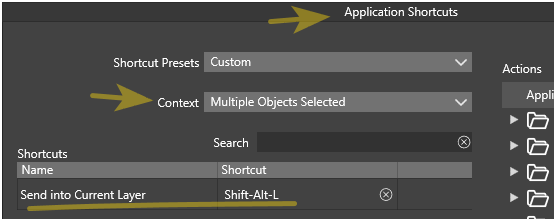
View : Customize : Contextual Menu...
In the context of Multiple Objects Selected, I added the action, so it shows up Right-clicking the artboard or an object.
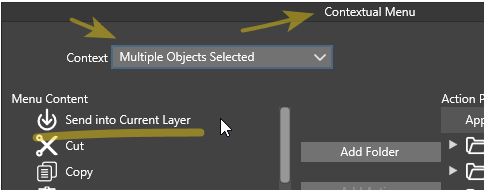
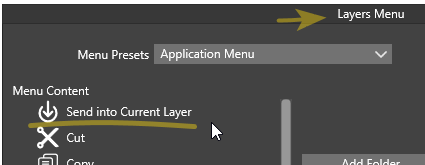
Layer Panel Menu : Costumize Menu...
Action is added to the layer menu content.
Shows up on context click in Layers Panel.
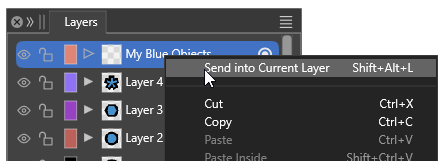
Action is logged for the undo-stack, but nothing happens..
Thanks,
Lars Herold -
I tested these, and the shortcut and contextual menu modes are working, but are very sensitive to the current layer selection.
The current layer is always changed when you click or select an object, so this makes it difficult to use shortcuts or contextual menus. In this case probably the objects are sent to the layer of one of the selected objects.This is the same in Illustrator and it is needed as the current layer should always update from the layer of the last selected object.
Using this command from the layers panel right-click menu will be impossible, since that menu applies commands on the selections made in the Layers panel, and this selection is updated on the right-click.
I will add a current layer indicator in the Layers panel (this one is missing), and a new Layer panel specific command " Send into this Layer")
-
This is the same in Illustrator and it is needed as the current layer should always update from the layer of the last selected object.
I can see that's how Illustrator works.
I don't know the intrinsics of FreeHand but it seems like it keeps a Target Layer active, even when you select objects on other layers. Same in VS when Select Highlighted and Highlight Selected are UNchecked in Layer Panel Options.Using this command from the layers panel right-click menu will be impossible, since that menu applies commands on the selections made in the Layers panel, and this selection is updated on the right-click.
- Yes, it was obvious that Selections and Current Layer indication were messed up when right-clicking.
I will add a current layer indicator in the Layers panel (this one is missing), and a new Layer panel specific command " Send into this Layer")
-
Send into this Layer by right-clicking a Layer makes perfect sense UI-wise and will be a godsent

 !
! -
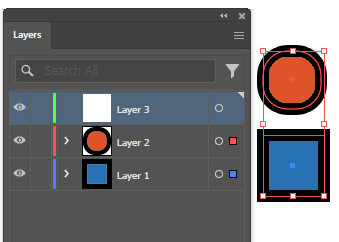
Great - If you can come up with Current Layer indication a bit more clear than the shades of blue (in my case) , along with Visibility, Lock status, Color, Selection and Isolation!
Illustrator uses the small corner indicator, FreeHand puts a pen icon in the layer row to show where new objects end up.
-
Illustrator
-
FreeHand
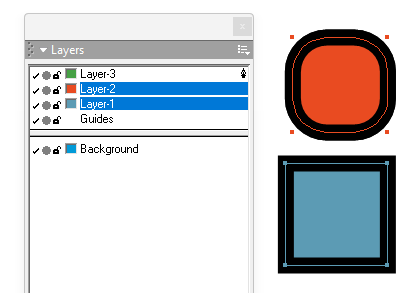
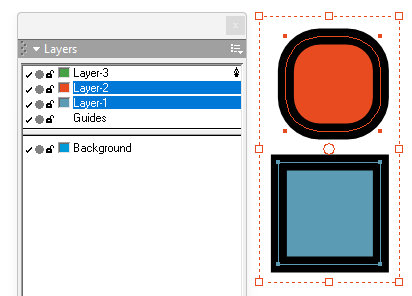
Off topic but Note btw. how FreeHand only marks up each selected object with a keyline of layer color but avoids the combined transform-bounding box, that tend to obscure things IMO. You can however double-click the selection to show transform handles for scale/rotate/skew interaction. Seen below..
Thanks,
Lars Herold
