Cloning objects.
-
I created several clones of an object using Option+D. How can I quickly select the original object from the clones? Ideally, I would like to request a right-click popup menu that highlights and selects the original object, or a shortcut key for the same function. Additionally, it would be helpful if there was an option to select all clones in the right-click popup menu.
Another thing I noticed is that Option+D creates a clone of the created clone, but not of the original object. How can I make clones of only the original object not the created object?
Perhaps these were addressed already, I couldn’t find them in search.
Thanks
M1 MacBook Air, 16GB, macOS Sonoma 14.4.1
-
I am a bit confused because Option+D usual dont create any clones
its just duplicate objects. But i guess you have changed the duplicate mode
to clones.+Shift+Ctrl+D at least on windows will create clones.
Here how to select the original
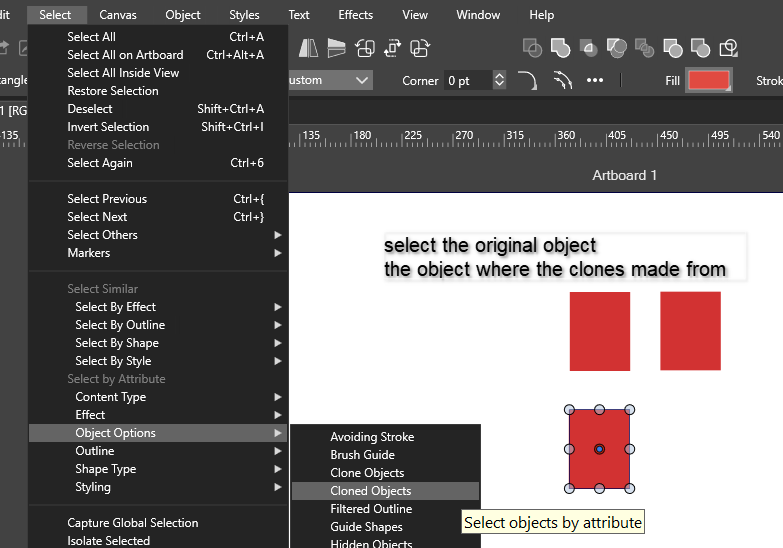
.
.
Here how to select the clones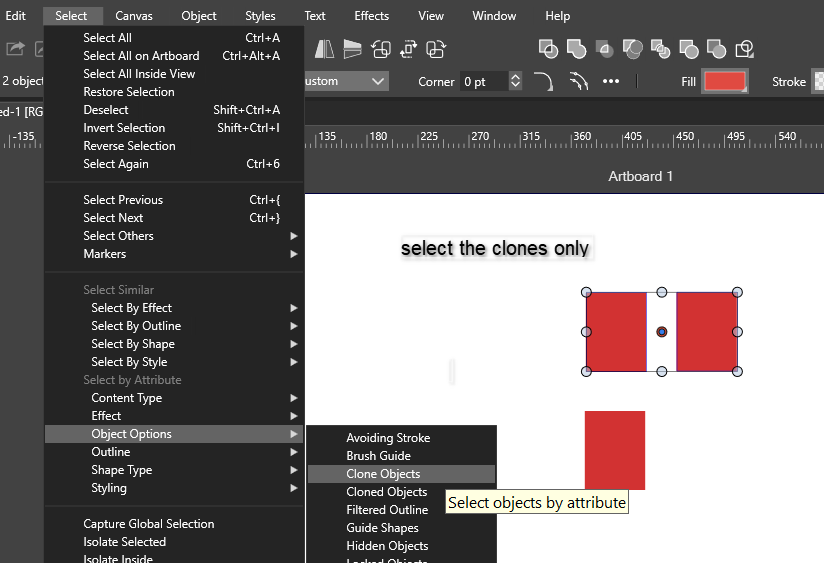
-
@Subpath @vectorstyler Thanks, was searching for that command. It's mapped under attributes and I was looking elsewhere.
Couple of things
I managed to add a menu shortcut using the customize toolboxes, but when I click on the icon, it only displays the attributes popup, and the icons and text description are not right.

I tried to add a custom shortcut, but it appears as “attribute” instead of being labeled as the cloned or clone, as it was named in the menu. I haven’t tested the shortcut yet.

I have two objects, one blue and the other magenta, each with its clone. When I select only one cloned object, say blue, the clone command selects parent clones of blue and magenta. Not sure if this is how it’s supposed to work. I would expect to select only blue parent clone only.

By the way, in Mac, Command+D to duplicate, and Option+D to clone. I don’t recall changing the shortcuts. Perhaps I did, and I need to check on that.

Hope cloning of parent object instead of cloned ones could be addressed.
Thanks.
-
@vectorstyler Just following up on this. I recently checked a similar clone function in the Inkscape 1.4 app, and it works as expected. Not sure if the clone tool designed to work this way in VS.
In Inkscape, cloning parent objects (using Option+D, similar to the VS clone command) only clones the selected parent object, not the child objects.
If I want to identify the parent object among the clones, I can use the relevant command or option (Edit>Clone>Select Original in Inkscape, or Select>Object Options>Cloned Objects in VS). This action selects only the parent of those cloned objects, not all parent objects of other clones in the artboard, unlike in VS.
-
@Kumr said in Cloning objects.:
I created several clones of an object using Option+D. How can I quickly select the original object from the clones?
No such selection mode, I will add one.
How can I make clones of only the original object not the created object?
No, this is not possible and will stay this way (the selection addition will improve this).
-
How can I make clones of only the original object not the created object?
Duplicate the clone
