VectorStyler
    • Categories
    • Unread
    • Recent
    • Tags
    • Popular
    • Register
    • Login

    Potential (Small) Bug in Appearance Panel

    Scheduled Pinned Locked Moved Bugs in VectorStyler
    4 Posts 3 Posters 53 Views 3 Watching
    Loading More Posts
    • Oldest to Newest
    • Newest to Oldest
    • Most Votes
    Reply
    • Reply as topic
    Log in to reply
    This topic has been deleted. Only users with topic management privileges can see it.
    • D Offline
      DreamS
      last edited by

      I'm not certain if this is actually a bug or intended behavior. This isn't a huge issue, but I noticed it, so I figured I would go ahead and report it.

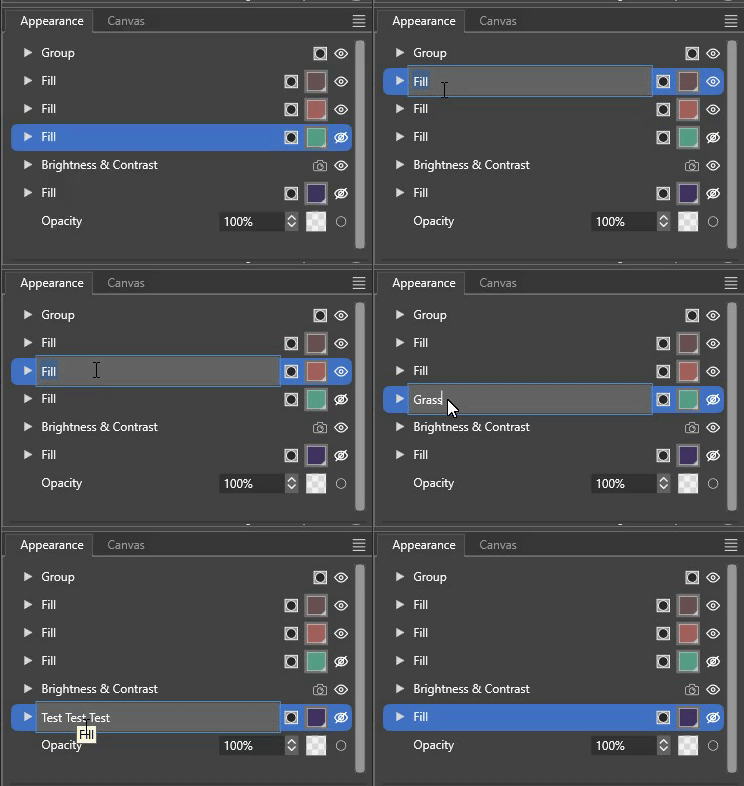
      When working in the Appearance Panel, selecting effects like Fills or anything else often switches to a Typing Field. Most of the time I just click away to close it because I don't need to change the name. But I tried once because I had multiple fills I was using to test different effects. When pressing enter, though, the name of the effect doesn't change (I hit Enter after typing each time).

      I'm not sure whether the bug is that the typing field is appearing at all, or that the name isn't changing, but here is a quick capture I took of it:
      alt text

      VectorStylerV 1 Reply Last reply Reply Quote 1
      • VectorStylerV Offline
        VectorStyler @DreamS
        last edited by

        @DreamS It is a bug, is this in the latest version?

        D 1 Reply Last reply Reply Quote 0
        • D Offline
          DreamS @VectorStyler
          last edited by

          @VectorStyler Sorry for the late reply, I have been pretty busy and missed the notifications. Just to confirm, this was in 1.3.016. In 1.3.018 this is no longer present, it doesn't trigger a typable field.

          debraspicherD 1 Reply Last reply Reply Quote 2
          • debraspicherD Offline
            debraspicher @DreamS
            last edited by

            @DreamS Yes I reported this bug during a prior version, so probably it was fixed by then. Very funky.

            Windows 11 Build 26200.7171 (25H2)
            AMD Ryzen 7 9700X with Gigabyte X870E Aorus Pro Ice
            32GB RAM @ 6000MHz
            PNY NVIDIA RTX 5070 Ti 16GB; Display 1: 4K @150%; Display 2: 4K @150%
            Wacom Intuos Pro L (2025); Wacom Intuos Pro M; Epson ET-8550; Siser Romeo

            1 Reply Last reply Reply Quote 1
            • First post
              Last post