Affinity Designer vs VectorStyler
-
I peak in to see what happens with Affinity but I mainly use it to open legacy documents and maybe a quick export job. I think it's 2.6 now? I'm still on 2.4.2. Little things here and there I might use it for, but I'm always holding my breath when I need to access the Expand Stroke function to do anything. The version I'm currently running is before they "fixed" Expand Stroke to accommodate a new feature set and the algorithmic issues less obvious for that particular audience... but the problems are still there under the hood, the bugs are rampant and some of the regressions, including changes to ES are a problem for those of us with legacy files.
I don't expect VS to directly compete with Affinity. Feature-wise it's already well-suited for many jobs. It just needs a bit more love when it comes to UX/document creation (especially Windows-related items) and then for me that's replacing a lot of programs that become increasingly annoying to deal with... (such as Adobe...) ...
Anyway, I don't post as much on the forum, but I email any bugs to the developer. They are very responsive and I always look forward to the new updates/tweaks.
-
In terms of learning, there are a lot of 'AD' video tutorials on YouTube, but almost none video tutorials of 'VS'; So it's difficult for beginners to get started with VS
-
@lilith said in Affinity Designer vs VectorStyler:
In terms of learning, there are a lot of 'AD' video tutorials on YouTube, but almost none video tutorials of 'VS'; So it's difficult for beginners to get started with VS
Well, nothing against YouTube videos, VS Vimeo videos have helped me
in one case or another. I found them quite good in terms of length and
execution, with a brief explanation of one feature.But i think we shouldn't ignore the size of the user base for both
programs, which is probably one of the reasons why there are more
videos for Affinity.Many YouTube tutorials are also created with the intention of making a
few bucks, which only makes sense with a sufficiently large audience.
One shouldn't underestimate the work that a tutorial, a YouTube video,
requires.I also think that potential VS users should watch Illustrator videos
instead, as many things work similarly.Not knowing Illustrator, because I didn't like it (this was before the
subscription), was my biggest hurdle when getting started. I came from
Corel Draw.So, in my opinion, VectorStyler is more for people who already have
some advanced knowledge of creating vector graphics.Beginners can also easily be referred to the tutorial section here in the forum,
where they can get a good overview of the options and how to use them. -
The new versions of Affinity Designer broke many tools I need for my work. These include the Contour tool (and all related tools, such as Stroke Width), which create sharp nodes instead of smooth ones and add a lot of unnecessary vertices that take time to remove. Furthermore, the Stroke Width tool changes the line thickness when converting them to curves (this error is particularly unnoticeable when exporting to other formats). And there's the well-known issue with SVG export—it's the worst export I've seen in any vector graphics program: not only does this file produce a ton of junk, but the shape size is highly dependent on DPI settings, and different programs, such as Blender and PryshaSlicer, will produce completely different results.
A plus in Affinity Designer is its ease of use, with all panel settings at your fingertips. The eyedropper tool picks colors not only from within the application itself but also from other monitors, which is very convenient. Very fast creation of Palettes and Color Swatches (unlike VS); and, of course, very smooth operation even on outdated hardware, which you won't find in other programs.
VS is a very difficult program to learn, with few tutorials, it runs noticeably slower than AD, has many interface glitches, and it's very difficult to move tabs between panels. The Eyedropper only takes colors from within the application itself and isn't available in all color panels. For example, it's missing from the Contour tool. Working with layers takes time to learn, as do most of the program's tools, and to get started, you need to customize it. But for my needs, it works perfectly; there are no issues with contours or exporting to SVG. -
@MrDixioner said in Affinity Designer vs VectorStyler:
VS is a very difficult program to learn, with few tutorials, it runs noticeably slower than AD, has many interface glitches, and it's very difficult to move tabs between panels.
Are these slower cases with similar documents as in AD?
BTW: the tutorial issue should be improved at some point.The Eyedropper only takes colors from within the application itself and isn't available in all color panels. For example, it's missing from the Contour tool.
Yes, this is the case. There are some technical issues with taking from outside of the app (with macos). I will try to find the solution for this.
-
Very fast creation of Palettes and Color Swatches (unlike VS)
I will have to check this, but I think there are some good palette creation tools in VS also.
Can you give an example that is easy in AD but hard to do in VS? (just to get inspiration to improve VS).
-
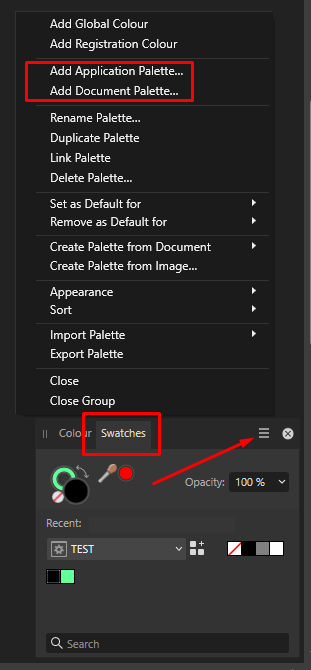
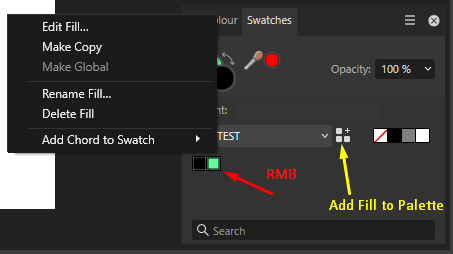
@VectorStyler To create a palette in AD:
- In the Swatches panel menu, select Add Application Palette, enter a name for the palette, and confirm. The new empty palette becomes active.
- I select the desired color using any available method, including the active fill color, click the "Add current fill to palette" button in the swatches panel, and the new color is added to the palette.
- From here, in this panel, I can easily delete a color by right-clicking it, rename it, edit it, and do everything else.
I don't need to open any other panels to work with palettes; everything is done in one place and very quickly. Creating a new palette in VS took me quite a bit of effort. Of course, it's a matter of habit, as every program is different.
-
@MrDixioner said in Affinity Designer vs VectorStyler:
In the Swatches panel menu, select Add Application Palette, enter a name for the palette, and confirm. The new empty palette becomes active.
In VS: palette panel menu, Create Palette -> Create Empty Palette
I select the desired color using any available method, including the active fill color, click the "Add current fill to palette" button in the swatches panel, and the new color is added to the palette.
Select the object and press the [+] button in the palette panel.
In addition: you can add multiple colors from multiple selected objectsFrom here, in this panel, I can easily delete a color by right-clicking it, rename it, edit it, and do everything else.
In VS:
Select multiple colors, and press the Delete key for deleting
Display in List view mode (panel menu) and edit names directly
Plus: select multiple colors and drag over a selection of objects, or into an other palette panelI don't need to open any other panels to work with palettes; everything is done in one place and very quickly.
Yes, but if there is only one panel, it is more difficult to manage multiple palettes.
For example how can you add colors from one palette into an other?
In VS it is just drag&dropCreating a new palette in VS took me quite a bit of effort.
it is just a menu command in VS
Some additional features in VS:
- creating palettes from the most frequent colors of an image
- creating a palette from selected object colors, or all colors on a canvas
- importing Illustrator, Affinity, Corel palettes
-
@VectorStyler Oh, I'm so sorry I didn't read the documentation well enough before trying to work with the palette myself and voicing my negative opinions on the forum
 But thank you so much for your detailed comments!
 -
@VectorStyler said in Affinity Designer vs VectorStyler:
Plus: select multiple colors and drag over a selection of objects
that's a really cool (hidden) feature !

