Detail optimization and function enhancement
-
@VectorStyler I have a specific need for the path color-changing function in the Paths panel, and I'm not sure if others have the same requirement. In my work, I need to offset some black lines in a graph by 1.5mm in a specified direction. There are too many paths, and the offset distance is small, so it's easy to make mistakes accidentally. Therefore, I need to change the color of the already offset paths as a mark. This operation needs to be applied to 9-21 such graphs. Since the quantity is large, I always try to optimize my workflow. I've also tried using actions to achieve this, which works, but it's cumbersome to switch back and forth between the operation interface and the panel. This Chinese software has the function of changing the color of the path after offsetting, and it can control the offset direction. When you click on the path with the mouse, you can see bidirectional arrows; just click in the corresponding opposite direction again to complete the operation. If possible, please add these two functions. At least add the function of changing the stroke color. Thank you.
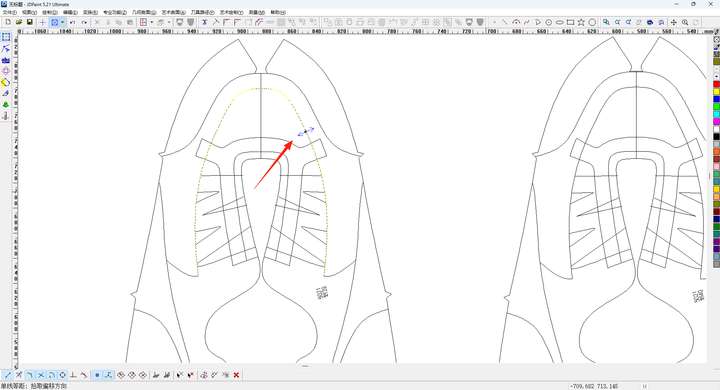 https://youtu.be/faf_Rhnh-w4?feature=shared
 -
@monsterfox This looks more like the Contour effect in VS with a single step.
-
@VectorStyler
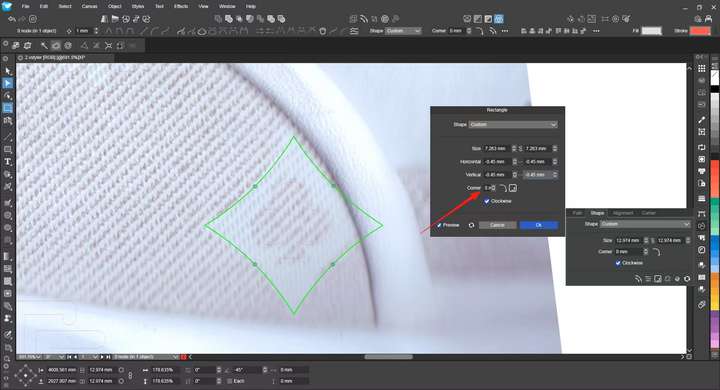 The input box is too small.
 -
@monsterfox said in Detail optimization and function enhancement:
The input box is too small.
I will fix this.
-
@VectorStyler https://youtu.be/5DpjF0Ld8vI?feature=shared
After editing the effect, the parameters cannot be modified; otherwise, it will revert to the unedited state. It is hoped that the parameters can be modified without disrupting the edited form. -
@monsterfox said in Detail optimization and function enhancement:
After editing the effect, the parameters cannot be modified
This is a bit problematic. Changing the grid size will reset the mesh grid into its default state.
I will think of a solution. -
@VectorStyler Cut a shape, create a new canvas, and paste the shape onto the canvas. However, the shape is not in the center of the canvas, and it is hoped that this issue can be optimized.

-
@monsterfox When pasting, the position on the new artboard is similar to the position on the original artboard, this is by design.
-
@VectorStyler I'm curious about maximizing the display of the current canvas. Theoretically, it should be in the center of the screen, and when we paste a graphic, it should also be in the center of the screen in theory, but there's a deviation. Most vector graphics software don't have this issue. Being able to paste graphics directly in the center of the canvas would save the subsequent steps of moving or aligning them to the center of the canvas. I still hope this problem can be resolved.
-
@monsterfox said in Detail optimization and function enhancement:
Being able to paste graphics directly in the center of the canvas would save the subsequent steps of moving or aligning them to the center of the canvas.
I will try to find a solution for this.
-
@VectorStyler
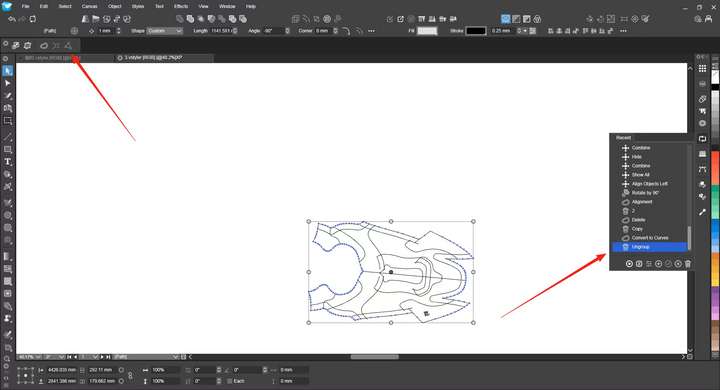 There are many other functions not listed here. Theoretically, all functions should be supported (except for some feature switches), and it is hoped that they can be fully added in the future.
 -
@monsterfox I will try to fix this.
-
@monsterfox Maybe I misunderstood, but the "Connect Paths" action is added to history, at least here.
A recording might help explaining the issue.What other actions are not added to the history?
-
@VectorStyler You got it wrong. This is the Recent panel, not the history.
-
@monsterfox Got it, I will try to replicate with that
-
@VectorStyler https://youtu.be/DDNwnIYu6Pc?feature=shared
https://youtu.be/BF5jP_AjDb8?feature=shared[0_1758984111661_测试.ai](/forum/assets/uploads/files/1758984114074-测试.ai)
If there are no grouped graphics in an AI file, copying them into VS will automatically create groups. We discussed this issue before, but I’ve noticed it creates more than one group with different distributions, and the number of groups increases as the number of graphics grows. Can this problem be resolved?Additionally, when any grouped graphics in VS are copied into AI, they disappear automatically. This is another issue that needs to be fixed.
-
@monsterfox I will try to fix these
-
@monsterfox @VectorStyler i agree that’s it would be nice if vectors opened in illustrator honored grouping. I do like when importing vectors into vs that they are grouped by color but it would be nice if the whole thing was grouped overall and then after the first grouping, it could still be grouped by colors
-
@Boldline My requirement is a bit different from yours—I just need to get as close as possible to the group relationship of the original graphic file. Your requirement can actually be easily solved with the Magic Wand Tool combined with panel operations.
-
@VectorStyler https://youtu.be/ZBSGW9rCt74?feature=shared
Export any graphic to SVG format and open the file in Inkscape—you’ll notice the file size has decreased. This is an issue that needs to be resolved.Proceed to perform a move or ungroup operation, then save the file and import it into VS. You’ll find the graphic now has transform attributes and has grown larger. (If you copy and paste between the two programs repeatedly, the graphic size will also keep getting smaller.)
It is hoped that these errors can be resolved.

