VectorStyler
    • Categories
    • Unread
    • Recent
    • Tags
    • Popular
    • Register
    • Login

    A suggestion about the ‘Scale’ slider in effects.
    Scheduled Pinned Locked Moved Resolved 1.2 bugs
    6 Posts 2 Posters 6.0k Views 2 Watching
    Loading More Posts
    • Oldest to Newest
    • Newest to Oldest
    • Most Votes
    Reply
    • Reply as topic
    Log in to reply
    This topic has been deleted. Only users with topic management privileges can see it.
    • H Offline
      hbalcic
      last edited by

      Hello friends,

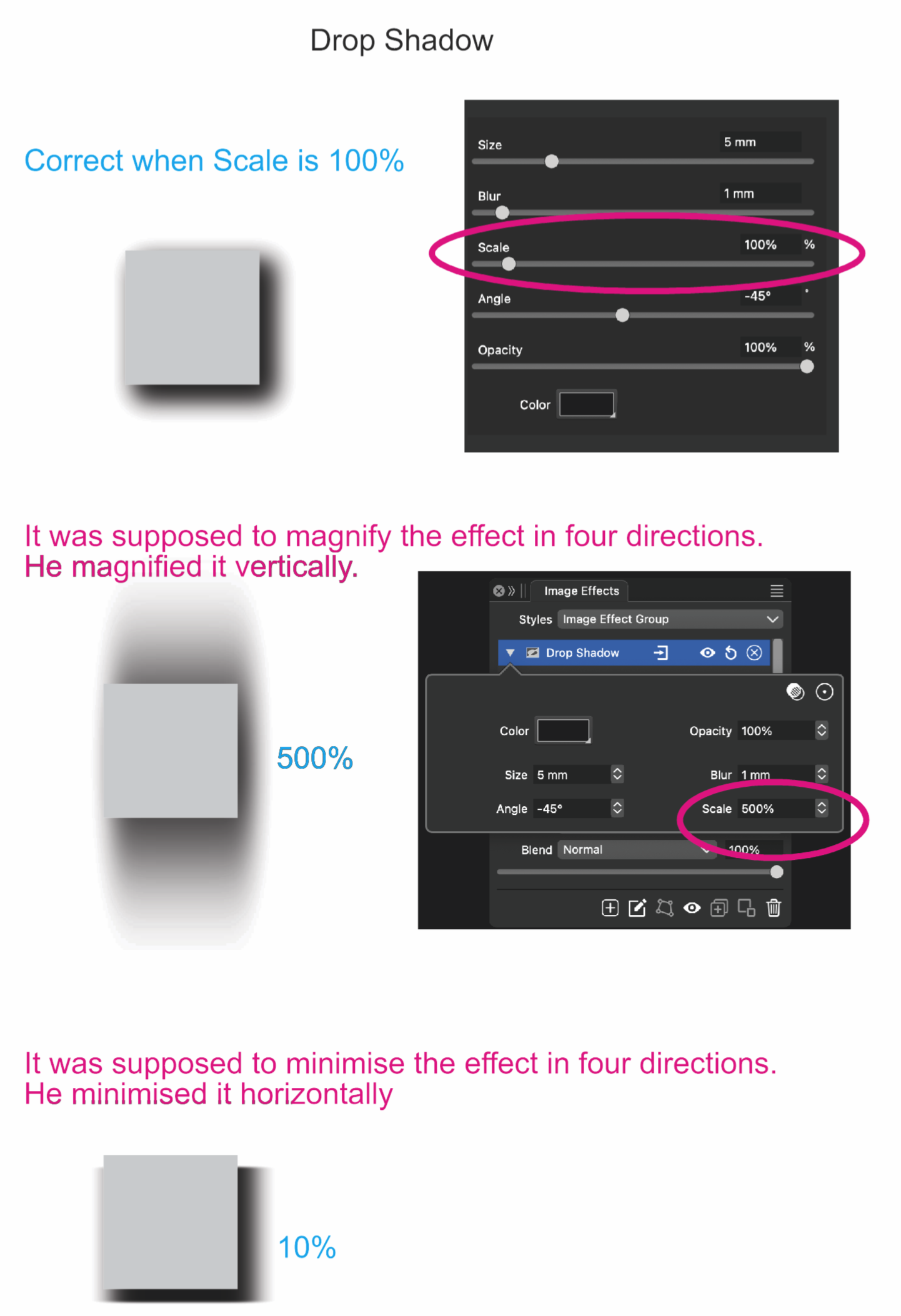
      The ‘Scale’ slider used in effects (Drop Shadow, Gaussian Blur, etc.) should generally be applied to 4 sides, while it works vertically as the value increases. It works horizontally as the value decreases. I am attaching the file.

      Best regards,
      Hakan Balcı

      0_1731318215944_Drop Shadow.vstyler

      0_1731318189482_Drop Shadow.png

      VectorStylerV 1 Reply Last reply Reply Quote 0
      • VectorStylerV Offline
        VectorStyler @hbalcic
        last edited by

        @hbalcic The scale field is used along with the angle to create an ellipsoid shape for the blur kernel.

        To change the size of the effect, just use the Size field (or Size and blur in drop shadow).

        1 Reply Last reply Reply Quote 0
        • H Offline
          hbalcic
          last edited by hbalcic

          The size is also limited to 45 mm for large works.

          VectorStylerV 1 Reply Last reply Reply Quote 1
          • VectorStylerV Offline
            VectorStyler @hbalcic
            last edited by

            @hbalcic said in A suggestion about the ‘Scale’ slider in effects.:

            The size is also limited to 45 mm for large works.

            But can you type larger values into the field?

            1 Reply Last reply Reply Quote 0
            • H Offline
              hbalcic
              last edited by

              I prepared A3 work and enlarged it, the effects remained the same size. For comparison, I took a screenshot below and enlarged it. I am attaching the document.

              0_1731331596845_Drop Shadow 2.vstyler
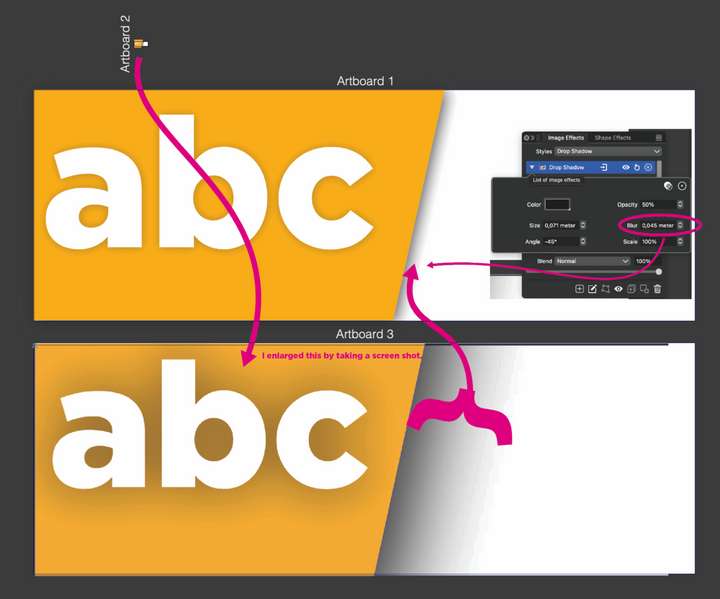
              0_1731331543710_Screen Shot 2024-11-11 at 16.23.51.png

              VectorStylerV 1 Reply Last reply Reply Quote 1
              • VectorStylerV Offline
                VectorStyler @hbalcic
                last edited by

                @hbalcic Were the effects enlarged by scaling the objects?

                In VS, the scaling is non-destructive and it is added on top top the effect parameters.
                The effect panel will show the original (not scaled) sizes.

                1 Reply Last reply Reply Quote 0
                • First post
                  Last post