VectorStyler
    • Categories
    • Unread
    • Recent
    • Tags
    • Popular
    • Register
    • Login

    Extend Windows menu buttons hotspot to the top

    Scheduled Pinned Locked Moved Features and Ideas
    2 Posts 2 Posters 3.0k Views 2 Watching
    Loading More Posts
    • Oldest to Newest
    • Newest to Oldest
    • Most Votes
    Reply
    • Reply as topic
    Log in to reply
    This topic has been deleted. Only users with topic management privileges can see it.
    • nocturnalYLN Offline
      nocturnalYL
      last edited by nocturnalYL

      0_1727796859368_3bb0fc7a-5e65-43b5-b061-7f894ae9be5a-image.png

      In the Windows version, to click on a menu bar item, we have to move the mouse pointer to the highlighted area, which is 12 pixels (no HiDPI) from the top of the screen.

      I suggest to make the hotspot area extend to the top of the screen if the window is maximised.

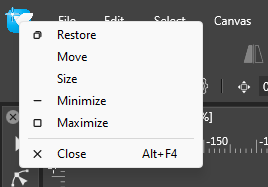
      And on that note, in Windows we click on the menu bar icon to open the window menu. VectorStyle does this too, which makes it more conformant than some of the modern Windows programs. We're talking about core components like Terminal, Settings and File Explorer here.
      0_1727797184762_9ca2ba69-0688-4a8e-8804-436ce4547d18-image.png

      Usually we can just flick the mouse all the way to the top left and click it. And we can double click to close the window, which I prefer doing over using the top-right ✕ icon. I would like to see this implemented too.

      VectorStylerV 1 Reply Last reply Reply Quote 1
      • VectorStylerV Offline
        VectorStyler @nocturnalYL
        last edited by

        @nocturnalYL I will try to improve this.

        1 Reply Last reply Reply Quote 1
        • First post
          Last post

