VectorStyler
    • Categories
    • Unread
    • Recent
    • Tags
    • Popular
    • Register
    • Login

    beta 1.2.014

    Scheduled Pinned Locked Moved VectorStyler 1.2 beta
    20 Posts 3 Posters 18.2k Views 2 Watching
    Loading More Posts
    • Oldest to Newest
    • Newest to Oldest
    • Most Votes
    Reply
    • Reply as topic
    Log in to reply
    This topic has been deleted. Only users with topic management privileges can see it.
    • B Offline
      B-Vs-V @VectorStyler
      last edited by

      @VectorStyler I'm not used to working in isolation mode, so I'm sorry if I don't quite understand the nuances of this; when you double-click on an object in VS, it seems to me that we're in isolation mode (?) but the object can't undergo any transformation... so what's the point of this?

      W11 Pro 25H2 - 12th Gen Intel(R) i7-12700K 3.61 GHz - RAM 64 Go - NVIDIA GF GTX 4070 Ti - Intuos - Dell UP3216Q / Eizo ColorEdge
      W11 Pro 25H2 - 12th Gen Intel(R) i7-12700KF 3.60 GHz -RAM 64 Go - NVIDIA GF GTX 3080 - IntuosPro- ProArt PA329C

      1 Reply Last reply Reply Quote 0
      • B Offline
        B-Vs-V @VectorStyler
        last edited by

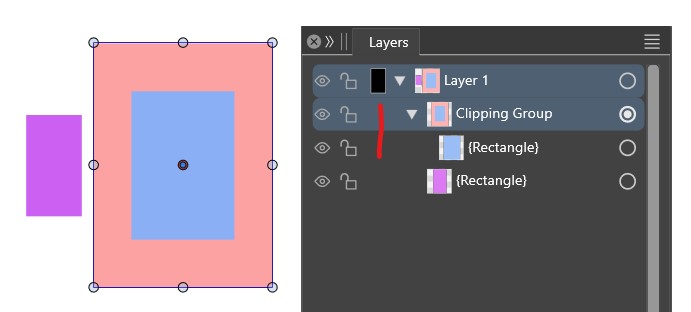
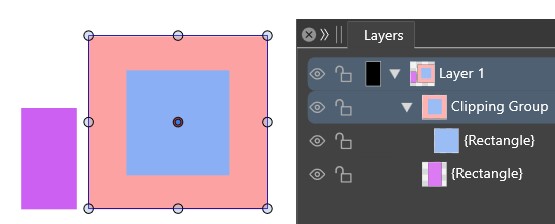
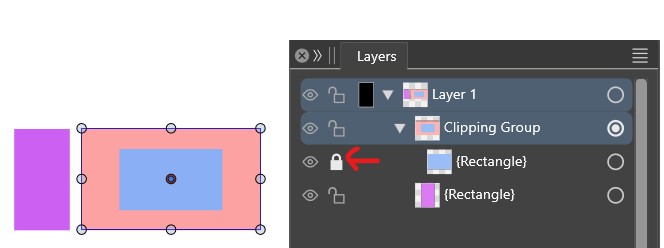
        @VectorStyler while testing the isolation mode, I realise that I don't know (anymore?) how to maintain the dimensions of an object clipped into another? clicking on the lock doesn't maintain its dimensions. Thanks ☺

        0_1709280440609_o1.jpg

        0_1709280447032_o2.jpg

        0_1709280453054_o3.jpg

        W11 Pro 25H2 - 12th Gen Intel(R) i7-12700K 3.61 GHz - RAM 64 Go - NVIDIA GF GTX 4070 Ti - Intuos - Dell UP3216Q / Eizo ColorEdge
        W11 Pro 25H2 - 12th Gen Intel(R) i7-12700KF 3.60 GHz -RAM 64 Go - NVIDIA GF GTX 3080 - IntuosPro- ProArt PA329C

        VectorStylerV 1 Reply Last reply Reply Quote 0
        • VectorStylerV Offline
          VectorStyler @B-Vs-V
          last edited by

          @Pat There is no need to lock to maintain the dimensions. Did you use drag&drop to move the rectangle into the clipping group?
          Not sure what could cause this issue, can you send me the file? Thanks!

          B 1 Reply Last reply Reply Quote 0
          • B Offline
            B-Vs-V @VectorStyler
            last edited by

            @VectorStyler Yes, drag-drop from the layer panel. Issue reproducible, new file sent ☺

            W11 Pro 25H2 - 12th Gen Intel(R) i7-12700K 3.61 GHz - RAM 64 Go - NVIDIA GF GTX 4070 Ti - Intuos - Dell UP3216Q / Eizo ColorEdge
            W11 Pro 25H2 - 12th Gen Intel(R) i7-12700KF 3.60 GHz -RAM 64 Go - NVIDIA GF GTX 3080 - IntuosPro- ProArt PA329C

            VectorStylerV 1 Reply Last reply Reply Quote 1
            • VectorStylerV Offline
              VectorStyler @B-Vs-V
              last edited by

              @Pat Got the file, but I just realized that I was thinking of another case.
              So the rectangle is already inside when the clipping group is scaled?
              In that case, yes the content is always scaled.

              B 1 Reply Last reply Reply Quote 0
              • B Offline
                B-Vs-V @VectorStyler
                last edited by

                @VectorStyler Thanks, no way then to maintain the dimensions of the clipped object ? Well, it would be interesting. I often use this feature in ADesigner in my graphics ("Lock/unlock children").

                W11 Pro 25H2 - 12th Gen Intel(R) i7-12700K 3.61 GHz - RAM 64 Go - NVIDIA GF GTX 4070 Ti - Intuos - Dell UP3216Q / Eizo ColorEdge
                W11 Pro 25H2 - 12th Gen Intel(R) i7-12700KF 3.60 GHz -RAM 64 Go - NVIDIA GF GTX 3080 - IntuosPro- ProArt PA329C

                VectorStylerV 1 Reply Last reply Reply Quote 0
                • VectorStylerV Offline
                  VectorStyler @B-Vs-V
                  last edited by

                  @Pat said in beta 1.2.014:

                  Thanks, no way then to maintain the dimensions of the clipped object ?

                  I added this to the feature request list. No lock/unlock yet in 1.2

                  But you can use the node editor tool to change the clipping shape.
                  Also: if you use the shape selector tool (grouped with the regular transform tool), and select the clipping group with that, it will select and transform its shape only.

                  B 1 Reply Last reply Reply Quote 0
                  • B Offline
                    B-Vs-V @VectorStyler
                    last edited by

                    @VectorStyler Thanks & if I understand your idea correctly 🤔 : that's what I'd do if I wanted to modify the clipped object, but if I want to modify the dimensions of the object in which the clipped object is, I can't do it without unclipping the object and reclipping it again.

                    W11 Pro 25H2 - 12th Gen Intel(R) i7-12700K 3.61 GHz - RAM 64 Go - NVIDIA GF GTX 4070 Ti - Intuos - Dell UP3216Q / Eizo ColorEdge
                    W11 Pro 25H2 - 12th Gen Intel(R) i7-12700KF 3.60 GHz -RAM 64 Go - NVIDIA GF GTX 3080 - IntuosPro- ProArt PA329C

                    VectorStylerV 1 Reply Last reply Reply Quote 0
                    • VectorStylerV Offline
                      VectorStyler @B-Vs-V
                      last edited by

                      @Pat said in beta 1.2.014:

                      that's what I'd do if I wanted to modify the clipped object

                      Yes, but with different tools:

                      • the first tool is to modify the whole group (clipped content also).
                      • the third tool is to modify the clipping shape (without the content).

                      0_1709297826175_tools.png

                      B 2 Replies Last reply Reply Quote 0
                      • B Offline
                        B-Vs-V @VectorStyler
                        last edited by

                        @VectorStyler ok understood ☺ & no need for the 'lock/unlock children' feature then.

                        W11 Pro 25H2 - 12th Gen Intel(R) i7-12700K 3.61 GHz - RAM 64 Go - NVIDIA GF GTX 4070 Ti - Intuos - Dell UP3216Q / Eizo ColorEdge
                        W11 Pro 25H2 - 12th Gen Intel(R) i7-12700KF 3.60 GHz -RAM 64 Go - NVIDIA GF GTX 3080 - IntuosPro- ProArt PA329C

                        1 Reply Last reply Reply Quote 0
                        • B Offline
                          B-Vs-V @VectorStyler
                          last edited by

                          @VectorStyler ... got an issue : the clipping object suddenly disappeared. I'll sent you the file in case it's usefull.

                          W11 Pro 25H2 - 12th Gen Intel(R) i7-12700K 3.61 GHz - RAM 64 Go - NVIDIA GF GTX 4070 Ti - Intuos - Dell UP3216Q / Eizo ColorEdge
                          W11 Pro 25H2 - 12th Gen Intel(R) i7-12700KF 3.60 GHz -RAM 64 Go - NVIDIA GF GTX 3080 - IntuosPro- ProArt PA329C

                          VectorStylerV 1 Reply Last reply Reply Quote 1
                          • VectorStylerV Offline
                            VectorStyler @B-Vs-V
                            last edited by

                            @Pat Looks like there is a bug when scaling shape. The issue is fixed with undoing, or replacing (with shape copy / paste) the shape of the clipping group.

                            B 1 Reply Last reply Reply Quote 0
                            • B Offline
                              B-Vs-V @VectorStyler
                              last edited by

                              @VectorStyler Once I've selected an object with the Shape tool, I can no longer modify it with the Node tool.

                              W11 Pro 25H2 - 12th Gen Intel(R) i7-12700K 3.61 GHz - RAM 64 Go - NVIDIA GF GTX 4070 Ti - Intuos - Dell UP3216Q / Eizo ColorEdge
                              W11 Pro 25H2 - 12th Gen Intel(R) i7-12700KF 3.60 GHz -RAM 64 Go - NVIDIA GF GTX 3080 - IntuosPro- ProArt PA329C

                              VectorStylerV 2 Replies Last reply Reply Quote 1
                              • VectorStylerV Offline
                                VectorStyler @B-Vs-V
                                last edited by

                                @Pat said in beta 1.2.014:

                                @VectorStyler Once I've selected an object with the Shape tool, I can no longer modify it with the Node tool.

                                I opened a bug on this one.

                                1 Reply Last reply Reply Quote 0
                                • VectorStylerV Offline
                                  VectorStyler @B-Vs-V
                                  last edited by

                                  @Pat said in beta 1.2.014:

                                  @VectorStyler Once I've selected an object with the Shape tool, I can no longer modify it with the Node tool.

                                  A "Convert to Curves" will make the shape editable again.

                                  1 Reply Last reply Reply Quote 0
                                  • First post
                                    Last post