VectorStyler
    • Categories
    • Unread
    • Recent
    • Tags
    • Popular
    • Register
    • Login

    How do I get rid of strokes on traced and exported images?

    Scheduled Pinned Locked Moved VectorStyler 1.2 beta
    5 Posts 3 Posters 6.0k Views 3 Watching
    Loading More Posts
    • Oldest to Newest
    • Newest to Oldest
    • Most Votes
    Reply
    • Reply as topic
    Log in to reply
    This topic has been deleted. Only users with topic management privileges can see it.
    • H Offline
      Harry
      last edited by Harry

      A problem occurred while taking those steps:

      1. Image trace without extracting strokes
      2. Export traced image to PNG
      3. The resulting image has unwanted strokes:

      0_1708370312033_Untitled-4.png

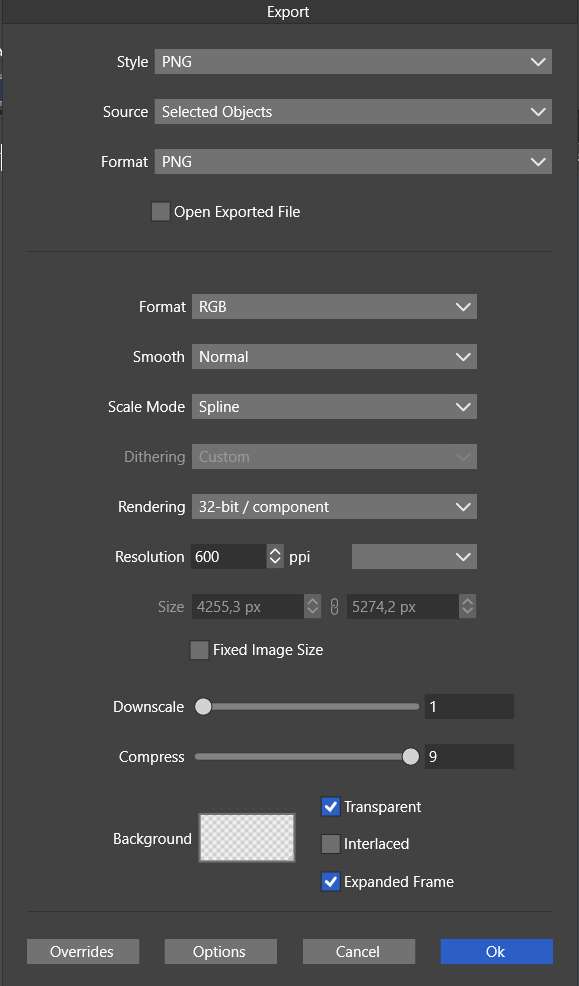
      My PNG export options:
      0_1708370395193_PNG Export options.png

      Win 11, XP Pen Deco 01 V2 graphic tablet

      b77B VectorStylerV 2 Replies Last reply Reply Quote 0
      • b77B Offline
        b77 @Harry
        last edited by

        @Harry I would try with Format [ Dithered Bitmap ] instead of RGB and
        one of the dithering algorithms (Floyd-Steinberg?).

        MacBook Pro (Intel) running Monterey 12.6.4

        H 1 Reply Last reply Reply Quote 1
        • VectorStylerV Offline
          VectorStyler @Harry
          last edited by

          @Harry In the Smooth drop down, select None, this will turn off anti-aliasing (that causes these edges).

          1 Reply Last reply Reply Quote 0
          • H Offline
            Harry @b77
            last edited by

            @b77 Thank you for your comment, but still couldn't find Floyd-Steinberg's dithering algorithm in VS settings and dithered bitmap didn't help.

            @VectorStyler Thanks! That worked!

            Win 11, XP Pen Deco 01 V2 graphic tablet

            b77B 1 Reply Last reply Reply Quote 0
            • b77B Offline
              b77 @Harry
              last edited by b77

              @Harry I misunderstood, thinking the issue is strictly related to export
              (the settings I suggested are found in the Export window).

              MacBook Pro (Intel) running Monterey 12.6.4

              1 Reply Last reply Reply Quote 2
              • First post
                Last post