VectorStyler
    • Categories
    • Unread
    • Recent
    • Tags
    • Popular
    • Register
    • Login

    Joining at path intersect option

    Scheduled Pinned Locked Moved Features and Ideas
    6 Posts 5 Posters 6.3k Views 4 Watching
    Loading More Posts
    • Oldest to Newest
    • Newest to Oldest
    • Most Votes
    Reply
    • Reply as topic
    Log in to reply
    This topic has been deleted. Only users with topic management privileges can see it.
    • BoldlineB Online
      Boldline
      last edited by

      This may have been brought up before but I wanted to be sure. This would be a very helpful tool for the work I do. The ability to join two parties where they intersect instead of only at their end points.
      I know all the keyboard shortcuts seem to be taken, but I was thinking of adding a modifier to the J key as an alternative join to get this result:

      https://www.instagram.com/reel/CvUaIU9MhZJ/?igshid=MzRlODBiNWFlZA==

      🍎 macOS Tahoe 26.2, Mac mini (M1, 2020), Chip Apple M1, Memory 16 GB
      Cintiq 27QHD Display and LG Ultra HD Display

      S VectorStylerV 2 Replies Last reply Reply Quote 1
      • S Offline
        Subpath @Boldline
        last edited by

        @Boldline

        Seems to me that this is already possible with the Trim and Join Tool

        Here a Video

        Win 11
        CPU: AMD Ryzen 5 9600X, 6-core.
        GPU: Nvidia Geforce RTX 5070.

        BoldlineB 1 Reply Last reply Reply Quote 3
        • encartE Offline
          encart
          last edited by

          Ok, and since @Boldline started a topic about intersections let me make a slight OT.
          Why is an Intersection Point created only on one curve? Many times I had a situation where the point was created on the wrong curve. I had to undo and perform it again. Currently, the intersection point is created on the curve that is below. If I understand correctly. Wouldn't it be better if they were created on both?

          Windows 11 Home 10.0.22621

          1 Reply Last reply Reply Quote 0
          • BoldlineB Online
            Boldline @Subpath
            last edited by

            @Subpath Yes thank you. Will add that to my tools I use. The VS method seems easier than the Illustrator method!I know I've heard of it before but with so many tools, I had not used it yet.

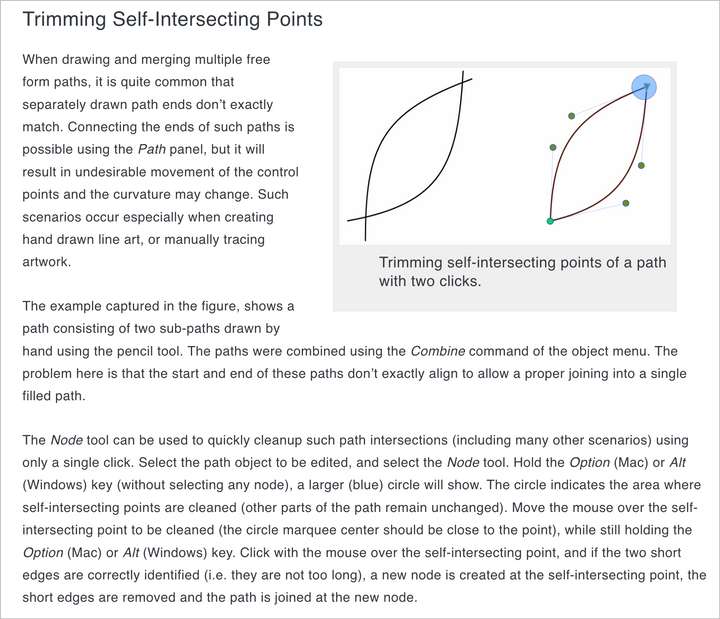
            This might be a case of outdated documentation, but was this section a solution for this before the "Trim and Join" tool was added? I can't get it to work but it might just be me

            https://www.vectorstyler.com/documentation/shapes/editpath/
            0_1691853933227_00aba9b5-ae7d-4de7-ba0b-c7d3daf854f4-BLD 2023-08-12 at 11.23.10@2x.png

            🍎 macOS Tahoe 26.2, Mac mini (M1, 2020), Chip Apple M1, Memory 16 GB
            Cintiq 27QHD Display and LG Ultra HD Display

            P 1 Reply Last reply Reply Quote 2
            • P Offline
              pentool @Boldline
              last edited by

              @Boldline The one in the documentation... I've tried that before, too. It does work in a way that first you need to combine them per docs. But then it only joins them and doesn't remove the extra segments. They become separated but you have to manually delete them.

              MacBook Pro 13" early 2015 8G | Intel Iris Graphics 6100 1536 MB | macOS Monterey 12.7.6

              1 Reply Last reply Reply Quote 0
              • VectorStylerV Offline
                VectorStyler @Boldline
                last edited by

                @Boldline The Trim and Join tool should work for this.

                1 Reply Last reply Reply Quote 0
                • First post
                  Last post