VectorStyler
    • Categories
    • Unread
    • Recent
    • Tags
    • Popular
    • Register
    • Login

    File > Revert

    Scheduled Pinned Locked Moved Features and Ideas
    5 Posts 4 Posters 5.1k Views 3 Watching
    Loading More Posts
    • Oldest to Newest
    • Newest to Oldest
    • Most Votes
    Reply
    • Reply as topic
    Log in to reply
    This topic has been deleted. Only users with topic management privileges can see it.
    • P Offline
      pentool
      last edited by

      Would like to suggest that File > Revert should put up a dialog asking if you're sure you wanna revert. I noticed it immediately reverts to the saved version. Which is, well, ok, I guess.

      But what happens if you are so drunk you can't see straight and by complete accident your hand slips, or your mouse mis-behaves and for whatever reason the File > Revert will get accidentally selected? You will immediately lose all your changes, which you may wanted to keep.

      Yes, I know save often, but Murphy is always lurking around trying to stab you in the back... 🙂

      MacBook Pro 13" early 2015 8G | Intel Iris Graphics 6100 1536 MB | macOS Monterey 12.7.6

      VectorStylerV 1 Reply Last reply Reply Quote 1
      • VectorStylerV Offline
        VectorStyler @pentool
        last edited by

        @pentool Added to the backlog.

        1 Reply Last reply Reply Quote 1
        • BoldlineB Online
          Boldline
          last edited by

          I'm not at all opposed to the "revert" option, but part of me wonders if it's necessary given you can just quit the open file without saving and get the same result. I guess you don't have to reopen the file again. I'm not advocating for removing the feature, but I think it needs to be expanded to have real value in my opinion.

          I could see using this feature more if I made a save point in the history panel and "revert" would give me the option to go back to the last file save (as it does now) or to one of a list of created save snapshot states in the history panel
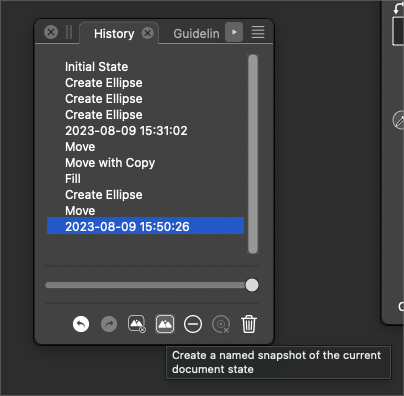
          0_1691588376909_60be6135-cb6b-4f12-af02-ef6f91aaa7da-BLD 2023-08-09 at 09.39.25.png

          🍎 macOS Tahoe 26.2, Mac mini (M1, 2020), Chip Apple M1, Memory 16 GB
          Cintiq 27QHD Display and LG Ultra HD Display

          b77B 1 Reply Last reply Reply Quote 0
          • b77B Offline
            b77 @Boldline
            last edited by

            Here's how Logic Pro does it — the last saved version and the preceding saves are
            displayed in a submenu of 'Revert to':

            alt text

            MacBook Pro (Intel) running Monterey 12.6.4

            BoldlineB 1 Reply Last reply Reply Quote 1
            • BoldlineB Online
              Boldline @b77
              last edited by

              @b77 said in File > Revert:

              the last saved version and the preceding saves are
              displayed in a submenu of 'Revert to

              Yes! This is what I was picturing. Very cool! VS allows each save point snapshot to be custom named (as I'm sure Logic Pro also does) which would make it even easier to know which option to revert to. It's kind of like adding the option from the history panel to the main section

              🍎 macOS Tahoe 26.2, Mac mini (M1, 2020), Chip Apple M1, Memory 16 GB
              Cintiq 27QHD Display and LG Ultra HD Display

              1 Reply Last reply Reply Quote 0
              • First post
                Last post