VectorStyler
    • Categories
    • Unread
    • Recent
    • Tags
    • Popular
    • Register
    • Login

    Locked layer: not totally locked ?
    Scheduled Pinned Locked Moved Questions and Support
    8 Posts 3 Posters 6.3k Views 3 Watching
    Loading More Posts
    • Oldest to Newest
    • Newest to Oldest
    • Most Votes
    Reply
    • Reply as topic
    Log in to reply
    This topic has been deleted. Only users with topic management privileges can see it.
    • B Offline
      B-Vs-V
      last edited by B-Vs-V

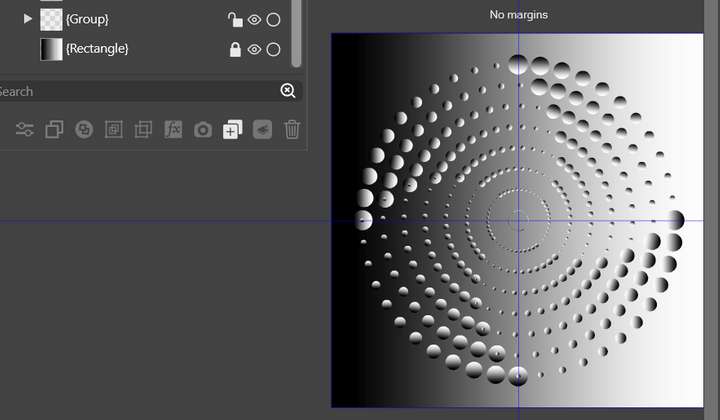
      A background layer (square) is locked. I wanted to test different colour gradients on shapes above. I selected everything and I've noticed that the gradient of the locked background changed as well:
      0_1668288354888_60bc3492-9217-4bbb-92be-528ec0f0935d-image.png

      W11 Pro 25H2 - 12th Gen Intel(R) i7-12700K 3.61 GHz - RAM 64 Go - NVIDIA GF GTX 4070 Ti - Intuos - Dell UP3216Q / Eizo ColorEdge
      W11 Pro 25H2 - 12th Gen Intel(R) i7-12700KF 3.60 GHz -RAM 64 Go - NVIDIA GF GTX 3080 - IntuosPro- ProArt PA329C

      b77B VectorStylerV 2 Replies Last reply Reply Quote 0
      • b77B Offline
        b77 @B-Vs-V
        last edited by

        @PatrickM By background layer do you mean an object — the square that is under the circles?

        MacBook Pro (Intel) running Monterey 12.6.4

        1 Reply Last reply Reply Quote 0
        • VectorStylerV Offline
          VectorStyler @B-Vs-V
          last edited by VectorStyler

          @PatrickM The locked gradient should not change. But, was it selected in the Layers panel?

          1 Reply Last reply Reply Quote 0
          • B Offline
            B-Vs-V
            last edited by

            @b77 Yes, the square under the circles is simply an object that I use to give a coloured background.

            @VectorStyler I didn't check that: I've selected all the objects with the Transform tool directly on the artboard but didn't expect a change of the locked object.

            W11 Pro 25H2 - 12th Gen Intel(R) i7-12700K 3.61 GHz - RAM 64 Go - NVIDIA GF GTX 4070 Ti - Intuos - Dell UP3216Q / Eizo ColorEdge
            W11 Pro 25H2 - 12th Gen Intel(R) i7-12700KF 3.60 GHz -RAM 64 Go - NVIDIA GF GTX 3080 - IntuosPro- ProArt PA329C

            VectorStylerV 1 Reply Last reply Reply Quote 0
            • VectorStylerV Offline
              VectorStyler @B-Vs-V
              last edited by

              @PatrickM said in Locked layer: not totally locked ?:

              I've selected all the objects with the Transform tool directly on the artboard

              No need to select in the layers panel.

              What tool was used to change the gradient? (gradient tool or panel?)

              B 1 Reply Last reply Reply Quote 0
              • B Offline
                B-Vs-V @VectorStyler
                last edited by

                @VectorStyler I like to use panels in general and I especially like the VS ones, so my first inclination is most often the gradient panel. I wish they could be "iconised", but I know that will come later ☺

                W11 Pro 25H2 - 12th Gen Intel(R) i7-12700K 3.61 GHz - RAM 64 Go - NVIDIA GF GTX 4070 Ti - Intuos - Dell UP3216Q / Eizo ColorEdge
                W11 Pro 25H2 - 12th Gen Intel(R) i7-12700KF 3.60 GHz -RAM 64 Go - NVIDIA GF GTX 3080 - IntuosPro- ProArt PA329C

                VectorStylerV 1 Reply Last reply Reply Quote 1
                • VectorStylerV Offline
                  VectorStyler @B-Vs-V
                  last edited by

                  @PatrickM Panel sizes can be reduced with the up/down arrow just before the name.

                  I will try to replicate the gradient on locked object change. It should not change.

                  B 1 Reply Last reply Reply Quote 1
                  • B Offline
                    B-Vs-V @VectorStyler
                    last edited by

                    @VectorStyler I've sent you the file.

                    W11 Pro 25H2 - 12th Gen Intel(R) i7-12700K 3.61 GHz - RAM 64 Go - NVIDIA GF GTX 4070 Ti - Intuos - Dell UP3216Q / Eizo ColorEdge
                    W11 Pro 25H2 - 12th Gen Intel(R) i7-12700KF 3.60 GHz -RAM 64 Go - NVIDIA GF GTX 3080 - IntuosPro- ProArt PA329C

                    1 Reply Last reply Reply Quote 1
                    • First post
                      Last post