VectorStyler
    • Categories
    • Unread
    • Recent
    • Tags
    • Popular
    • Register
    • Login

    Am I missing a step in being able to break apart this shape and delete?

    Scheduled Pinned Locked Moved Questions and Support
    5 Posts 3 Posters 4.4k Views 2 Watching
    Loading More Posts
    • Oldest to Newest
    • Newest to Oldest
    • Most Votes
    Reply
    • Reply as topic
    Log in to reply
    This topic has been deleted. Only users with topic management privileges can see it.
    • BoldlineB Online
      Boldline
      last edited by

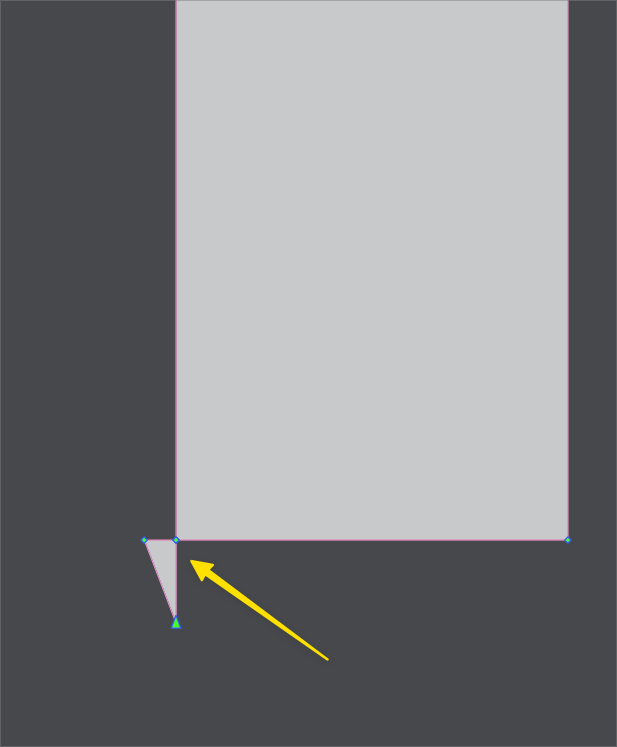
      Is there a step I'm missing to be able to break this piece off and delete it? I know we've spoken about this a lot in the past and a feature was added to the object menu to accomplish this. everything I had tried did not seem to work. I had pulled another one down overtop itself and used merge and it was able to be selected individually and deleted easily without using the new feature at all, but this one was not

      https://recordit.co/ttpQqOhq6R
      0_1666992224694_1b0612b3-5a8a-44a3-9e10-2d6ee8867883-BLD 2022-10-28 at 17.23.23.png

      🍎 macOS Tahoe 26.2, Mac mini (M1, 2020), Chip Apple M1, Memory 16 GB
      Cintiq 27QHD Display and LG Ultra HD Display

      b77B 1 Reply Last reply Reply Quote 0
      • b77B Offline
        b77 @Boldline
        last edited by

        @Boldline For this you need to use 'Separate at Intersections' from the Object menu > Shape.

        MacBook Pro (Intel) running Monterey 12.6.4

        BoldlineB 1 Reply Last reply Reply Quote 0
        • BoldlineB Online
          Boldline @b77
          last edited by

          @b77 This is the test file for both this topic and the shift alignment issue. the shift alignment issue is the top version and the "separate at intersections" is the bottom one.

          I tried reducing the angle some to see if that would allow the shift modifier to work properly, but I had the same issue.

          For the "separate at intersections" one, it seems the ones on the right side work properly right away, but the bottom left shape needs more help to work properly... maybe it's a bug? It did eventually work but it took an extra attempt more than the other side to accomplish

          0_1666993251653_test file.vstyler

          🍎 macOS Tahoe 26.2, Mac mini (M1, 2020), Chip Apple M1, Memory 16 GB
          Cintiq 27QHD Display and LG Ultra HD Display

          BoldlineB 1 Reply Last reply Reply Quote 0
          • BoldlineB Online
            Boldline @Boldline
            last edited by

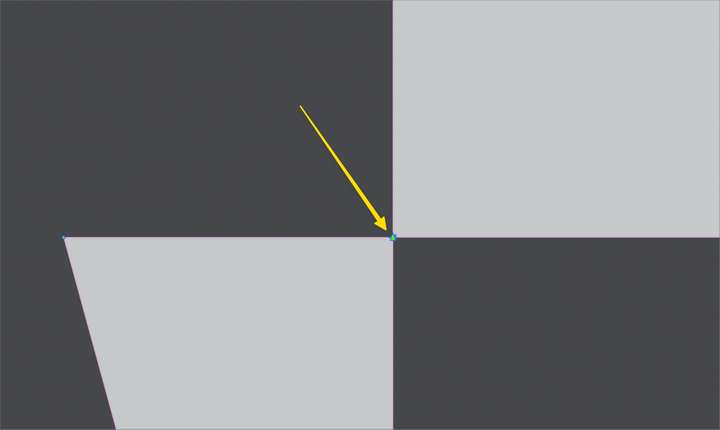
            @VectorStyler It appears the side with the issue - the left side.. it has two nodes overtop one another after doing a couple "separate at intersections" attempts on it. This seems like an issue because it should be no different than the right side version of the same thing. Both had the same treatment - but the left side requires extra ""separate at intersections" attempts and results in 2 nodes instead of the typical one
            0_1666993637020_751d8d30-2f7f-4a76-969c-fa31d1c17c49-BLD 2022-10-28 at 17.45.48.png

            🍎 macOS Tahoe 26.2, Mac mini (M1, 2020), Chip Apple M1, Memory 16 GB
            Cintiq 27QHD Display and LG Ultra HD Display

            VectorStylerV 1 Reply Last reply Reply Quote 0
            • VectorStylerV Offline
              VectorStyler @Boldline
              last edited by

              @Boldline With two "separate at intersections" commands this corner was also separated.
              I opened a bug on this one, as one command should be sufficient.

              1 Reply Last reply Reply Quote 0
              • First post
                Last post
