VectorStyler
    • Categories
    • Unread
    • Recent
    • Tags
    • Popular
    • Register
    • Login

    Mesh - how to...

    Scheduled Pinned Locked Moved Questions and Support
    30 Posts 3 Posters 37.1k Views 3 Watching
    Loading More Posts
    • Oldest to Newest
    • Newest to Oldest
    • Most Votes
    Reply
    • Reply as topic
    Log in to reply
    This topic has been deleted. Only users with topic management privileges can see it.
    • B Offline
      B-Vs-V
      last edited by

      I've drawn an object (pen tool) and I wanted to add a mesh to get different colours & to test noise on it. I've clicked on the Mesh gradient editor and I've got this:

      0_1665693222383_Mesh0.JPG

      How do I edit this mesh ? I've tried to add more lines/colours without success. I then tried with the node tool and I've got this:
      0_1665693327171_Mesh1.JPG

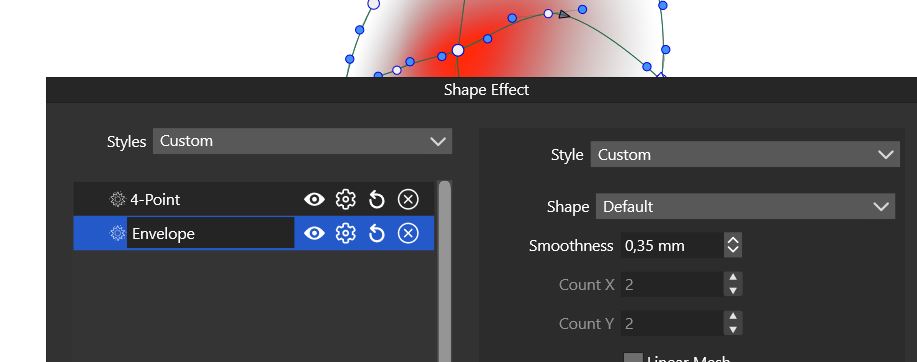
      I've checked in the Shape editor but I can't change parameters of the mesh:

      0_1665693789566_ShapeEffect.JPG

      Shape effect ?:
      0_1665693820389_ShapeEffect1.JPG

      Thanks for any feedback.
      Patrick

      W11 Pro 25H2 - 12th Gen Intel(R) i7-12700K 3.61 GHz - RAM 64 Go - NVIDIA GF GTX 4070 Ti - Intuos - Dell UP3216Q / Eizo ColorEdge
      W11 Pro 25H2 - 12th Gen Intel(R) i7-12700KF 3.60 GHz -RAM 64 Go - NVIDIA GF GTX 3080 - IntuosPro- ProArt PA329C

      b77B VectorStylerV 3 Replies Last reply Reply Quote 0
      • b77B Offline
        b77 @B-Vs-V
        last edited by b77

        @PatrickM Only (the bigger) control points at the intersections of lines can have their color changed — the other (smaller) ones don't have an assigned color.
        These can only be moved or deleted: https://recordit.co/wYbAUx94KS

        To add new color control points to the mesh you need to double-click any of the lines of the existing mesh
        with the Mesh Gradient Editor (U), not with the Shape Editor (A).

        MacBook Pro (Intel) running Monterey 12.6.4

        B 1 Reply Last reply Reply Quote 2
        • B Offline
          B-Vs-V @b77
          last edited by B-Vs-V

          @b77 Thanks for your feedback 😃

          Like in Ai if I recall correctly. It is what I did try yesterday but no way, single/double/triple/... click did not add any "node". It's why I was looking for other "controls"

          I've just reopened the file and it is fine now although I can't change the colour 😞 like if white dominate the new point...

          W11 Pro 25H2 - 12th Gen Intel(R) i7-12700K 3.61 GHz - RAM 64 Go - NVIDIA GF GTX 4070 Ti - Intuos - Dell UP3216Q / Eizo ColorEdge
          W11 Pro 25H2 - 12th Gen Intel(R) i7-12700KF 3.60 GHz -RAM 64 Go - NVIDIA GF GTX 3080 - IntuosPro- ProArt PA329C

          1 Reply Last reply Reply Quote 0
          • VectorStylerV Offline
            VectorStyler @B-Vs-V
            last edited by

            @PatrickM I tested the mesh editor just now, both on Windows and Mac, and it seems to be working here.

            One thing to check: what is shown in the Appearance panel when that mesh is selected? It should be a single "Mesh" content.

            B 1 Reply Last reply Reply Quote 0
            • B Offline
              B-Vs-V @VectorStyler
              last edited by

              @VectorStyler Here is a screenshot of the Appearance panel:
              0_1665731522980_Appearance.JPG

              However, I'm not successful in assigning a different colour to selected points, either individually or in groups.

              When I remove the colours to add one and make the 'white' disappear, the whole shape disappears.

              0_1665731601108_Mesh colors1.JPG
              0_1665731612089_Mesh colors2.JPG
              0_1665731626245_Mesh colors3.JPG
              0_1665731634311_Mesh colors4.JPG

              W11 Pro 25H2 - 12th Gen Intel(R) i7-12700K 3.61 GHz - RAM 64 Go - NVIDIA GF GTX 4070 Ti - Intuos - Dell UP3216Q / Eizo ColorEdge
              W11 Pro 25H2 - 12th Gen Intel(R) i7-12700KF 3.60 GHz -RAM 64 Go - NVIDIA GF GTX 3080 - IntuosPro- ProArt PA329C

              VectorStylerV 1 Reply Last reply Reply Quote 0
              • VectorStylerV Offline
                VectorStyler @B-Vs-V
                last edited by

                @PatrickM I noticed that the opacity of the selected node is 0. Could this be the issue?

                B 2 Replies Last reply Reply Quote 0
                • B Offline
                  B-Vs-V @VectorStyler
                  last edited by

                  @VectorStyler I check but I am positively sure that I did not change the opacity of any point.

                  W11 Pro 25H2 - 12th Gen Intel(R) i7-12700K 3.61 GHz - RAM 64 Go - NVIDIA GF GTX 4070 Ti - Intuos - Dell UP3216Q / Eizo ColorEdge
                  W11 Pro 25H2 - 12th Gen Intel(R) i7-12700KF 3.60 GHz -RAM 64 Go - NVIDIA GF GTX 3080 - IntuosPro- ProArt PA329C

                  VectorStylerV 1 Reply Last reply Reply Quote 0
                  • B Offline
                    B-Vs-V @VectorStyler
                    last edited by

                    @VectorStyler Yes, it is the issue.
                    But when I select a single point or several, the opacity can display 100% and when I deselect the whole object and select it again and the point, the opacity is then of 0%.

                    W11 Pro 25H2 - 12th Gen Intel(R) i7-12700K 3.61 GHz - RAM 64 Go - NVIDIA GF GTX 4070 Ti - Intuos - Dell UP3216Q / Eizo ColorEdge
                    W11 Pro 25H2 - 12th Gen Intel(R) i7-12700KF 3.60 GHz -RAM 64 Go - NVIDIA GF GTX 3080 - IntuosPro- ProArt PA329C

                    1 Reply Last reply Reply Quote 0
                    • VectorStylerV Offline
                      VectorStyler @B-Vs-V
                      last edited by

                      @PatrickM The 0 opacity could be caused by a bug, we just need to narrow down when this happens.
                      Could you send me the file by email, I might find some cause of this.

                      How was the mesh created initially? Menu command, or mesh tool?

                      B 2 Replies Last reply Reply Quote 0
                      • B Offline
                        B-Vs-V @VectorStyler
                        last edited by

                        @VectorStyler I'll send you the file asap. I did create the mesh with the mesh tool.

                        W11 Pro 25H2 - 12th Gen Intel(R) i7-12700K 3.61 GHz - RAM 64 Go - NVIDIA GF GTX 4070 Ti - Intuos - Dell UP3216Q / Eizo ColorEdge
                        W11 Pro 25H2 - 12th Gen Intel(R) i7-12700KF 3.60 GHz -RAM 64 Go - NVIDIA GF GTX 3080 - IntuosPro- ProArt PA329C

                        1 Reply Last reply Reply Quote 1
                        • B Offline
                          B-Vs-V @VectorStyler
                          last edited by

                          @VectorStyler said in Mesh - how to...:

                          @PatrickM The 0 opacity could be caused by a bug, we just need to narrow down when this happens.
                          Could you send me the file by email, I might find some cause of this.

                          The file has been sent ☺

                          W11 Pro 25H2 - 12th Gen Intel(R) i7-12700K 3.61 GHz - RAM 64 Go - NVIDIA GF GTX 4070 Ti - Intuos - Dell UP3216Q / Eizo ColorEdge
                          W11 Pro 25H2 - 12th Gen Intel(R) i7-12700KF 3.60 GHz -RAM 64 Go - NVIDIA GF GTX 3080 - IntuosPro- ProArt PA329C

                          1 Reply Last reply Reply Quote 1
                          • VectorStylerV Offline
                            VectorStyler @B-Vs-V
                            last edited by

                            @PatrickM The rectangle box in the second image is the Envelope effect added on the mesh. The node tool will edit the envelope, not the mesh.

                            B 2 Replies Last reply Reply Quote 0
                            • B Offline
                              B-Vs-V @VectorStyler
                              last edited by

                              @VectorStyler Yes, nice that I know now that new points have no opacity.
                              I'm wondering whether a general stroke to the object can be generated ? I can't in my simple drawing (and the opacity is 100%).

                              W11 Pro 25H2 - 12th Gen Intel(R) i7-12700K 3.61 GHz - RAM 64 Go - NVIDIA GF GTX 4070 Ti - Intuos - Dell UP3216Q / Eizo ColorEdge
                              W11 Pro 25H2 - 12th Gen Intel(R) i7-12700KF 3.60 GHz -RAM 64 Go - NVIDIA GF GTX 3080 - IntuosPro- ProArt PA329C

                              1 Reply Last reply Reply Quote 0
                              • B Offline
                                B-Vs-V @VectorStyler
                                last edited by B-Vs-V

                                @VectorStyler Is there a way to add noise only at selected points of the mesh and not to the whole object? Thanks for the feedback.

                                0_1665761169356_d512d6ce-0ed6-48b8-b6bf-e1fbbab84319-image.png

                                Edit : What is/are the difference(s) between (i) the panel Noise and (ii) Panels -> Effects -> Image Effects panel --> Pixelate -> White Noise effect

                                W11 Pro 25H2 - 12th Gen Intel(R) i7-12700K 3.61 GHz - RAM 64 Go - NVIDIA GF GTX 4070 Ti - Intuos - Dell UP3216Q / Eizo ColorEdge
                                W11 Pro 25H2 - 12th Gen Intel(R) i7-12700KF 3.60 GHz -RAM 64 Go - NVIDIA GF GTX 3080 - IntuosPro- ProArt PA329C

                                VectorStylerV b77B 2 Replies Last reply Reply Quote 0
                                • VectorStylerV Offline
                                  VectorStyler @B-Vs-V
                                  last edited by

                                  @PatrickM said in Mesh - how to...:

                                  Is there a way to add noise only at selected points of the mesh and not to the whole object?

                                  Not possible now with the gradient mesh.
                                  But the white noise effect can have a mask and that mask can be a gradient mesh.

                                  What is/are the difference(s) between (i) the panel Noise and (ii) Panels -> Effects -> Image Effects panel --> Pixelate -> White Noise effect

                                  The Noise Fill panel uses noise to setup fill (or stroke) styles. The Image Effects -> Generate -> Noise does almost the same, but here an image is generated that may be composited with another (existing) fill.

                                  The White Noise effect is a plain random noise, while the other noise types (perlin, musgrave, etc) are gradient noise. They are fundamentally different it terms of what they create.
                                  For the gradient noise, use the "Browse Noise" from the Noise panel Noise field to see what they are.

                                  B 1 Reply Last reply Reply Quote 1
                                  • B Offline
                                    B-Vs-V @VectorStyler
                                    last edited by

                                    @VectorStyler Thanks ☺ , another level of complexity. Well, I have to spend more time on this.

                                    Using VS is a real challenge 😓 💪 but the effort is worth it.😄

                                    W11 Pro 25H2 - 12th Gen Intel(R) i7-12700K 3.61 GHz - RAM 64 Go - NVIDIA GF GTX 4070 Ti - Intuos - Dell UP3216Q / Eizo ColorEdge
                                    W11 Pro 25H2 - 12th Gen Intel(R) i7-12700KF 3.60 GHz -RAM 64 Go - NVIDIA GF GTX 3080 - IntuosPro- ProArt PA329C

                                    1 Reply Last reply Reply Quote 1
                                    • b77B Offline
                                      b77 @B-Vs-V
                                      last edited by b77

                                      @PatrickM Try this:

                                      • add a fill to the object;
                                      • drag the fill under the mesh (in the Appearance panel);
                                      • with the fill content still selected, add a noise effect to it;
                                      • select any of the color control points of the mesh;
                                      • change its opacity.

                                      See the attached file:
                                      0_1665765656207_Mesh + noise.vstyler

                                      MacBook Pro (Intel) running Monterey 12.6.4

                                      B 2 Replies Last reply Reply Quote 1
                                      • B Offline
                                        B-Vs-V @b77
                                        last edited by B-Vs-V

                                        @b77 Thanks for your feedback 👍

                                        W11 Pro 25H2 - 12th Gen Intel(R) i7-12700K 3.61 GHz - RAM 64 Go - NVIDIA GF GTX 4070 Ti - Intuos - Dell UP3216Q / Eizo ColorEdge
                                        W11 Pro 25H2 - 12th Gen Intel(R) i7-12700KF 3.60 GHz -RAM 64 Go - NVIDIA GF GTX 3080 - IntuosPro- ProArt PA329C

                                        1 Reply Last reply Reply Quote 0
                                        • B Offline
                                          B-Vs-V @b77
                                          last edited by

                                          @b77 I don't get what is expected.

                                          First, I create an object with a fill (green). I then add a mesh (mesh tool) & I change the opacity of a point.
                                          Without adding any noise, I notice that I can't see the fill, please see below:

                                          0_1665767439135_Mesh1.JPG

                                          0_1665767454396_Mesh2.JPG

                                          W11 Pro 25H2 - 12th Gen Intel(R) i7-12700K 3.61 GHz - RAM 64 Go - NVIDIA GF GTX 4070 Ti - Intuos - Dell UP3216Q / Eizo ColorEdge
                                          W11 Pro 25H2 - 12th Gen Intel(R) i7-12700KF 3.60 GHz -RAM 64 Go - NVIDIA GF GTX 3080 - IntuosPro- ProArt PA329C

                                          b77B 1 Reply Last reply Reply Quote 0
                                          • b77B Offline
                                            b77 @B-Vs-V
                                            last edited by

                                            @PatrickM Quick video to the rescue: https://recordit.co/6uw81ghcdw

                                            MacBook Pro (Intel) running Monterey 12.6.4

                                            B 1 Reply Last reply Reply Quote 1
                                            • First post
                                              Last post
