VectorStyler
    • Categories
    • Unread
    • Recent
    • Tags
    • Popular
    • Register
    • Login

    Repeater halftone problem on rasters

    Scheduled Pinned Locked Moved VectorStyler 1.1 Bugs
    56 Posts 5 Posters 138.3k Views 4 Watching
    Loading More Posts
    • Oldest to Newest
    • Newest to Oldest
    • Most Votes
    Reply
    • Reply as topic
    Log in to reply
    This topic has been deleted. Only users with topic management privileges can see it.
    • BoldlineB Offline
      Boldline @b77
      last edited by

      @b77 Thanks!!!! I am going to try that and get back to you. This is exciting!

      🍎 macOS Tahoe 26.2, Mac mini (M1, 2020), Chip Apple M1, Memory 16 GB
      Cintiq 27QHD Display and LG Ultra HD Display

      1 Reply Last reply Reply Quote 0
      • b77B Offline
        b77 @b77
        last edited by b77

        @VectorStyler Can a pseudo-separation be done using the color adjustment effects, so that each of four duplicates of a color image can have the cyan, the magenta, the yellow and the black separation, and Boldline doesn't need to export separation PDFs for this?

        I tried a bit with the available effects but couldn't do it. Maybe I didn't try enough?

        MacBook Pro (Intel) running Monterey 12.6.4

        VectorStylerV 1 Reply Last reply Reply Quote 0
        • VectorStylerV Offline
          VectorStyler @b77
          last edited by

          @b77 Maybe with the Curves color effect. Create four copies of an image and clump down all but one color channel curve on each.

          b77B 1 Reply Last reply Reply Quote 0
          • DazmondoD Offline
            Dazmondo @Boldline
            last edited by

            @Boldline said in Repeater halftone problem on rasters:

            Is there a way to get multiple color results from an imported raster image?

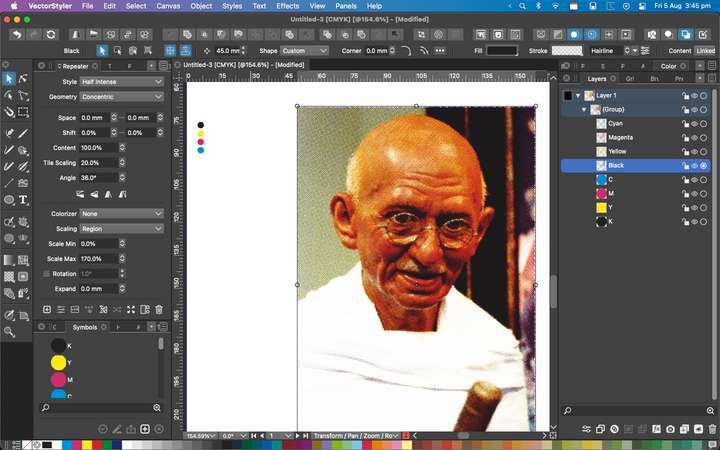
            Just had a quick mess around by separating in Affinity, importing into VS and assigning repeater dots --- works great - obviously needs tweaking but opens up a few doors for creating duotones for T-shirts
            0_1659711006548_Screen Grab 2022-08-05 at 3.45.10 pm.png

            DazmondoD 1 Reply Last reply Reply Quote 1
            • b77B Offline
              b77 @VectorStyler
              last edited by b77

              @VectorStyler Nope, tried that. It applies cyan, magenta and yellow where's only black or grey.
              Probably because the effect is RGB based (the image was changed to CMYK color mode).

              OK, I'll post a solution here if I find an effect that does this.

              MacBook Pro (Intel) running Monterey 12.6.4

              1 Reply Last reply Reply Quote 0
              • DazmondoD Offline
                Dazmondo @Dazmondo
                last edited by

                @Dazmondo said in Repeater halftone problem on rasters:

                Just had a quick mess around by separating in Affinity, importing into VS and assigning repeater dots --- works great - obviously needs tweaking but opens up a few doors for creating duotones for T-shirts

                Heres the VS doc: https://drive.google.com/file/d/1IefoB6blZgPRVzZ6A_7UVgZww0CERITJ/view?usp=sharing

                1 Reply Last reply Reply Quote 0
                • S Offline
                  Subpath @Dazmondo
                  last edited by Subpath

                  @Dazmondo said in Repeater halftone problem on rasters:

                  Wow just watched the video - giving me ideas how to do this in VS --- thanks

                  i though it would give us a few ideas 🙂

                  and maybe VectorStyler too

                  Win 11
                  CPU: AMD Ryzen 5 9600X, 6-core.
                  GPU: Nvidia Geforce RTX 5070.

                  1 Reply Last reply Reply Quote 0
                  • VectorStylerV Offline
                    VectorStyler @Dazmondo
                    last edited by

                    @Dazmondo said in Repeater halftone problem on rasters:

                    etched style halftones

                    There is a larger repeater task planned just after 1.2, so not very soon but soon.

                    1 Reply Last reply Reply Quote 1
                    • BoldlineB Offline
                      Boldline @b77
                      last edited by Boldline

                      @b77 said in Repeater halftone problem on rasters:

                      @Boldline Export separations with Print to File and open the generated PDFs back in VS, change the black shapes to the correct color for the first three files (C, M, Y) or for the Pantones, and run Repeater on them.

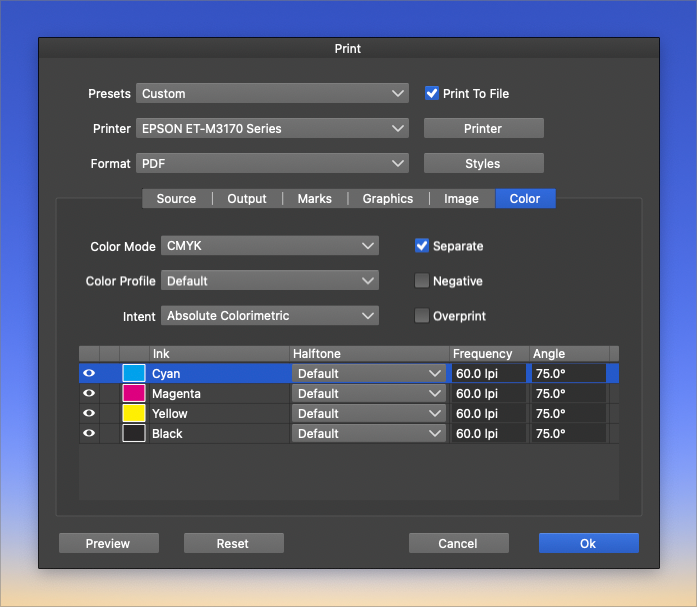
                      @b77 Ok I'm finally trying this but I'm a complete newbie when it comes to most printing setups. I have it set to "print to file" and "separate", but am I supposed to be running it with all 4 CMYK?
                      Are there other settings I should be adjusting? Thanks for your help!
                      0_1659970097700_f787df3b-7f01-40d0-b494-e0dd7ad40ccf-BLD 2022-08-08 at 10.48.10.png

                      🍎 macOS Tahoe 26.2, Mac mini (M1, 2020), Chip Apple M1, Memory 16 GB
                      Cintiq 27QHD Display and LG Ultra HD Display

                      b77B 1 Reply Last reply Reply Quote 0
                      • b77B Offline
                        b77 @Boldline
                        last edited by

                        @Boldline That's it — hit OK and you should get one PDFs for each process color (C, M, Y, K).

                        MacBook Pro (Intel) running Monterey 12.6.4

                        BoldlineB 1 Reply Last reply Reply Quote 0
                        • BoldlineB Offline
                          Boldline @b77
                          last edited by

                          @b77 ok - for this end result I really only want two colors, gray and white. It's going to go on a black shirt. Right now I have four pdfs that all look almost identical

                          🍎 macOS Tahoe 26.2, Mac mini (M1, 2020), Chip Apple M1, Memory 16 GB
                          Cintiq 27QHD Display and LG Ultra HD Display

                          b77B 1 Reply Last reply Reply Quote 0
                          • b77B Offline
                            b77 @Boldline
                            last edited by b77

                            @Boldline Then the white should be a spot color (a Pantone maybe) and make sure the grey object is made only of blacK ink — no mixing of cyan, magenta and yellow.

                            MacBook Pro (Intel) running Monterey 12.6.4

                            BoldlineB 1 Reply Last reply Reply Quote 0
                            • BoldlineB Offline
                              Boldline @b77
                              last edited by Boldline

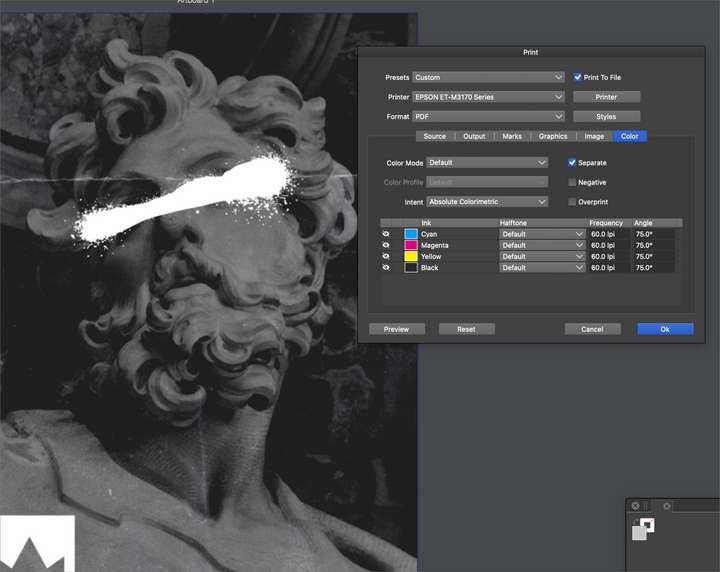
                              @b77 Can you give me a little more direction on how to go about adding a white in there and gray? Or point me to a place where I can learn how to do this? I'm not following what I need to do next - thanks
                              Am I supposed to be converting it to vector in Repeater first in this case?
                              0_1660065038712_43704435-96ca-449b-a605-4b9b323e7927-BLD 2022-08-09 at 13.09.21.png

                              🍎 macOS Tahoe 26.2, Mac mini (M1, 2020), Chip Apple M1, Memory 16 GB
                              Cintiq 27QHD Display and LG Ultra HD Display

                              b77B 2 Replies Last reply Reply Quote 0
                              • b77B Offline
                                b77 @Boldline
                                last edited by

                                @Boldline Oh, I thought you were dealing with vector objects, not bitmaps.

                                If it's monochrome, why do you need separations?

                                MacBook Pro (Intel) running Monterey 12.6.4

                                BoldlineB 1 Reply Last reply Reply Quote 0
                                • VectorStylerV Offline
                                  VectorStyler
                                  last edited by

                                  There are some small changes to repeaters. Editing the Intensity of the Object Content scaling mode allows now the selection of a color mode and color channel to be used as the intensity source.

                                  1 Reply Last reply Reply Quote 0
                                  • b77B Offline
                                    b77 @Boldline
                                    last edited by

                                    @Boldline In any case, you can change the color mode of the bitmap to Grayscale from Effects > Adjust Colors > Color Mode.

                                    MacBook Pro (Intel) running Monterey 12.6.4

                                    1 Reply Last reply Reply Quote 0
                                    • BoldlineB Offline
                                      Boldline @b77
                                      last edited by

                                      @b77 said in Repeater halftone problem on rasters:

                                      @Boldline Oh, I thought you were dealing with vector objects, not bitmaps.

                                      If it's monochrome, why do you need separations?

                                      Sorry for the confusion. In this case it's a raster image that I wanted to convert to a white screen and a gray screen with halftones. The white would not be halftoned. I wanted to see if this was possible in VS

                                      Based on your thinking, How else would I did the separations?

                                      🍎 macOS Tahoe 26.2, Mac mini (M1, 2020), Chip Apple M1, Memory 16 GB
                                      Cintiq 27QHD Display and LG Ultra HD Display

                                      b77B 1 Reply Last reply Reply Quote 0
                                      • b77B Offline
                                        b77 @Boldline
                                        last edited by

                                        @Boldline You can try vectorizing it and selecting only the white resulting objects that make the sprayed area (Select > Select by > Fill…), group them and give it a Pantone Translucent White, then convert a copy of the bitmap itself to Grayscale and use that for Repeater.

                                        Other than that, since VS doesn't do bitmap masking, this would require an image editor like Photoshop or PhotoPaint which can do the needed masking and conversion to duotone (made of two Pantones).

                                        MacBook Pro (Intel) running Monterey 12.6.4

                                        DazmondoD 1 Reply Last reply Reply Quote 0
                                        • DazmondoD Offline
                                          Dazmondo @b77
                                          last edited by Dazmondo

                                          @Boldline said in Repeater halftone problem on rasters:

                                          Sorry for the confusion. In this case it's a raster image that I wanted to convert to a white screen and a gray screen with halftones. The white would not be halftoned. I wanted to see if this was possible in VS
                                          Based on your thinking, How else would I did the separations?

                                          Just saw this last night and woke up thinking about how to approach this. I'm not sure if this is exactly what you want to achieve Boldline but heres a Vid-grab of how I'd tackle this, now I've got my head around repeater: https://drive.google.com/file/d/1cWbX3VjoKbr5FrhFsbnHSv4Bi_R01Dwv/view?usp=sharing

                                          Excuse the poor video quality Vimeo won't let me upload now unless I start a PLAN (hate that word) so it's back to google drive

                                          I have come across a few problems (maybe bugs) with the ruler guides not respecting Top-down coordinates and also the gradient mask tool flitting to the wrong place

                                          DazmondoD 1 Reply Last reply Reply Quote 2
                                          • DazmondoD Offline
                                            Dazmondo @Dazmondo
                                            last edited by Dazmondo

                                            @Boldline said in Repeater halftone problem on rasters:

                                            Sorry for the confusion. In this case it's a raster image that I wanted to convert to a white screen and a gray screen with halftones. The white would not be halftoned. I wanted to see if this was possible in VS

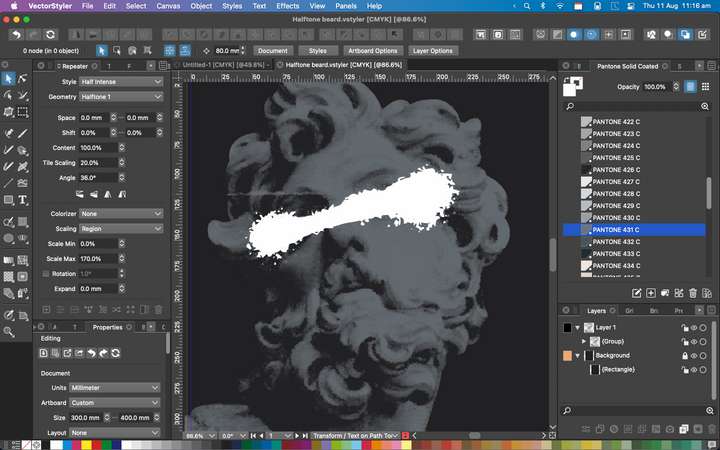
                                            Further to the above - thought I'd have a quick go with the ref image in the post and it all seems straight froward, although VS tracing is not as good as ImageVectorizer (which I would normally use) Really great that we can now access the symbol which is repeated in Raster work without having to create a symbol from scratch👍
                                            :0_1660213248991_Screen Grab 2022-08-11 at 11.16.02 am.png

                                            Heres the VS file:0_1660213362622_Halftone beard.vstyler

                                            DazmondoD 1 Reply Last reply Reply Quote 1
                                            • First post
                                              Last post