Merge operation deletes the object underneath
-
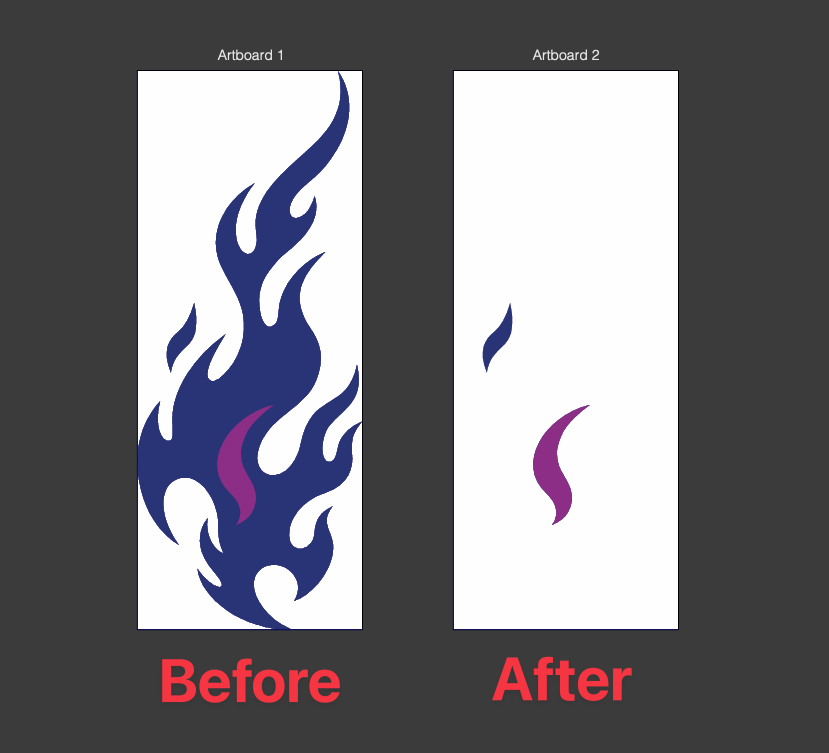
I’m having an issue with the Merge boolean operation.
When I place one object over another and use Merge, the object underneath, which should have the overlapping area cut out of it, seems to have deleted completely instead.
I first noticed this in my normal setup, so I reset VectorStyler to the default settings and tried the same operation again. The same issue still occurs.
Steps to reproduce
Create two overlapping objects.
Place the object that will be used for the cut above the other object.
Select both objects.
Apply Merge.
The lower object is deleted instead of remaining with the overlapping area removed.I’ve attached an example file that reproduces the problem.
Merge Issue with Flames.vstylerHere's my OS I'm working on,

Is anyone else seeing this behavior, or is there something about the Merge operation that I’m missing?
