VectorStyler
    • Categories
    • Unread
    • Recent
    • Tags
    • Popular
    • Register
    • Login

    Intertwine Effect: Where is it?
    Scheduled Pinned Locked Moved Questions and Support
    34 Posts 5 Posters 6.9k Views 4 Watching
    Loading More Posts
    • Oldest to Newest
    • Newest to Oldest
    • Most Votes
    Reply
    • Reply as topic
    Log in to reply
    This topic has been deleted. Only users with topic management privileges can see it.
    • T Offline
      ThatMikeGuy @VectorStyler
      last edited by

      @VectorStyler Doh! I missed that. Maybe since it was grayed out. I guess since it required selection of two paths. I'll try that. Thanks.
      How about a search function? Is there a way to search if you don't know where to find a tool or function?

      1 Reply Last reply Reply Quote 1
      • BoldlineB Offline
        Boldline @Daniel
        last edited by

        @Daniel said in Intertwine Effect: Where is it?:

        @VectorStyler: Fair enough. Something like the knotting path effect in Inkscape? https://www.youtube.com/watch?v=08zpOs-yoTw - Check this tutorial. 🙂

        This is actually something I need to create for an upcoming client project.

        🍎 macOS Sequoia 15.3, Mac mini (M1, 2020), Chip Apple M1, Memory 16 GB
        Cintiq 27QHD Display and LG Ultra HD Display

        DanielD 1 Reply Last reply Reply Quote 1
        • DanielD Offline
          Daniel @Boldline
          last edited by Daniel

          @Boldline: if you want inspiration for some very intricate knotting patterns, look up Henman Pictogram font 2.
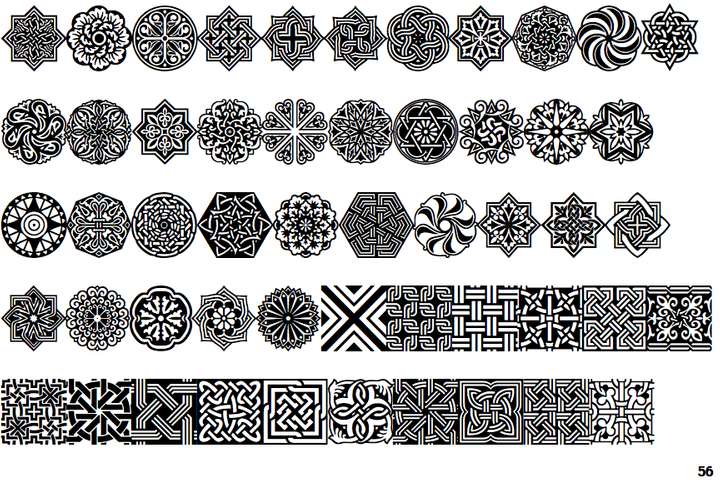
          0_1766167224146_f928cef6-0f8c-4082-97d2-45648f360ac4-image.png

          Work: Windows 11 | Intel i9 14900HS (24 Cores/32 Threads) | GeForce RTX 4070 | 64 GB RAM
          Personal: Windows 11 | Amd Ryzen 9 7950X (16 Core, 32 Threads) | GeForce RTX 3060 | 32 GB RAM

          S BoldlineB 2 Replies Last reply Reply Quote 3
          • S Offline
            Subpath @ThatMikeGuy
            last edited by

            @ThatMikeGuy

            I just wanted to let you know that @VectorStyler is already working on the problems with the "crossing gap" shape effect.
            It is already mentioned in the top region of this thread.

            Win 11
            CPU: AMD Ryzen 5 9600X, 6-core.
            GPU: Nvidia Geforce RTX 5070.

            1 Reply Last reply Reply Quote 1
            • S Offline
              Subpath @Daniel
              last edited by

              @Daniel

              WOW !!!
              Thats a lot Variations.

              Win 11
              CPU: AMD Ryzen 5 9600X, 6-core.
              GPU: Nvidia Geforce RTX 5070.

              1 Reply Last reply Reply Quote 1
              • S Offline
                Subpath
                last edited by

                Some more Knots 🙂
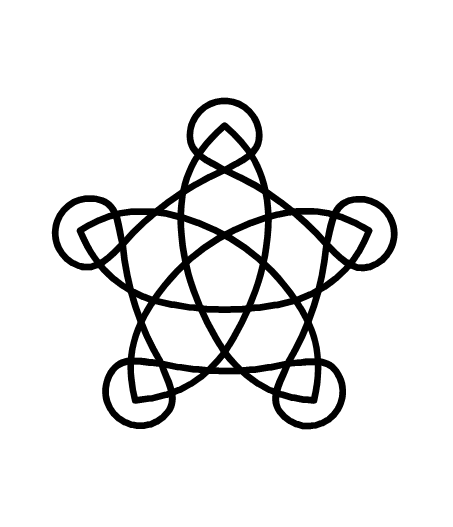
                as inspiration for the intertwine feature

                Knotplot is a program for creating knots in celtic style and many more
                here the Link
                https://knotplot.com/

                Win 11
                CPU: AMD Ryzen 5 9600X, 6-core.
                GPU: Nvidia Geforce RTX 5070.

                1 Reply Last reply Reply Quote 1
                • S Offline
                  Subpath @Daniel
                  last edited by

                  @Daniel

                  Using the ShapeBuilder is also a great Idea !

                  Win 11
                  CPU: AMD Ryzen 5 9600X, 6-core.
                  GPU: Nvidia Geforce RTX 5070.

                  DanielD 1 Reply Last reply Reply Quote 1
                  • DanielD Offline
                    Daniel @Subpath
                    last edited by Daniel

                    @Subpath: Knot plot is great! Thanks for sharing. Yes, Henman is one of my favourite ornamental family. It's a family of three. Patterns, borders and individual ornaments. By a legendary Armenian designer.

                    Work: Windows 11 | Intel i9 14900HS (24 Cores/32 Threads) | GeForce RTX 4070 | 64 GB RAM
                    Personal: Windows 11 | Amd Ryzen 9 7950X (16 Core, 32 Threads) | GeForce RTX 3060 | 32 GB RAM

                    1 Reply Last reply Reply Quote 1
                    • BoldlineB Offline
                      Boldline @Daniel
                      last edited by

                      @Daniel great thank you for the suggestion. I’ll check it out

                      🍎 macOS Sequoia 15.3, Mac mini (M1, 2020), Chip Apple M1, Memory 16 GB
                      Cintiq 27QHD Display and LG Ultra HD Display

                      1 Reply Last reply Reply Quote 1
                      • DanielD Offline
                        Daniel
                        last edited by

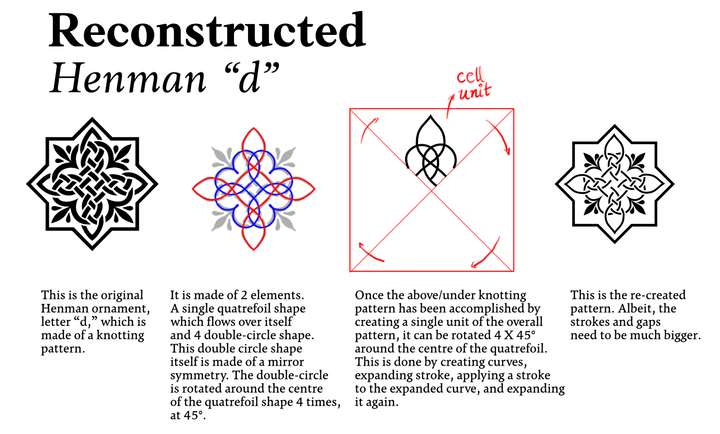
                        0_1766850126900_47549c50-dec6-47f9-87b1-babc59928816-image.png

                        If anyone would like to take a stab. I am taking on a challenge to reconstruct and reverse engineer every single ornament of the three Henman family. I'll post instructions as I go along. So you can try. 🙂

                        Work: Windows 11 | Intel i9 14900HS (24 Cores/32 Threads) | GeForce RTX 4070 | 64 GB RAM
                        Personal: Windows 11 | Amd Ryzen 9 7950X (16 Core, 32 Threads) | GeForce RTX 3060 | 32 GB RAM

                        S 1 Reply Last reply Reply Quote 3
                        • S Offline
                          Subpath @Daniel
                          last edited by

                          @Daniel

                          looks great! 👍

                          Btw. would it be possible to create a thread about this in the tutorial section?
                          That way it would be easier for other users to find.

                          Win 11
                          CPU: AMD Ryzen 5 9600X, 6-core.
                          GPU: Nvidia Geforce RTX 5070.

                          1 Reply Last reply Reply Quote 0
                          • First post
                            Last post