Snapping when dragging multiple nodes

-
Dragging and snapping a single node works as expected.
Should be able to select multiple nodes (from one or more objects) either manually or by marquee, and when ONE of those nodes is dragged then THAT node should snap to objects/nodes, etc. The other selected nodes should move in sync even though they are not involved in the snapping.
Currently I sometimes see a brief flash of the snapping target object, but only in the precise position of its nodes, not its shape. And only targets on the same layer. No snap action is felt.
Snap to Shape and Snap to Points are both On. Show Indicators is On.
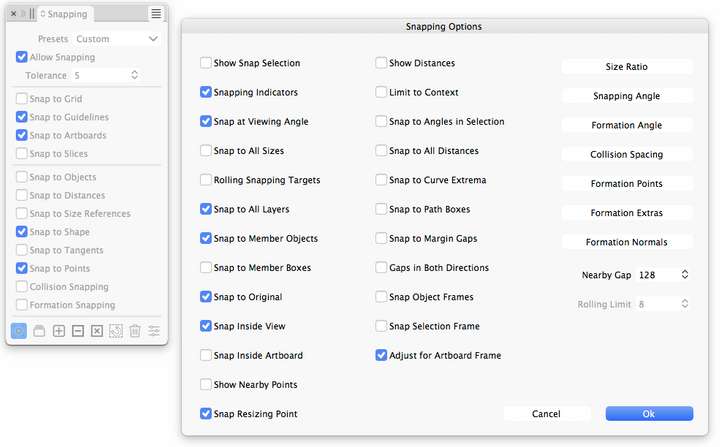
I suspect that VS is trying to find locations where ALL of the selected nodes meet the snapping criteria, not just the dragged node.
Are there settings which govern this?
While I'm here, why does VS snap to objects on hidden layers? Shouldn't they be automatically excluded?
-
@Raven There is no settings for this. All selected nodes will snap by design.
The snapping should be clearly indicated and it should happen inside the tolerance set in the panel.There might be some bug for some special shape or point configuration where the snapping gets it wrong between multiple possibilities
Please send me a file where this brief flash of the snapping target object occurs.
While I'm here, why does VS snap to objects on hidden layers?
It does so by design. Should there be an option for this, or just no snapping for these?
-
@VectorStyler said in Snapping when dragging multiple nodes:
Please send me a file where this brief flash of the snapping target object occurs.
The particular document I was working on can't be released, but I've attached a trivial demo doc with just a couple of simple shapes.
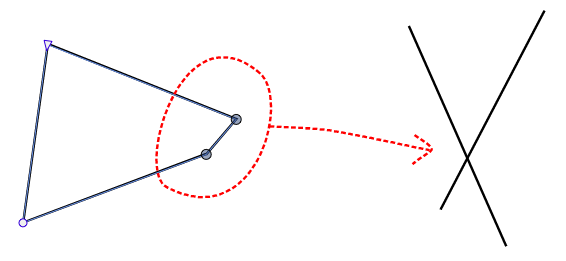
0_1768433136421_Snapping when dragging multiple points.vstylerSay for example I want to snap the right node/s of the triangle to the intersection of the two straight lines.
Snapping when dragging just one node works as expected.
But, if I select more than one of the nodes on the triangle, manually or with a marquee, then drag one to the target - it doesn't snap. It's desired that the dragged node be considered as the key for snapping - the other dragged nodes should just move in sync.
I haven't seen the brief flash of the snapping targets again.I've tried restoring settings to defaults.
Damn: I've just had VS crash the Mac when opening that simple file. Perhaps something is screwed with the installation and I need to reinstall?Re: snapping to objects on hidden layers.
Yes, I see no purpose in snapping to them. I use layers a lot for interim/alternative versions of a design: duplicating a layer for safekeeping before continuing work. In later stages I can show/hide the old/new design layers for comparison of progress, choosing the better one. I also duplicate layers before carrying out a destructive operation. Snapping to the "old" invisible layer is unwanted.
The only workaround I can see is to manually open the Layer options for each of the currently invisible layers and in the Geometry tab >> Options button >> deselect all the snapping options. Awkward when frequently changing which layers I am working with.
Given that this doesn't seem to have been a topic before I assume that others don't have an issue and it would need to be an option. Perhaps the current "All Layers" setting for snapping can be multiple choice with an alternative of "All Visible Layers".
Affinity has an "Only snap to visible objects" setting in it's snapping panel (and dragging multiple nodes does work as expected). -
@VectorStyler https://youtu.be/cX2A70jwcdA?feature=shared
Could the issue of snapping an object to a specific point when dragging be fixed as well? This function is used quite frequently.It should only snap the selected point, while the other points of the object itself should not have the snapping function enabled.
-
@monsterfox said in Snapping when dragging multiple nodes:
Could the issue of snapping an object to a specific point when dragging be fixed as well?
The next build will solve this issue in a bit different way: all dragged points will snap.
I will release this first.
