Difficulty with selecting Guidelines

-
I'm trying to understand more about the guidelines tool in VS. I like that the guideline cannot easily be dragged over with a selection box and be activated that way. This is a plus.
That said, the issue I have is that I am able to always hover over an existing guideline and select it. When my guideline turns from red to blue, it's usually stuck and unable to move at all. I can be adjusting the angle on the canvas with the rotation symbol active at the ends of the guide and as soon as I let go, it will lock and turn blue) and I cannot continue editing.
I noticed that when I drag the guideline on the canvas, sometimes it swaps colors from blue to red and back multiple times before I release it.
From reading the documentation, I know and tested the ability to go into the guideline panel and adjust the angle there for example - but I have to alter the angle or change a setting just to make that guideline have the ability to be active again. There's not a way that I can see where I can highlight the guideline in the guideline panel and have it automatically activate the corresponding guide. There's not a selection circle to click on like on the right side of a layer in the layers panel.
Could we add that layer panel circiel selection functionality to the guidelines panel? What causes the guideline to change color and is there a way to better control when it locks?
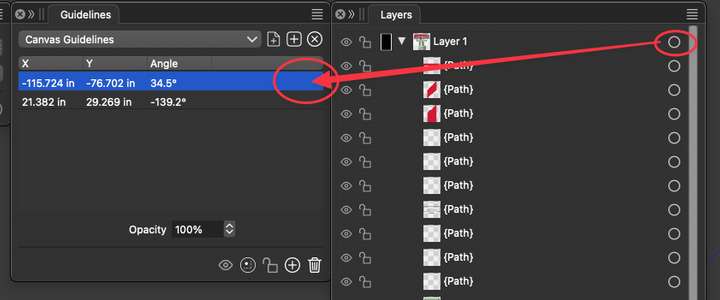
Here is a video showing what I am talking about in the guidelines panel
🍎 macOS Tahoe 26.2, Mac mini (M1, 2020), Chip Apple M1, Memory 16 GB
Cintiq 27QHD Display and LG Ultra HD Display -
@Boldline I will try to replicate and fix this.
-
This post is deleted! -
@Boldline Send me a file where guidelines are difficult to select.
About the Layers panel, guidelines will not be selectable here as they are not objects (these are objects in Illustrator).
A guideline can also be selected (turn red) by selecting it in the Guidelines panel.
-
@VectorStyler said in Difficulty with selecting Guidelines:
@Boldline Send me a file where guidelines are difficult to select.
About the Layers panel, guidelines will not be selectable here as they are not objects (these are objects in Illustrator).
A guideline can also be selected (turn red) by selecting it in the Guidelines panel.
Just emailed you the file.
I understand the selection option in the layers panel will not work for the guides, I was suggesting that the same principal feature be added to the gudies panel - where you can select the guide by clicking on a similar circle added to the guides panel. You mentioned here that the user should be able to click on the guide itself in the guide panel and have the corresponding guide be activated on the canvas, but that is not working for me. When I click on the guide in the guide panel, nothing activates.

