VectorStyler
    • Categories
    • Unread
    • Recent
    • Tags
    • Popular
    • Register
    • Login

    update 1.3.004

    Scheduled Pinned Locked Moved Announcements and News
    11 Posts 5 Posters 1.1k Views 4 Watching
    Loading More Posts
    • Oldest to Newest
    • Newest to Oldest
    • Most Votes
    Reply
    • Reply as topic
    Log in to reply
    This topic has been deleted. Only users with topic management privileges can see it.
    • S Offline
      Subpath @VectorStyler
      last edited by

      @VectorStyler

      ... Create group of single object when creating mirrors ...

      test it already, works great 👍

      0_1766083113259_single mirror.png

      Win 11
      CPU: AMD Ryzen 5 9600X, 6-core.
      GPU: Nvidia Geforce RTX 5070.

      1 Reply Last reply Reply Quote 3
      • M Offline
        marce @VectorStyler
        last edited by

        @VectorStyler About the RTF import, there are some issues still. Look this: in MSWord, it is displayed as following:

        0_1766084240864_86a7ff7d-425f-461d-bd77-b32300452a0d-image.png
        And an accented word in this way:
        0_1766084261236_cde2477a-1a59-412b-b37c-c307b3099619-image.png
        But when imported in VS, in the first case, space is not presents between normal and bold text:

        0_1766084376544_a322c644-a18d-4f05-9633-bb39389765c9-image.png
        And in the case of the accented word, an space is inserted:
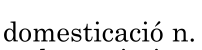
        0_1766084412088_86214e89-a626-43ea-9526-d50bb73afa39-image.png

        Im attaching the rtf file, that is copy&paste from wikipedia:
        https://drive.google.com/file/d/1b6pStv6W5hJbWq6KpQyVpHSYthfuKVmM/view?usp=sharing

        Ryzen 9 3900X on Asus prime x570-p
        Memory 48gb ddr4
        Nvidia gtx 970 on an Asus strix, 4gb gddr5
        NVMe CT100p 1TB

        1 Reply Last reply Reply Quote 0
        • M Offline
          marce @VectorStyler
          last edited by marce

          @VectorStyler About Text frame, im not sure if it is related to text frame. When i move a text frame in a single artboard, i have a no lag movement. When doing that with a multiple linked text frames across boards, i have a little lag.
          Additionaly, when i insert an image when there is a multiple artboards, with linked text frame, i have no lag moving the image. But, after i acivate wrap, i have lag. If i deactivate lag, the lag persist, it dont roll back to the non lag movement.
          Can be seen here:
          https://drive.google.com/file/d/10Of-WmgcRPe9c_zLex2JcQ7GklVnLC68/view?usp=sharing0_1766085114755_Probando multiple artboards.vstyler
          https://drive.google.com/file/d/10Of-WmgcRPe9c_zLex2JcQ7GklVnLC68/view?usp=sharing
          Im attaching the file with multiple text frames that dont have the same performance than a single artboard.
          Im not sure if im explaining this correctly that can be understood.

          Ryzen 9 3900X on Asus prime x570-p
          Memory 48gb ddr4
          Nvidia gtx 970 on an Asus strix, 4gb gddr5
          NVMe CT100p 1TB

          VectorStylerV 1 Reply Last reply Reply Quote 1
          • M Offline
            marce @VectorStyler
            last edited by

            @VectorStyler 0_1766085240102_9e261bf8-c83b-4142-af72-28dba4374210-image.png and the crashy bmp are imported correctly! thanks very much

            Ryzen 9 3900X on Asus prime x570-p
            Memory 48gb ddr4
            Nvidia gtx 970 on an Asus strix, 4gb gddr5
            NVMe CT100p 1TB

            1 Reply Last reply Reply Quote 1
            • M Offline
              marce @VectorStyler
              last edited by

              @VectorStyler Recent fonts ordered from last used and so on. Great, thanks!

              Ryzen 9 3900X on Asus prime x570-p
              Memory 48gb ddr4
              Nvidia gtx 970 on an Asus strix, 4gb gddr5
              NVMe CT100p 1TB

              1 Reply Last reply Reply Quote 1
              • VectorStylerV Offline
                VectorStyler @marce
                last edited by

                @marce text wrap can cause the same lag as resizing a text frame.

                1 Reply Last reply Reply Quote 0
                • VectorStylerV Offline
                  VectorStyler
                  last edited by

                  There was a regression in the new build when using shortcuts with Command+, a fix was uploaded.

                  This requires a manual download and install of VS (no version increment).

                  BoldlineB 1 Reply Last reply Reply Quote 1
                  • BoldlineB Online
                    Boldline @VectorStyler
                    last edited by

                    @VectorStyler Thank you for fixing it so quickly!

                    🍎 macOS Tahoe 26.2, Mac mini (M1, 2020), Chip Apple M1, Memory 16 GB
                    Cintiq 27QHD Display and LG Ultra HD Display

                    1 Reply Last reply Reply Quote 0
                    • L Offline
                      Li Xiao @VectorStyler
                      last edited by

                      @VectorStyler
                      The webpage shows version 1.3.003, but the downloaded file is correct (1.3.004).
                      https://www.vectorstyler.com//releasepage/

                      S 1 Reply Last reply Reply Quote 1
                      • S Offline
                        Subpath @Li Xiao
                        last edited by

                        @Li-Xiao

                        i saw this too
                        version 1.3.003 where shown two times

                        Win 11
                        CPU: AMD Ryzen 5 9600X, 6-core.
                        GPU: Nvidia Geforce RTX 5070.

                        1 Reply Last reply Reply Quote 0
                        • First post
                          Last post