How do I select and cmd-G grouped shapes to a new group?
-
In Illustrator you can select shape parts with the node-tool, cmd-G group them in a new group and thus have them collected on the new.
How can I do something similar in VS?Attempting to do this in VS with the aforementioned method does not work. Any suggestion for alternative approach?
https://somup.com/cTlblZRdUW
0_1765975663106_filmklip_display-font-menlo.vstyler -
@Raaskot said in How do I select and cmd-G grouped shapes to a new group?:
In Illustrator you can select shape parts with the node-tool, cmd-G group them in a new group and thus have them collected on the new.
This is not supported in VectorStyler.
You have to break the nodes with the Node tool (buttons in context panel), break the shapes apart and then group the resulting objects.
-
@VectorStyler
Hm. Tried it out: thinks Separate Path combined with Ungroup works best for me. With Break the exclusions (ie. in "O"s) are eliminated.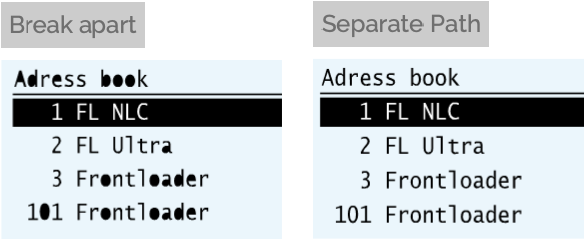
-
@Raaskot in case it helps, when using the break option, the interior fills of enclosed shapes can be made a different color and then merged and then deleted, revealing an empty space again.
Break does not act like unite Boolean for example, all pieces remain albeit the same color -
Thanks
 Yet if there's many shapes with exclusions it may (ie texts) it may be cumbersome. Is there a dedicated function for this?
@Boldline said in How do I select and cmd-G grouped shapes to a new group?:
the interior fills of enclosed shapes can be made a different color


