VectorStyler
    • Categories
    • Unread
    • Recent
    • Tags
    • Popular
    • Register
    • Login

    Files not Exporting

    Scheduled Pinned Locked Moved Questions and Support
    exportartboards
    5 Posts 2 Posters 1.2k Views 2 Watching
    Loading More Posts
    • Oldest to Newest
    • Newest to Oldest
    • Most Votes
    Reply
    • Reply as topic
    Log in to reply
    This topic has been deleted. Only users with topic management privileges can see it.
    • C Offline
      ceaselesswatcher
      last edited by

      Hello I recently got 1.3 and I run into the problem of the files not showing up in the designated folders (or at all) when I run either export or export artboards

      I've tried png, jpeg, psd, pdf,and svg and nothing shows up
      Vectorstyler seems to process the save

      0_1764507942256_b64d6748-85ba-4436-ab3c-304ba62979e4-image.png
      but the export folder remains empty

      VectorStylerV 1 Reply Last reply Reply Quote 1
      • VectorStylerV Offline
        VectorStyler @ceaselesswatcher
        last edited by

        @ceaselesswatcher Send an example file to support at vectorstyler.com and I will try to replicate the error
        What was the folder into which it is exported?

        1 Reply Last reply Reply Quote 0
        • C Offline
          ceaselesswatcher
          last edited by

          Update: i found it
          for some reason Vectorstyler made a copy of my filepath in its own folder in (C:)
          I found all my files there and not in my designated folder in (D:)

          VectorStylerV 1 Reply Last reply Reply Quote 1
          • VectorStylerV Offline
            VectorStyler @ceaselesswatcher
            last edited by

            @ceaselesswatcher Might be a bug, that it did not export to d: Was this a network drive?

            1 Reply Last reply Reply Quote 0
            • C Offline
              ceaselesswatcher
              last edited by

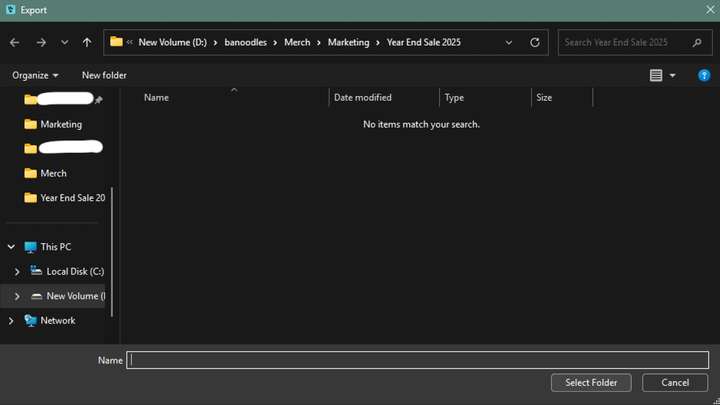
              0_1764519123824_26e46ca0-3529-4165-bba5-297080b9dc67-image.png

              Here's the export window and me prompting it to save in (D:)
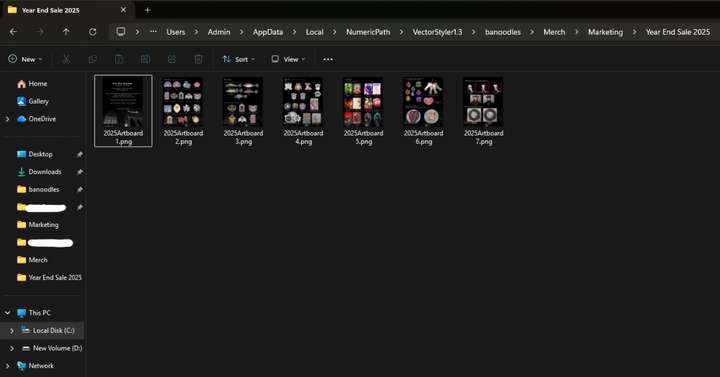
              0_1764519143636_edb17fd7-9f36-49f3-b216-548e8e350a1e-image.png

              Not a network, just a partition in my SSD

              1 Reply Last reply Reply Quote 1
              • First post
                Last post