Smooth tool
-
The smooth tool is notorious for destroying curves and erratically removing nodes. It works for very simple scenarios. Perhaps the simplest of them such as the one the lady showed. Of course no designer worth their salt would choose to smooth a curve in the way she showed initially. However, what VS needs is a Vector Curve Optimisation function. Both Xara and PL have unique approaches. I love Xara's non-destructive approach but I love PL's live preview. So a combo of both would be amazing.
-
@Daniel said in Smooth tool:
The smooth tool is notorious for destroying curves and erratically removing nodes.
Yeah the video itself was really dumb - it just came up in my feed and reminded me about that smooth tool and how I missed it lol.
I used the smooth tool a LOT back in my Illustrator days. I found if you have the setting to high it will quickly destroy path curves, but once you get the settings dialed in, it was a quick and dirty tool that helped solve issues on the fly.
If you're needing absolute precision of a curve, then this is probably not the tool for that. I used it for subjective situations in my artwork - "hand drawn" designs I would make that needed slight adjustments, or cleaning up a vector trace, etc. I used it enough that I miss having it available in VS.The "simplify path" tool could be handy in some cases, but I feel it needs more control options and right now it affects the entire shape, not a specific portion.
@Daniel said in Smooth tool:
However, what VS needs is a Vector Curve Optimisation function. Both Xara and PL have unique approaches. I love Xara's non-destructive approach but I love PL's live preview. So a combo of both would be amazing.
I was trying unsuccessfully to find these online to see how they function. If you get a chance, would you post a couple videos showing both methods? I'm always open to new ideas and methods.
🍎 macOS Tahoe 26.2, Mac mini (M1, 2020), Chip Apple M1, Memory 16 GB
Cintiq 27QHD Display and LG Ultra HD Display -
VS Path Simplifier Tool does this. It's no way perfect and mileage will vary based on your path content, but replicating the video example is not too bad : https://somup.com/cTXUFzRD4q
-
@EricP I appreciate you sharing that tool - I either forgot or never used it before and it's very close to what I was looking for in that silly IG post I linked.
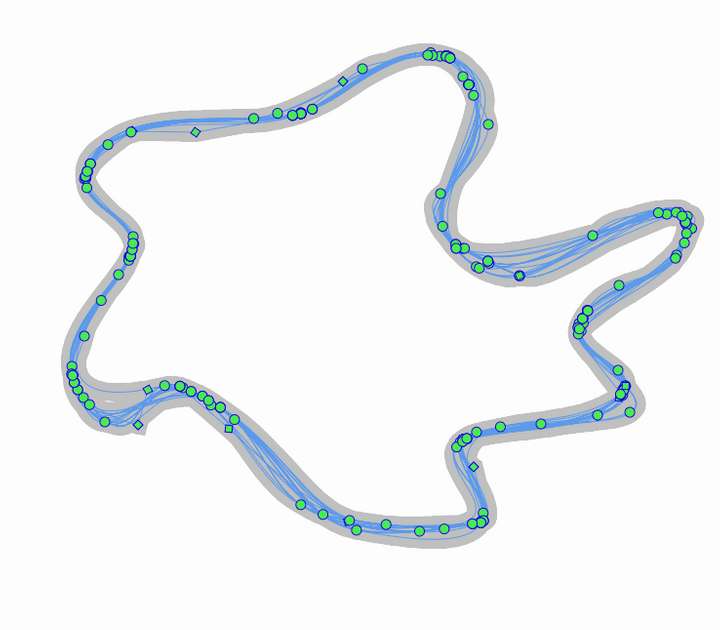
That said, when I went to use it, there were errors; it seemed to keep replicating the path instead of refining the existing one
0_1764444033069_simplifier tool.vstyler
-
@Boldline I will fix these issues
-
@Boldline https://imgbox.com/uREIHee5 - There it is. There are two gifs. One done through percentages. The other through factors. Both are better than what's available in Illustrator.
-
I actually compared the curve smoothing algorithm across Vectorstyler, Illustrator, Inkscape, Affinity, PhotoLine and Xara. Here's how they performed:
- Poorest of them all: Affinity. Affinity does not have a separate function for this. It is included into the node delete function. "Fit to curve delete node" Completely destroys the curve.
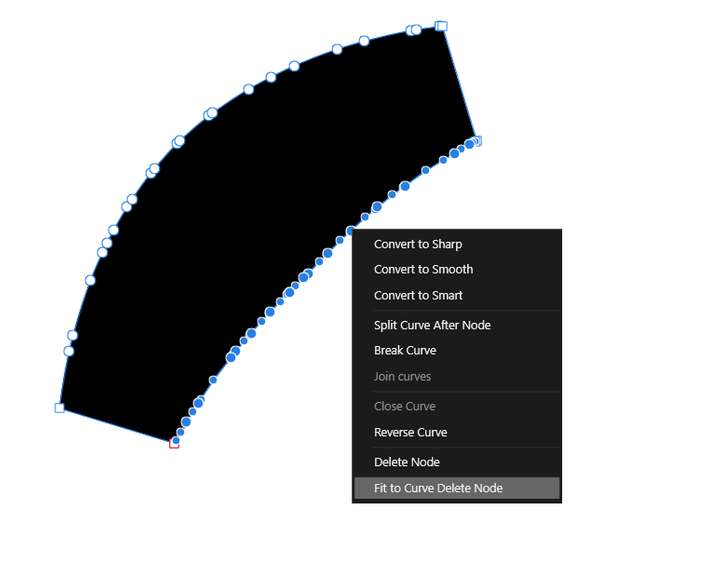
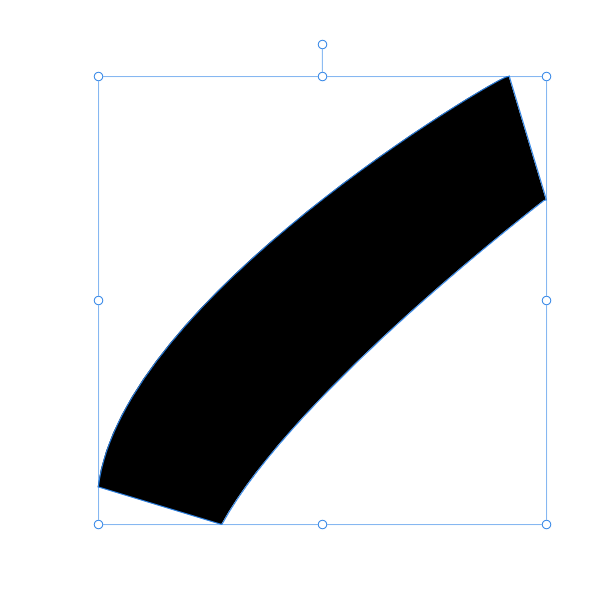
Here's the result. It is a completely different curve altogether.
-
Vectorstyler: The simplifier tool is very poor in it's current form. It does not do what it is supposed to do per the tool tip.
-
Inkscape: Simplify path produces erratic results. There's no way to compare before/after. It is comparable to Illustrator in performance.
-
PhotoLine: Curve Optimisation also destroys curve form if the factor is raised by more than a few points. Practically useless.
-
Illustrator: Smooth tool is again drag and pray. Hopeless for except the most simple scenarios. This is why Astute Plugins still sell. Astute Plugins do this brilliant.
-
Xara: It still has - after 30 years - the best algorithm for curve optimisation! https://imgbox.com/501rb5PJ - Here's the gif of my experiment. Reducing 50 nodes to a mere 4. Notice the ability to see before/after in real-time and course correct. I love that!
Work: Windows 11 | Intel i9 14900HS (24 Cores/32 Threads) | GeForce RTX 4070 | 64 GB RAM
Personal: Windows 11 | Amd Ryzen 9 7950X (16 Core, 32 Threads) | GeForce RTX 3060 | 32 GB RAM -
@Daniel said in Smooth tool:
The simplifier tool is very poor in it's current form. It does not do what it is supposed to do per the tool tip.
Send me some examples where this did not work.
-
@VectorStyler: https://imgbox.com/KTPwu6su - Here's an example. The smoothing is rather weak. I didn't have a tablet at hand so it is done with a mouse. But still.

-
@Daniel Can you send me the file with that shape?
-
@VectorStyler There you go: https://filebin.net/w3zru2w3rkxzp3s7
-
@Daniel The best brush tool for smoothing is Corel Draw. I even mentioned it to @VectorStyler - if it could do that, it would be perfect, both smoothing and smudging/pinching.
-
@Yoshy: I tried it. And I have to say that Xara still beats it. It is quite intelligent in that it knows I am trying to retain the form of the curve, whilst removing the unnecessary nodes. Therefore, its able to insert a node at the average point and maintain curve form. It also gives a real-time preview of what is going to happen, something Corel does not do.
-
Most curves without inflection spots (point) should be approximated by a second degree Bezier. 1 inflexion → 3rd degree and then it should be arbitrary for a Smooth + Minimalistic function.
A Smooth function typically changes the shape. A Minimizing function should retain the shape.Square has hard corners → Smooth → all corners get rounded but also the sides gets bulged for "smooth" to happen. It (smoothing) is not the same as just rounding the corners and it shouldn't be. Maybe moving the rounding corner outside (negative numbers) the corner should make that corner more like an 'Eifel tower' type of corner and the sides to go concave?
-
@Daniel very smooth and very control in corel draw https://sendvid.com/jylqv7jd
-
@Yoshy
I think we might be misunderstanding each other here. When I say smoothing, I mean creating the most optimal curve with the minimal number of nodes without sacrificing the overall form of the curve. What CorelDraw seems to be doing is to change the form of the curve itself based on the strength of the settings.In that case, smoothing can still be done by factors like in PhotoLine. Because I don't think a brush is the best way to achieve this. You have to repeatedly parse the curve with the brush to do it. Whereas if you did via a dialogue box, you can opt to do this either for the whole curve, or sections of the curve: Like here below:

-
@Daniel said in Smooth tool:
I don't think a brush is the best way to achieve this. You have to repeatedly parse the curve with the brush to do it.
We might all be on different wavelengths! From what I see and understand, VS ( @VectorStyler is a genius) already has the two main tools we would use for simplifying and smoothing out paths: the "path simplifier tool" for direct use by the user scrubbing the curve and the "simplify path" panel for more broad smoothing of entire objects. With all respect to the developer, both tools still need some improvement to best work their different roles. From what everyone has contributed in this thread and in other related posts and @VectorStyler's focus on bugs and improvement, both tools will get to their best version
-
@Boldline fair point.
-
@Daniel I love the ideas you've shared for the "simplify path" tool. I may end up using it a lot more as those ideas get added as @VectorStyler sees fit.
I appreciate that VS has options for designers who need precise and exact edits to their curved paths and another option for those who are going for what looks good by sight for their art and are not needing something technical



