VectorStyler
    • Categories
    • Unread
    • Recent
    • Tags
    • Popular
    • Register
    • Login

    VectorStyler 1.3.001

    Scheduled Pinned Locked Moved Announcements and News
    34 Posts 12 Posters 12.9k Views 9 Watching
    Loading More Posts
    • Oldest to Newest
    • Newest to Oldest
    • Most Votes
    Reply
    • Reply as topic
    Log in to reply
    This topic has been deleted. Only users with topic management privileges can see it.
    • DanielD Offline
      Daniel
      last edited by

      Oh my God! Oh ny God!!!! Bezigon Tool!!!!!!! After 3 decades returns to a vector software! Thank you so very much. You're my hero @VectorStyler. I'm genuinely blinking through tears of joy writing this. Please add it to your list here so please don't miss it!!!

      Work: Windows 11 | Intel i9 14900HS (24 Cores/32 Threads) | GeForce RTX 4070 | 64 GB RAM
      Personal: Windows 11 | Amd Ryzen 9 7950X (16 Core, 32 Threads) | GeForce RTX 3060 | 32 GB RAM

      VectorStylerV 1 Reply Last reply Reply Quote 2
      • VectorStylerV Offline
        VectorStyler
        last edited by

        Regarding presets and settings: 1.3 will start with default settings, workspace and presets, this is needed to have the new features available (ex. customized toolboxes will not show new features)

        Previous presets can be copied from the user data folder.

        1 Reply Last reply Reply Quote 3
        • S Offline
          Subpath @VectorStyler
          last edited by Subpath

          @VectorStyler

          I would also like to express my appreciation for the work you put
          into the 1.3 update. So, a deep bow from me for that.

          I recently switched to a new PC, so this update is doubly enjoyable.
          Congratulations on this milestone ! 👍

          Win 11
          CPU: AMD Ryzen 5 9600X, 6-core.
          GPU: Nvidia Geforce RTX 5070.

          1 Reply Last reply Reply Quote 3
          • W Offline
            William Kansepa
            last edited by

            @VectorStyler I am deeply grateful for this amazing update!!! Echoing what @Boldline has said, this will indeed take VS to the next level!!!

            HP•Windows 11 Pro•11th Gen Intel(R) Core(TM) i7-1165G7 @ 2.80GHz 2.70 GHz• RAM: 16.0 GB (DDR4)

            1 Reply Last reply Reply Quote 5
            • VectorStylerV Offline
              VectorStyler @Daniel
              last edited by

              @Daniel About the Bezigon tool: the default mode will draw lines and Option(Alt)+ will draw curves. This can be changed with the ""Draw Curves in Bezigon by Default"" in Settings -> Other Options

              1 Reply Last reply Reply Quote 6
              • A Offline
                achillepr
                last edited by

                Just bought it. I don't use it much, I'm an amateur, but I do it mostly to support this wonderful program and its creators. Thank you.

                VectorStylerV 1 Reply Last reply Reply Quote 7
                • VectorStylerV Offline
                  VectorStyler @achillepr
                  last edited by

                  @achillepr said in VectorStyler 1.3.001:

                  Just bought it. I don't use it much, I'm an amateur, but I do it mostly to support this wonderful program and its creators.

                  Thank you.

                  1 Reply Last reply Reply Quote 1
                  • VectorStylerV Offline
                    VectorStyler
                    last edited by

                    in the Windows version the desktop shortcut and menu name was not updated to 1.3.
                    This is now fixed.

                    debraspicherD 1 Reply Last reply Reply Quote 3
                    • debraspicherD Offline
                      debraspicher @VectorStyler
                      last edited by

                      @VectorStyler Yes I was coming to report this

                      Windows 11 Build 26200.7171 (25H2)
                      AMD Ryzen 7 9700X with Gigabyte X870E Aorus Pro Ice
                      32GB RAM @ 6000MHz
                      PNY NVIDIA RTX 5070 Ti 16GB; Display 1: 4K @150%; Display 2: 4K @200%
                      Wacom Intuos Pro L (2025); Wacom Intuos Pro M; Epson ET-8550; Siser Romeo

                      1 Reply Last reply Reply Quote 1
                      • A Offline
                        ai_slop
                        last edited by

                        Looks impressive. Thanks for your hard work

                        1 Reply Last reply Reply Quote 3
                        • E Offline
                          EricP
                          last edited by

                          Yes, a truly impressive release with a lot of unique features you don't find elsewhere. I still haven't found how they all work but I am so far delighted by what I saw. Thank you

                          1 Reply Last reply Reply Quote 5
                          • syllieS Offline
                            syllie
                            last edited by

                            The one day that I did not check the forum and boom there it is! I am so excited to give this version a spin. Thank you so much @VectorStyler for your continuous efforts to make this such a good vector editor. I am going to run it yet again through my 'how does it stack up for SPD work' check. So happy that I have a quiet time coming up to check this all out!

                            Windows 10 Pro | 22H2

                            1 Reply Last reply Reply Quote 7
                            • K Offline
                              Kumr
                              last edited by

                              Thank you for the update. Packed with great set of tools for easy workflow and design.

                              M1 MacBook Air, 16GB, macOS Sonoma 14.4.1

                              1 Reply Last reply Reply Quote 4
                              • E Offline
                                EricP
                                last edited by

                                this new Arc Tool. What an absolute joy to use !!

                                0_1764143839583_f62a9420-34f2-4db0-b929-90dd2e3ef697-image.png

                                1 Reply Last reply Reply Quote 5
                                • L Offline
                                  lilith
                                  last edited by

                                  I can't find the roadmap, please send me a link

                                  VectorStylerV 1 Reply Last reply Reply Quote 2
                                  • VectorStylerV Offline
                                    VectorStyler @lilith
                                    last edited by

                                    @lilith said in VectorStyler 1.3.001:

                                    I can't find the roadmap, please send me a link

                                    I have taken it down because it is mostly not valid anymore. A lot have been done in 1.2 and 1.3 and I need to update it.

                                    BoldlineB 1 Reply Last reply Reply Quote 2
                                    • E Offline
                                      EricP
                                      last edited by EricP

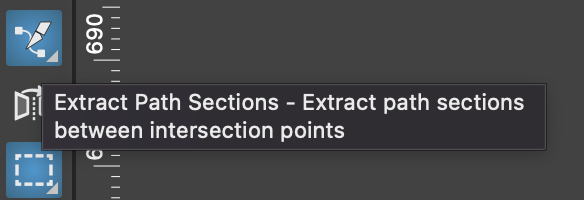
                                      @VectorStyler Could you please explain how to use the new Extract Path Sections tool ? I tried it but could not find how it works
                                      0_1764163109347_496a97b9-0e44-477b-9da5-4c33950e581e-image.png

                                      VectorStylerV 1 Reply Last reply Reply Quote 0
                                      • VectorStylerV Offline
                                        VectorStyler @EricP
                                        last edited by

                                        @EricP Paint with the tool over a path section between 2 intersections with other paths.

                                        E 1 Reply Last reply Reply Quote 0
                                        • E Offline
                                          EricP @VectorStyler
                                          last edited by

                                          @VectorStyler yes, that's what I tried. It paints a thin red line but does nothing else. I can't record a video right now to show you

                                          VectorStylerV 1 Reply Last reply Reply Quote 0
                                          • VectorStylerV Offline
                                            VectorStyler @EricP
                                            last edited by

                                            @EricP I will open a bug and will try to replicate the issue. If you have a file where that you can send me it can help.


                                            1 Reply Last reply Reply Quote 0
                                            • First post
                                              Last post