VectorStyler
    • Categories
    • Unread
    • Recent
    • Tags
    • Popular
    • Register
    • Login

    Joining nodes when two they collide doesn't work

    Scheduled Pinned Locked Moved Questions and Support
    4 Posts 2 Posters 2.1k Views 2 Watching
    Loading More Posts
    • Oldest to Newest
    • Newest to Oldest
    • Most Votes
    Reply
    • Reply as topic
    Log in to reply
    This topic has been deleted. Only users with topic management privileges can see it.
    • RaaskotR Offline
      Raaskot
      last edited by Raaskot

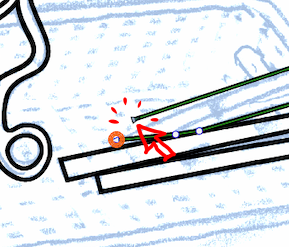
      In ie. Blender (as far I know not in Adobe) one can set vector drawing to join nodes on/off when they collide or are collected in the drawing process. You can do this in VS too by pressing Option when dragging node – an utterly useful feature!

      But it seems to work only when it concerns single shape entities. I cannot get it to work when I want to connect two shapes this way -- even if I combine (cmd-8) them in one object.

      Am I doing something wrong?
      0_1754557489516_d3008475-1385-4b29-984f-df2d2560b991-image.png

      VectorStylerV 2 Replies Last reply Reply Quote 0
      • VectorStylerV Offline
        VectorStyler @Raaskot
        last edited by

        @Raaskot Is this in the Pen tool or the Node tool?

        RaaskotR 1 Reply Last reply Reply Quote 0
        • RaaskotR Offline
          Raaskot @VectorStyler
          last edited by

          @VectorStyler
          It is both.

          1 Reply Last reply Reply Quote 1
          • VectorStylerV Offline
            VectorStyler @Raaskot
            last edited by

            @Raaskot In this case the join can only be done by selecting both nodes (even if overlapping) and using the join command from the context panel (with the Node tool).

            Should it be an option to join automatically?

            1 Reply Last reply Reply Quote 0
            • First post
              Last post
