Prevent distorting round corners – how?
-
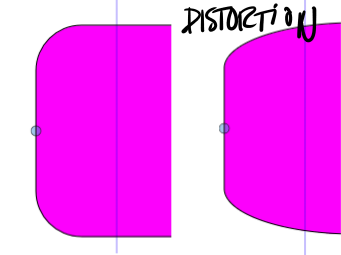
How do I prevent distorting the round corners when scaling an object containing corner values?
My problem goes for shapes in both select object and curve mode
-
@Raaskot If the object is still a rectangle (not converted to curves) and there are no other transforms on it (the Shape Effects panel should be empty), then enabling the Settings -> Editing -> Direct Shape Transformation should do this.
Steps:
- enable the Settings -> Editing -> Direct Shape Transformation option
- draw a rectangle
- adjust the corners with the corner tool
- scale the rectangle with the transform tool (not the panel).
But if a non-destructive scaling or other transform (or distortion) is added, then the corner is also scaled.
-
@VectorStyler
Cool, got it. The corner tool is the way + Direct Shape Transformation option is the way to go. Thanks.
-
@VectorStyler
Hm, sorry. I thought I've figured out, but when creating rectangles they behave differently from document to document. This example shows rectangles from two files, but the green one distorts.Can you tell me the difference between A and B?
-
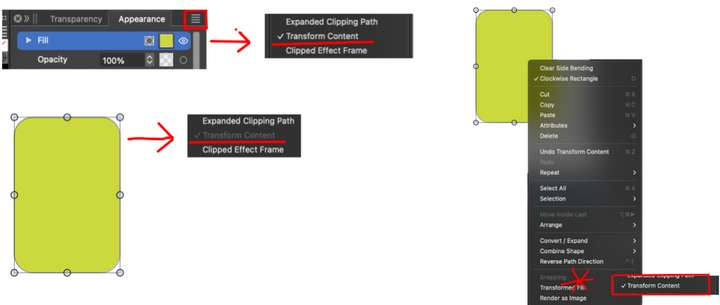
@Raaskot Yes, this is a bit hidden. In the Appearance panel, when the Fill item is selected the panel menu contains a Transform Content option. This is enabled for (B) but not for (A).
When enabled, the transformations are accumulated as non-destructive transform, regardless of option or shape type -
@VectorStyler
Very good, thanks!Yet I think as an user this UI issue is utterly tricky: I'd never guessed to open the (1) Appearance Panel and (2) select Fill-item and then (3) pull the menu to click the (4) Transform Content option without your help

I'd expected this in the RM-popup on object instead. Then I could check and compare for object issues. Perhaps with an other name than just "Transform Content" since this also includes the frame?