VectorStyler
    • Categories
    • Unread
    • Recent
    • Tags
    • Popular
    • Register
    • Login

    Setting a fixed rotation angle for multiple shapes
    Scheduled Pinned Locked Moved Questions and Support
    8 Posts 3 Posters 5.0k Views 3 Watching
    Loading More Posts
    • Oldest to Newest
    • Newest to Oldest
    • Most Votes
    Reply
    • Reply as topic
    Log in to reply
    This topic has been deleted. Only users with topic management privileges can see it.
    • E Online
      EricP
      last edited by

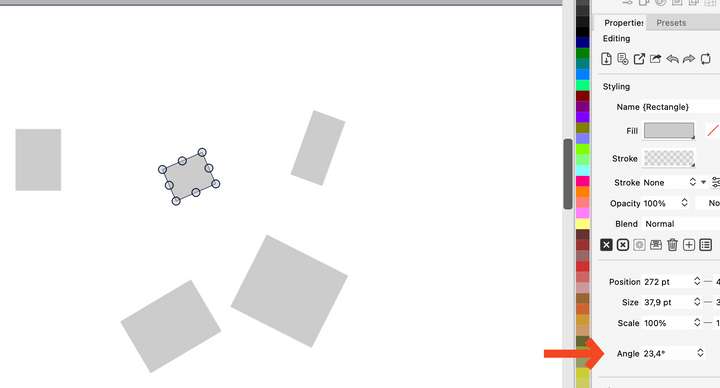
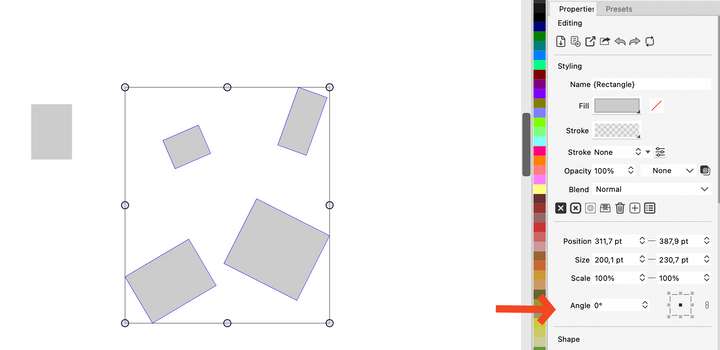
      I have multiple shapes with random rotation. I want to select some of them and reset their individual rotation back to 0°.

      If I multi-select them, the properties panel shows 0° (which, logically, is the rotation for the selection box of the shapes) and doesn't allow to reset individual shape rotation to a fixed common value (of say 0°)

      I wonder if there is a way in VS to impose a common set of transformation parameters to multiple objects (like all have a rotation of 0° or a width of 10pt).

      Affinity has a 'transform objects separately' option, which works well for size, but not for rotation
      0_1748892850236_SCR-20250602-sorz-2.png
      0_1748892874100_SCR-20250602-soxp-2.png

      S VectorStylerV 2 Replies Last reply Reply Quote 1
      • S Offline
        Subpath @EricP
        last edited by Subpath

        @EricP

        I know only one way to set a Shape rotation back to 0.
        Call the Transform Panel select the rotated Shape there is a angle
        value which shows a value now set it to 0.
        (Menu > Window > Transform)
        This work only by select one Shape and then the other one.

        Win 11
        CPU: AMD Ryzen 5 9600X, 6-core.
        GPU: Nvidia Geforce RTX 5070.

        1 Reply Last reply Reply Quote 0
        • VectorStylerV Offline
          VectorStyler @EricP
          last edited by

          @EricP If these were not yet converted to curves, then Effects -> Remove All Shape Effects can clear the rotation for all.

          S 1 Reply Last reply Reply Quote 1
          • S Offline
            Subpath @VectorStyler
            last edited by Subpath

            @VectorStyler

            Thanks for remind me.
            Works pretty well even with only selected ones.

            Win 11
            CPU: AMD Ryzen 5 9600X, 6-core.
            GPU: Nvidia Geforce RTX 5070.

            1 Reply Last reply Reply Quote 0
            • E Online
              EricP
              last edited by

              @VectorStyler, @Subpath thank you. That worked as expected.

              out of curiosity, what's the purpose of Object>Transform>Reset Transform function ?

              VectorStylerV 1 Reply Last reply Reply Quote 0
              • VectorStylerV Offline
                VectorStyler @EricP
                last edited by

                @EricP said in Setting a fixed rotation angle for multiple shapes:

                what's the purpose of Object>Transform>Reset Transform function ?

                It "flattens" the existing transform on an object without change in the object appearance (and without converting to curves) so you can start with new scaling or rotation.

                1 Reply Last reply Reply Quote 1
                • E Online
                  EricP
                  last edited by

                  @VectorStyler thank you . That makes sense.

                  Also, for my original question, I see that I can just remove the transform effect from the shape effect list for the selected objects. This preserves any other shape effect applied.

                  VectorStylerV 1 Reply Last reply Reply Quote 1
                  • VectorStylerV Offline
                    VectorStyler @EricP
                    last edited by

                    @EricP said in Setting a fixed rotation angle for multiple shapes:

                    I see that I can just remove the transform effect from the shape effect list for the selected objects

                    Yes, the Shape Effects panel can be used to manage shape effects of an object.

                    1 Reply Last reply Reply Quote 1
                    • First post
                      Last post