VectorStyler
    • Categories
    • Unread
    • Recent
    • Tags
    • Popular
    • Register
    • Login

    Print Interface Optimization

    Scheduled Pinned Locked Moved Features and Ideas
    4 Posts 2 Posters 3.2k Views 2 Watching
    Loading More Posts
    • Oldest to Newest
    • Newest to Oldest
    • Most Votes
    Reply
    • Reply as topic
    Log in to reply
    This topic has been deleted. Only users with topic management privileges can see it.
    • M Offline
      monsterfox
      last edited by

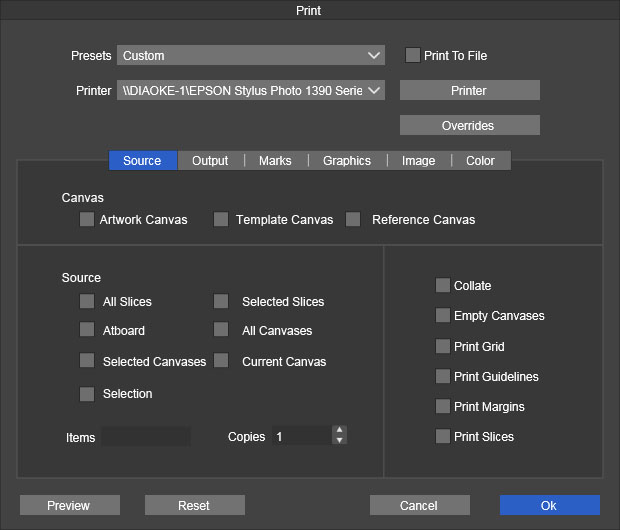
      Could you modify the default print interface? The original interface has a secondary menu, which I frequently use but find somewhat cumbersome. Therefore, could you optimize the interface to make it more user-friendly, as shown in the image? Thank you.
      0_1742187951052_24137d87-1e85-4a20-b50e-5ae365dcff5e-50a1b5c38dd872d9fc325f6426d7b74.jpg

      VectorStylerV 1 Reply Last reply Reply Quote 1
      • VectorStylerV Offline
        VectorStyler @monsterfox
        last edited by

        @monsterfox This is a bit of a problem. The content of the Canvas is dynamic (there can be other root canvases) so checkboxes would not work.

        M 1 Reply Last reply Reply Quote 0
        • M Offline
          monsterfox @VectorStyler
          last edited by

          @VectorStyler I still don't fully understand the purpose of the Canvas, and it's also mostly unclickable. However, I believe the print target source is something everyone uses frequently. Could we separate it out first?

          VectorStylerV 1 Reply Last reply Reply Quote 1
          • VectorStylerV Offline
            VectorStyler @monsterfox
            last edited by

            @monsterfox I will try to find a better layout for this.

            1 Reply Last reply Reply Quote 0
            • First post
              Last post