VectorStyler
    • Categories
    • Unread
    • Recent
    • Tags
    • Popular
    • Register
    • Login

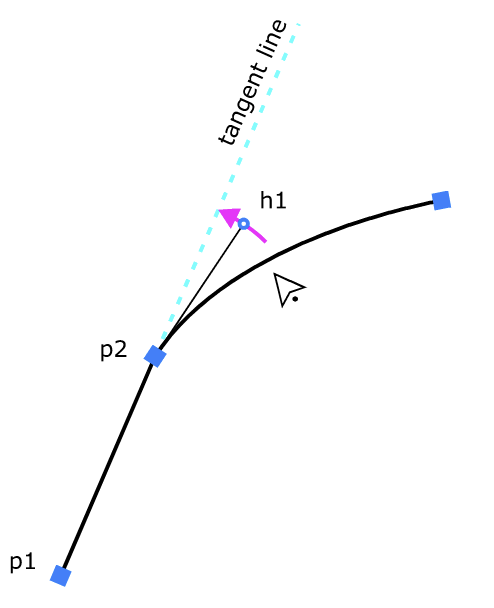
    How to snap handle to the tangent line?
    Scheduled Pinned Locked Moved Questions and Support
    12 Posts 5 Posters 8.4k Views 5 Watching
    Loading More Posts
    • Oldest to Newest
    • Newest to Oldest
    • Most Votes
    Reply
    • Reply as topic
    Log in to reply
    This topic has been deleted. Only users with topic management privileges can see it.
    • Devil DinosaurD Offline
      Devil Dinosaur
      last edited by

      You can press ctrl+click (Mac) on the handle and set it to "symmetric" or press "y" while the handle is selected.

      Fred.
      MacBook Pro (M1) - MacOs Sonoma 14

      AyoA 1 Reply Last reply Reply Quote 1
      • AyoA Offline
        Ayo @Devil Dinosaur
        last edited by

        @Devil-Dinosaur
        Thanks but that makes p2 a smooth point with two new handles between p1 and p2. It does not make point handle 'h1' snap to the tangent line.

        VectorStylerV debraspicherD 2 Replies Last reply Reply Quote 2
        • VectorStylerV Offline
          VectorStyler @Ayo
          last edited by

          @Ayo said in How to snap handle to the tangent line?:

          It does not make point handle 'h1' snap to the tangent line.

          No such feature.

          A workaround is to use the path panel: select the p2 node and (depending on the path direction) set the tangent angle to the other angle +180.

          AyoA 1 Reply Last reply Reply Quote 0
          • AyoA Offline
            Ayo @VectorStyler
            last edited by

            @VectorStyler
            Cumbersome.
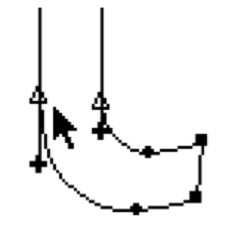
            Maybe an idea for the future to add a tangent point to the cusp and smooth point series? Like Freehand/Fontographer has?
            0_1741685247402_8c49bfdb-8ef3-4a52-87d5-f91e4f39ee40-image.png 0_1741685288754_c29f219a-ead4-412b-9d93-cb507f406631-image.png

            1 Reply Last reply Reply Quote 3
            • debraspicherD Offline
              debraspicher
              last edited by debraspicher

              I would use this quite a bit if a shortcut/snapping option existed.

              Windows 11 Build 26200.7171 (25H2)
              AMD Ryzen 7 9700X with Gigabyte X870E Aorus Pro Ice
              32GB RAM @ 6000MHz
              PNY NVIDIA RTX 5070 Ti 16GB; Display 1: 4K @150%; Display 2: 4K @200%
              Wacom Intuos Pro L (2025); Wacom Intuos Pro M; Epson ET-8550; Siser Romeo

              VectorStylerV 1 Reply Last reply Reply Quote 1
              • debraspicherD Offline
                debraspicher @Ayo
                last edited by

                @Ayo I have done Devil's method by sometimes selecting the P1<->P2 line segment and right clicking "Line" or pressing 1. Then if I convert P2, sometimes I can get a nice transition.. but it's never exact as you say.

                Windows 11 Build 26200.7171 (25H2)
                AMD Ryzen 7 9700X with Gigabyte X870E Aorus Pro Ice
                32GB RAM @ 6000MHz
                PNY NVIDIA RTX 5070 Ti 16GB; Display 1: 4K @150%; Display 2: 4K @200%
                Wacom Intuos Pro L (2025); Wacom Intuos Pro M; Epson ET-8550; Siser Romeo

                1 Reply Last reply Reply Quote 2
                • VectorStylerV Offline
                  VectorStyler @debraspicher
                  last edited by

                  @debraspicher @Ayo Not sure I can do this before 1.3, but for 1.3 it might be possible as an action from the Path panel.

                  debraspicherD 1 Reply Last reply Reply Quote 2
                  • S Offline
                    Subpath
                    last edited by Subpath

                    For those who may not know, in some cases it's possible to align handles
                    using the alignment panel. (Horizontal, Vertical)
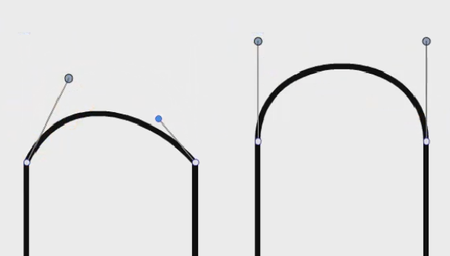
                    Here's a video

                    0_1741763584279_align handle.png

                    Win 11
                    CPU: AMD Ryzen 5 9600X, 6-core.
                    GPU: Nvidia Geforce RTX 5070.

                    AyoA 1 Reply Last reply Reply Quote 2
                    • AyoA Offline
                      Ayo @Subpath
                      last edited by

                      @Subpath said in How to snap handle to the tangent line?:

                      possible to align handles
                      using the alignment panel. (Horizontal, Vertical)

                      For horizontal and vertical angles (0 and 90 degrees) the existing snapping option is sufficient. It is precisely when the segment p1_p2 has an unusual angle that the problem occurs.

                      AyoA 1 Reply Last reply Reply Quote 2
                      • AyoA Offline
                        Ayo @Ayo
                        last edited by

                        @Ayo
                        FYI

                        Astutegraphics PathScribe
                        When dragging the handle it snaps and gives a small red "c" (connector point) indicating when aligned precisely.
                        After released, dragging the handle keeps the constrain angle.
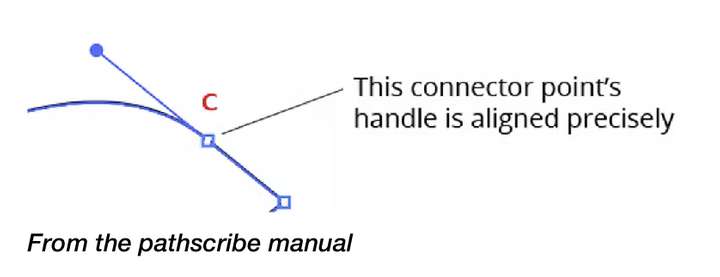
                        0_1741769949710_2be44b26-a6f5-44df-bd73-7773ee8a2508-image.png

                        Freehand
                        Freehand needs a connector point for this. Also here, after assigned point to "Connector Point", dragging the handle keeps the constrain angle.
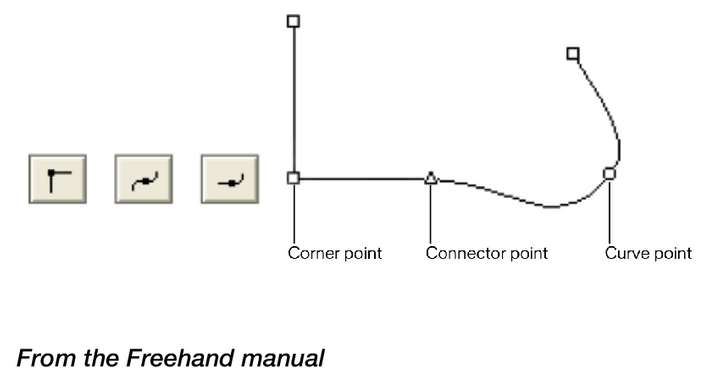
                        0_1741770707930_c1009ae6-94a4-4c99-abaf-008802302324-image.png

                        1 Reply Last reply Reply Quote 2
                        • debraspicherD Offline
                          debraspicher @VectorStyler
                          last edited by

                          @VectorStyler Thank you. It's an important function for things like lettering/logotype. An easy example, if someone is designing a custom typeface that's based on a skew, having a snapping feature would speed things up for getting those clean curves...

                          Windows 11 Build 26200.7171 (25H2)
                          AMD Ryzen 7 9700X with Gigabyte X870E Aorus Pro Ice
                          32GB RAM @ 6000MHz
                          PNY NVIDIA RTX 5070 Ti 16GB; Display 1: 4K @150%; Display 2: 4K @200%
                          Wacom Intuos Pro L (2025); Wacom Intuos Pro M; Epson ET-8550; Siser Romeo

                          1 Reply Last reply Reply Quote 1
                          • First post
                            Last post
