VectorStyler
    • Categories
    • Unread
    • Recent
    • Tags
    • Popular
    • Register
    • Login

    How to just add a node on a curve very accuratly, using magnetism of curve and guides?

    Scheduled Pinned Locked Moved Questions and Support
    11 Posts 3 Posters 7.9k Views 3 Watching
    Loading More Posts
    • Oldest to Newest
    • Newest to Oldest
    • Most Votes
    Reply
    • Reply as topic
    Log in to reply
    This topic has been deleted. Only users with topic management privileges can see it.
    • VectorStylerV Offline
      VectorStyler @fdarnel
      last edited by

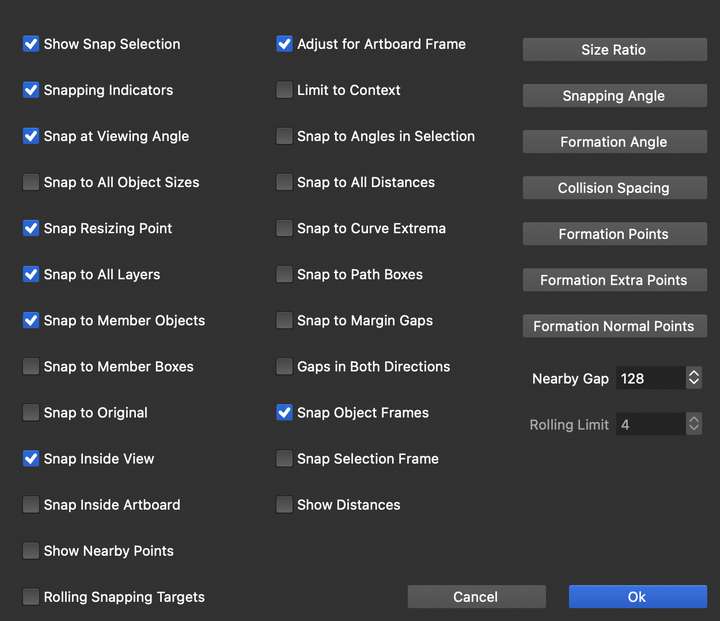
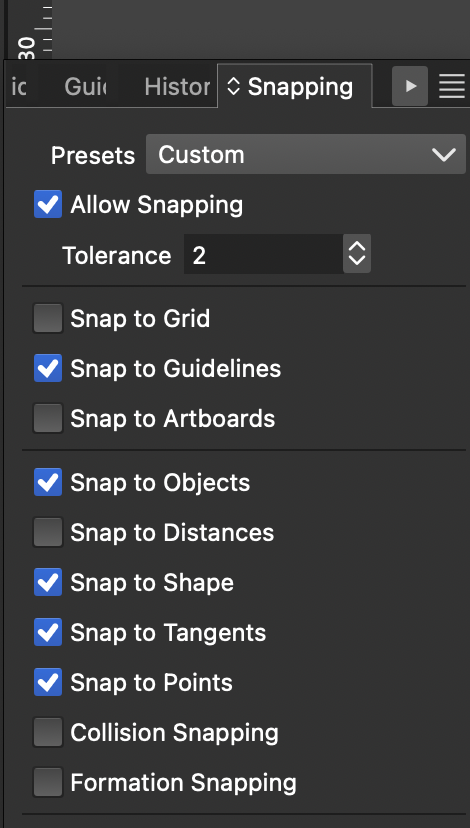
      @fdarnel What are the options enabled in the Snapping panel?

      F 1 Reply Last reply Reply Quote 0
      • F Offline
        fdarnel @VectorStyler
        last edited by

        @VectorStyler
        1_1740756442382_snap_2.png 0_1740756442382_snap_1.png

        VectorStylerV 1 Reply Last reply Reply Quote 0
        • VectorStylerV Offline
          VectorStyler @fdarnel
          last edited by

          @fdarnel This seems to be OK. I tested snapping here in the latest version and it is working, here is a recording https://share.cleanshot.com/rZ1MpW29

          1 Reply Last reply Reply Quote 0
          • VectorStylerV Offline
            VectorStyler @fdarnel
            last edited by

            @fdarnel said in How to just add a node on a curve very accuratly, using magnetism of curve and guides?:

            The Node Tool doesn't snap to the guides and the curve

            I might have misunderstood the issue:

            A question: is the mouse pressed when the node tool is not snapping?

            F 1 Reply Last reply Reply Quote 0
            • F Offline
              fdarnel @VectorStyler
              last edited by

              @VectorStyler

              No, mouse not pressed. In your example, nodes already exist. On just curve and guide crossing, the Feather Tool works, not the Node Tool.

              https://www.dropbox.com/scl/fi/01av0xyk3ykwzxe9g6j7d/ScreenRecorderProject2_2.mp4?rlkey=pccjcmdtq8asica19hyloi2ej&dl=0

              VectorStylerV 1 Reply Last reply Reply Quote 1
              • VectorStylerV Offline
                VectorStyler @fdarnel
                last edited by

                @fdarnel No such feature (yet). I will try to add this soon, as an option.

                1 Reply Last reply Reply Quote 2
                • F Offline
                  fdarnel
                  last edited by

                  Ok, It would be nice, we never have too much precision.

                  F VectorStylerV 2 Replies Last reply Reply Quote 1
                  • F Offline
                    FastVector @fdarnel
                    last edited by

                    @fdarnel It is a work around, but you can make a square and then bring the corner of the square to the place where you want to add the new node. Than add the new node close the the corner and drag the node to the corner.

                    Windows 10 | 1920x1080 | 125%

                    1 Reply Last reply Reply Quote 1
                    • VectorStylerV Offline
                      VectorStyler @fdarnel
                      last edited by

                      @fdarnel An other workaround, this one creates many nodes and does not work with guidelines:
                      Select the two shapes (one where the nodes to be inserted, another for intersecting).
                      Select Object -> Shape -> Intersection Points
                      This will points to the shape where the intersections occur.

                      1 Reply Last reply Reply Quote 1
                      • F Offline
                        fdarnel
                        last edited by

                        Thanks for the workarounds. I'll try them.

                        1 Reply Last reply Reply Quote 0
                        • First post
                          Last post