VectorStyler
    • Categories
    • Unread
    • Recent
    • Tags
    • Popular
    • Register
    • Login

    Deactivate the red alignment circle from text or a shape when the "option" modifier key is in use?

    Scheduled Pinned Locked Moved Features and Ideas
    2 Posts 2 Posters 2.2k Views 1 Watching
    Loading More Posts
    • Oldest to Newest
    • Newest to Oldest
    • Most Votes
    Reply
    • Reply as topic
    Log in to reply
    This topic has been deleted. Only users with topic management privileges can see it.
    • BoldlineB Offline
      Boldline
      last edited by

      If I am moving text or a shape, oftentimes I mistakenly end up moving the red alignment circle instead. I know I can toggle that feature in VS contextual menu already.

      Would it be a good idea to temporarily deactivate the red alignment circle from text or a shape when the "option" modifier key is in use? Correct me if I am wrong, but I can't see a need for the red alinement circle feature when text or a shape is being duplicated.

      Much like how the "convert to curves" is now greyed out when its not able to be used with the current selection.
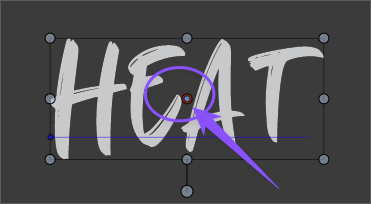
      0_1737121135587_3f76cf43-8082-41c3-a243-4865876cd08a-BLD 2025-01-17 at 08.36.39.png

      🍎 macOS Tahoe 26.2, Mac mini (M1, 2020), Chip Apple M1, Memory 16 GB
      Cintiq 27QHD Display and LG Ultra HD Display

      VectorStylerV 1 Reply Last reply Reply Quote 1
      • VectorStylerV Offline
        VectorStyler @Boldline
        last edited by

        @Boldline This can be deactivated in general by using the tool options in the context panel:

        0_1737124331671_options.png

        1 Reply Last reply Reply Quote 0
        • First post
          Last post
