VectorStyler
    • Categories
    • Unread
    • Recent
    • Tags
    • Popular
    • Register
    • Login

    Poor copy operation speed

    Scheduled Pinned Locked Moved Questions and Support
    3 Posts 2 Posters 3.2k Views 2 Watching
    Loading More Posts
    • Oldest to Newest
    • Newest to Oldest
    • Most Votes
    Reply
    • Reply as topic
    Log in to reply
    This topic has been deleted. Only users with topic management privileges can see it.
    • M Offline
      monsterfox
      last edited by monsterfox

      My computer is an old computer from more than a decade ago. It still runs Illustrator smoothly, and there is no problem with running VS in most scenarios. However, when performing copy operations, it always freezes. A small amount of graphic copying requires a wait of more than ten seconds before it responds and can be pasted. For a larger amount, it even takes about three minutes of waiting time. I asked LI XIAO to test it, and his computer responds quickly. Is it really because my computer configuration is too poor to run VS?

      VectorStylerV 1 Reply Last reply Reply Quote 1
      • VectorStylerV Offline
        VectorStyler @monsterfox
        last edited by

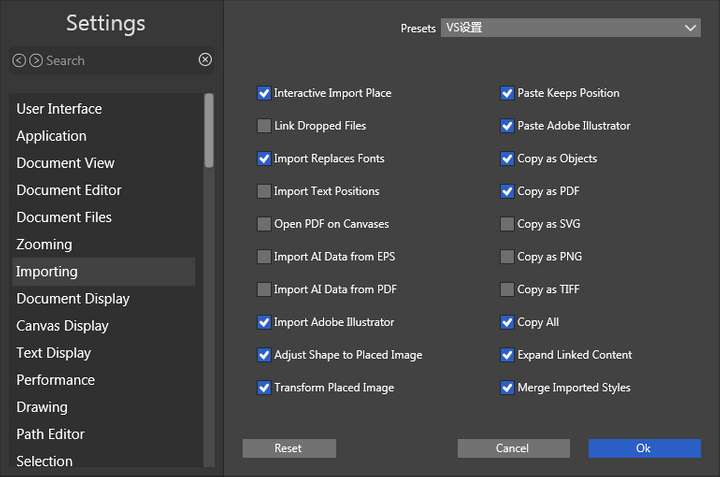
        @monsterfox In Settings -> Import section, uncheck the "Copy as PDF" option and test if that improves the speed.

        M 1 Reply Last reply Reply Quote 0
        • M Offline
          monsterfox @VectorStyler
          last edited by

          @VectorStyler That method is effective. After experimenting for a long time, this setting is the most perfect, and it can also be copied to the AI software 0_1719141194383_mmexport1719140962505.png
          1 Reply Last reply Reply Quote 1
          • First post
            Last post
