VectorStyler
    • Categories
    • Unread
    • Recent
    • Tags
    • Popular
    • Register
    • Login

    Object snapping without visible hairline?

    Scheduled Pinned Locked Moved Questions and Support
    5 Posts 2 Posters 4.8k Views 2 Watching
    Loading More Posts
    • Oldest to Newest
    • Newest to Oldest
    • Most Votes
    Reply
    • Reply as topic
    Log in to reply
    This topic has been deleted. Only users with topic management privileges can see it.
    • C Offline
      creative
      last edited by creative

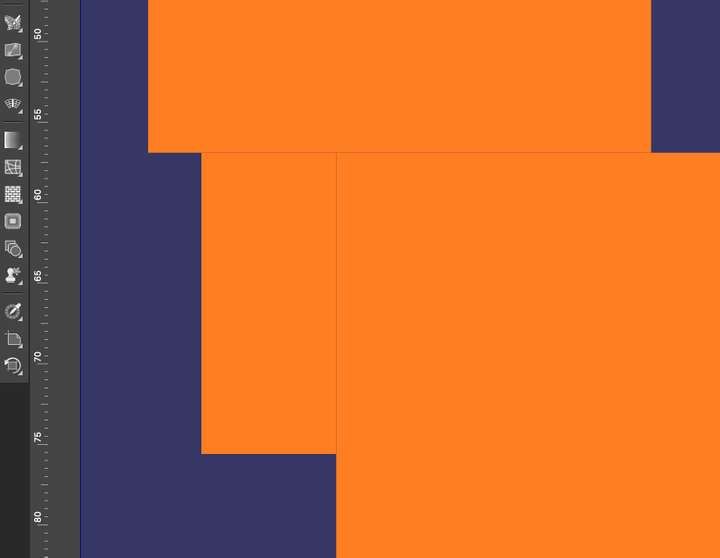
      If object snapping is enabled and two rectangles without stroke only filling are snapped together they still have a visible hairline in between. How to avoid that?0_1712855118787_screenshot.jpg

      VectorStylerV 1 Reply Last reply Reply Quote 0
      • VectorStylerV Offline
        VectorStyler @creative
        last edited by

        @creative said in Object snapping without visible hairline?:

        have a visible hairline in between

        yes, this is an artifact of anti-aliasing. The only way to avoid it is to turn off anti-aliasing (View->Subpixel) to to set a small overlap.

        C 1 Reply Last reply Reply Quote 1
        • C Offline
          creative
          last edited by

          Thanks got it, from default "Normal" to "None"

          1 Reply Last reply Reply Quote 0
          • C Offline
            creative @VectorStyler
            last edited by

            @VectorStyler Is there something like "align to pixel grid" like in Illustrator?

            VectorStylerV 1 Reply Last reply Reply Quote 1
            • VectorStylerV Offline
              VectorStyler @creative
              last edited by

              @creative said in Object snapping without visible hairline?:

              @VectorStyler Is there something like "align to pixel grid" like in Illustrator?

              "Align to Pixel" in the Transform panel menu. But it is a non-destructive operation, so it can be removed by unchecking.

              1 Reply Last reply Reply Quote 1
              • First post
                Last post