Multipoint and tangent based shape creation
-
Would love to have tools that can draw shapes (circles, lines) using multiple points. Eg draw circles/arcs from 2-3 points. And draw circles that touch other circles based on a point or two, etc.
Also, being able to draw tangent based lines/circles (eg draw a line tangent to circle or more, draw a circle tangent to 2-3 other circles, etc). Adobe has some very nice plugins like Hot Door, Astute Graphics that do this sort of thing.
MacBook Pro 13" early 2015 8G | Intel Iris Graphics 6100 1536 MB | macOS Monterey 12.7.6
-
@pentool there's the 3 point circle and 3 point rectangle - is this in part, what you are looking for?
I know arcs are requested and should be in a future update if I remember correctly

-
@pentool Arcs can be made from the circle made with the 3-Point Circle tool, by using the Node Editor (A).
-
Oops, yes, sorry, late to the party for the 3-point drawing!

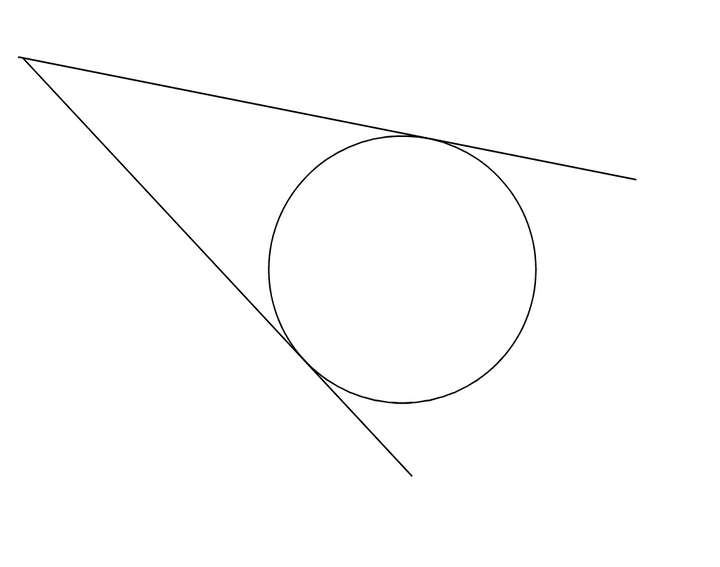
But in the case of the tangents, like in the example below, there's a circle and I want to draw a line that is tangent to it. So I click the first point where I want to place the line, then I touch the circle on either side, and it will draw the line tangent to the circle on that side. Something like that.
And of course this goes not only for circles but any line with a curvature (eg drawn with the pen tool, etc)
There's a tool called "Curvature Circle" but unfortunately that doesn't work for straight lines, eg I wanna draw a circle tangent to that line, since the lines doesn't have a curvature.
-
@pentool It's not exactly what you want but if you enable 'Collision Snapping' in the
Snapping panel you can make an existing circle snap "inside" this shape:
-
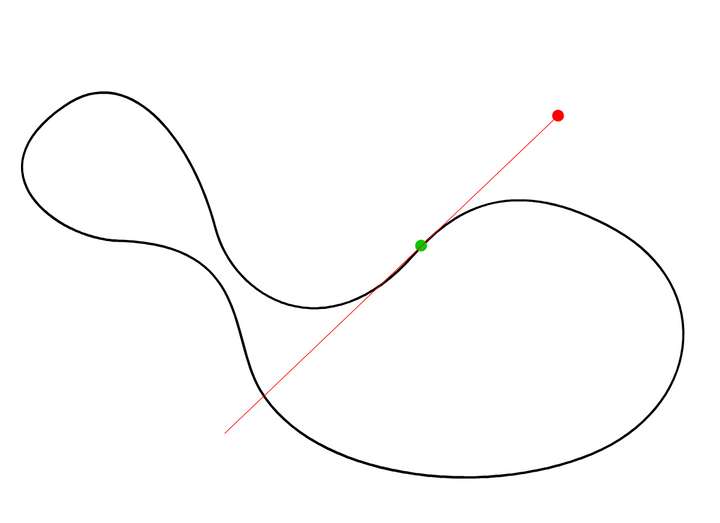
@b77 Well, yes, but what I had in mind is something that works in all scenarios. For example, I have a path (black line). I want to draw a line (red) from the red point that is tangent to the green point.
I don't want to restrict down to this example. I mean it's possible to use construction techniques or eyeball it, etc. Was just suggesting something that can be done in an easy way.
-
@pentool I understand that you need a tangent mode for the Line tool,
or maybe a separate Tangent tool.
I did say it's not exactly what you want but I posted this because it could
come handy.And… here's another method that could be useful — not exactly what you need but…
- add a node to the shape anywhere you want (the green point in your drawing);
- draw a line with the Line tool;
- enable 'Snap to Shape' and 'Snap to Points' in the Snapping panel;
- pick the line with the Collider tool (fourth tool in the toolbar) and snap it along the shape, or…
- snap it to the node you just added (to this one it will snap perpendicularly, but
you can rotate it 90°)
Again this is not drawing a tangent from the red dot to the green dot, but it's good to know.

