How to control Hover Selection Outline
-
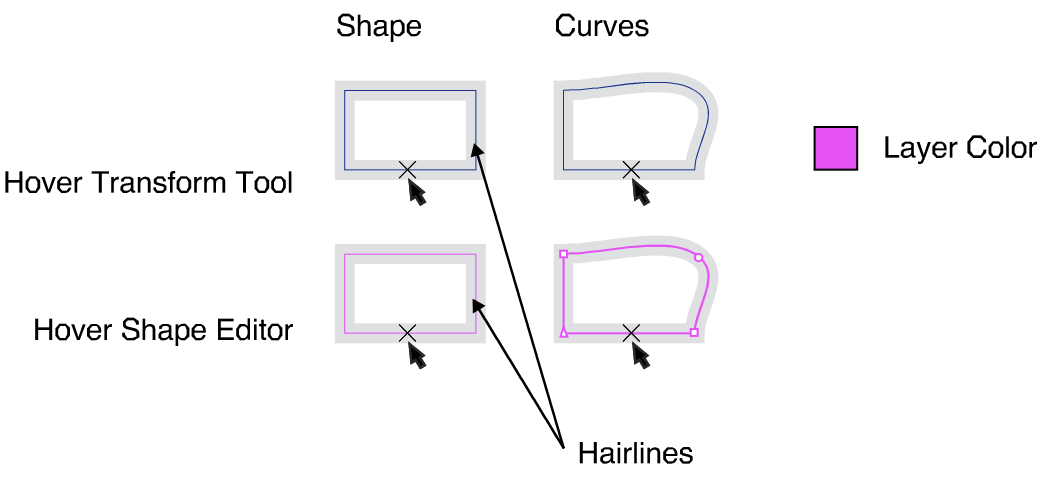
When I hover with the selection tool pointer over a shape edge there appears a X-cross under the pointer and a hairline following the shape.
This line looks a darkish blue while my layer color is pink.
When I hover with the node tool pointer over the shape edge I get a similar line but in the layer color.
How is this controlled. I can't find a setting to change the dark blue line to layer color?
I was hoping for the 'Object Selection Frame' setting, but it doesn't do anything. How does this work. See picture.
Under the setting 'Object Selection Frame' you will find 'Object Shape Center' Where and what does this setting affect? Unclear to me.
All settings in Editing Options 1
-
-
Cannot be edited for now (should it be editable?)
-
That has accidentally leaked out from the version 1.2 resources, not visible in 1.1 and will be in 1.2 only.
-
-
@VectorStyler said in How to control Hover Selection Outline:
Cannot be edited for now (should it be editable?)
Yes!
What if I don't like dark-blue...Vectorstyler is unfortunately quite cluttered in its interface. In order to find peace and order at least on my drawing board I look for the settings that I like and that make me feel 'at home'. If your 'select, node and handles indicators' are in layer colors, the 'elsewhere' determined hairline colors are then disturbing.
Almost everything is editable to customize your working environment to what you like and/or is functional. That's nice.
Why not link selection tool hairline to 'Transform Selection Frame' color and node tool hairline to the 'Node Editing Outline' color? Which is easier on the eyes gives you meaningful feedback.
-
addition
The hover-over is a preview of what you want to select under the pointer. Then give it that color but in hairline. -
@Ayo Added this to the backlog, but for 1.2 only.
-
Nice!
A lot is coming your way. Respect!

