Text Horrors
-
@Igull By 'completely unselectable at lower zoom levels' you mean
you cannot select and move text objects with the Select/Transform
tool (shortcut: V), or do you mean you cannot enter text editing mode
by double-clicking the text?Also: is this happening in Outline mode (Cmd-Y)?
MacBook Pro (Intel) running Monterey 12.6.4
-
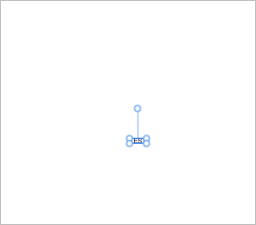
@Igull It might help to see a video of the issue you are having. Text can be a little tricky in any of the vector programs. I was testing in Affinity Designer and it is also looking similar to what VS has with the large "bubble" corners
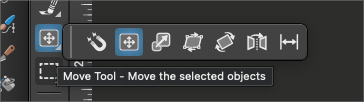
In VS, there is the "Move" tool which hides all other options for edit and only allows moving to occur. I've used this when I have multiple small objects that I want to rearrange without having to worry about accidentally modifying the selection
🍎 macOS Tahoe 26.2, Mac mini (M1, 2020), Chip Apple M1, Memory 16 GB
Cintiq 27QHD Display and LG Ultra HD Display -
@b77 said in Text Horrors:
@Igull By 'completely unselectable at lower zoom levels' you mean
you cannot select and move text objects with the Select/Transform
tool (shortcut: V),Correct.
or do you mean you cannot enter text editing mode
by double-clicking the text?That's also an issue at lower zoom levels
Also: is this happening in Outline mode (Cmd-Y)?
Yes.
-
@Igull Can you upload or send me a document, saved with the zoom level where the text frame is hard to select?
In Outline mode, text frames are selected only when clicking on the outline of the frame.
-
@Boldline said in Text Horrors:
In VS, there is the "Move" tool which hides all other options for edit and only allows moving to occur. I've used this when I have multiple small objects that I want to rearrange without having to worry about accidentally modifying the selection
And there is the simple answer ! That certainly cures all the issues I'm currently having and works at any zoom level without issue - thanks ! I wasn't aware of this tool as I have a self-limited tool setup here - there are far too many tools in the VS arsenal that I don't need (unlike my real workshop
 )
)However
I'm not sure I understand why it is necessary to have yet another tool do the job of the transform tool - it works perfectly in AI without swapping out to another tool ??One thing I did notice with the move tool is that you can option-drag to clone another text block - a saving feature.
The move tool doesn't pick up the text frame as well as the block text from the text tool - you have to be pretty accurate to just get the edge of the frame - it occasionally works by grabbing the internal text, but not always.
Thanks for that snippet - it's now on my M shortcut key (like most CAD apps curiously
)Neil
-
@Igull Do you need to be in Outline mode when preparing that user manual you mentioned in another thread?
Only in Outline mode you have this limitation with selecting text objects — see developer's comment. -
@Igull said in Text Horrors:
The 'text' tool texts end up with hundreds of selectable bubbles/nodes around and you can't see anything, using 'frame text' ends up with frames getting resized/rounded or just plain unmovable etc.
Try checking off these settings in Preferences:
Editing Options 2:
Edit Corners in Transform Tool
Edit Corners on Node ToolIf you turn these off the aforementioned bubbles won't show.
-
@William-Kansepa said in Text Horrors:
If you turn these off the aforementioned bubbles won't show.
Doh, I think age must be a hindrance here, I just didn't think to switch those off
Thanks for that, that essentially fixes all the other zoom issues too - and using the transform tool to boot LOL
Thanks for that and thanks to everyone else for chiming in on the issue ! Text editing is so much easier here now
TBH, the only time I ever adjust corner radii is accurately via the panel editfield and never by hand, so those prefs can remain saved.
Neil
-
@Igull said in Text Horrors:
TBH, the only time I ever adjust corner radii is accurately via the panel edit field and never by hand, so those prefs can remain saved.
It's interesting because for me I almost always size by visual appearance and rarely by setting a certain number. I'm sure it has a lot to do with how technical our fields are in terms of what is required. Finding options for both types of users is best.
-
@Boldline said in Text Horrors:
Finding options for both types of users is best.
Yes, absolutely right !
As an aside, I'm having other issues today with corners
Resizing a 5mm cornered rectangle screws up the corners - they don't remain the same size - even when sizing proportionately (shift key) and the line thickness gets thicker on the left and right sides of the rectangle also which I can't seem to rectify. Even using a convert to curves on the rectangle to start with still causes the same problems 
Any thoughts/solutions ?Edit: Update, drawing any rectangle/oval is having the same issue with line widths. However, I'n finding that if I click the 'stroke inside' then back to 'stroke outside' the path, it resets the width issue - looks like a bug to me, I'll wait before I post the bug for now. Still having the non-symmetrical corner issue though.
Neil
-
@Igull It would help some to take screenshots and do some screen recording and including those with your questions so others can see what you are dealing with


