How to Edit Text Background?
-
Please see the screenshot and file (created using the latest version of VectorStyler (version 1.1.070)) below:
Text Black Background Screenshot
0_1671412813612_Text_Background.vstyler
How to remove or scale up the text background from the Appearance panel?
-
@gotanidea You can change the style of the text to 'Shape Text Style': http://recordit.co/R85LMJKfzz
(I tried to edit the current style from the Character Styles panel (Panels > Styles) by disabling the Fill
in the 'Background' section, but that didn't get rid of the black background).MacBook Pro (Intel) running Monterey 12.6.4
-
@b77 said in How to Edit Text Background?:
@gotanidea You can change the style of the text to 'Shape Text Style': http://recordit.co/R85LMJKfzz
(I tried to edit the current style from the Character Styles panel (Panels > Styles) by disabling the Fill
in the 'Background' section, but that didn't get rid of the black background).Yes, but I think we should've been able to remove or edit the text background from the Appearance panel, as in Illustrator
-
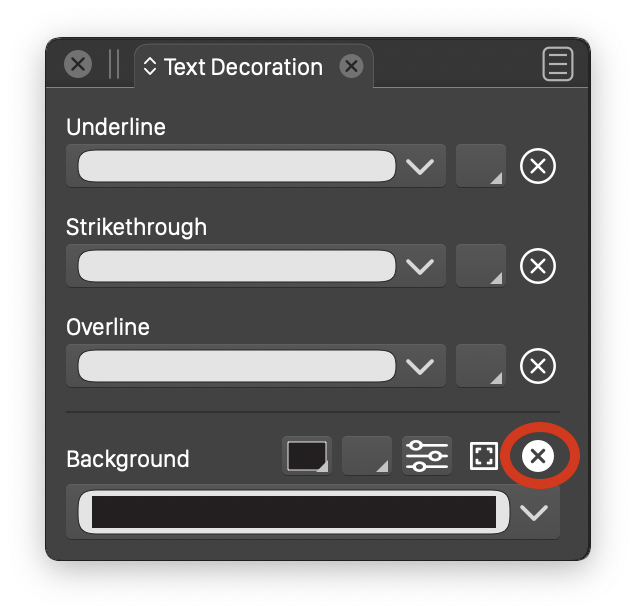
@gotanidea Managing the background fill of a text in VectorStyler is done in the Text Decorations panel.
The Appearance panel is used to stack fills / strokes / effects on the text as an object.
To remove the background, click on the red circled icon in the Background section:
-
@VectorStyler said in How to Edit Text Background?:
@gotanidea Managing the background fill of a text in VectorStyler is done in the Text Decorations panel.
The Appearance panel is used to stack fills / strokes / effects on the text as an object.
To remove the background, click on the red circled icon in the Background section:
Thank you!
-
@b77 @gotanidea The modal character options editor has a bug when working with background / underline and other decorators. Some drop downs don't open. The fix for these will be in the next build.
-
@VectorStyler said in How to Edit Text Background?:
@b77 @gotanidea The modal character options editor has a bug when working with background / underline and other decorators. Some drop downs don't open. The fix for these will be in the next build.
Good to know that. Thanks again

