VectorStyler
    • Categories
    • Unread
    • Recent
    • Tags
    • Popular
    • Register
    • Login

    Rendering artifacts with VS

    Scheduled Pinned Locked Moved Questions and Support
    19 Posts 5 Posters 14.9k Views 5 Watching
    Loading More Posts
    • Oldest to Newest
    • Newest to Oldest
    • Most Votes
    Reply
    • Reply as topic
    Log in to reply
    This topic has been deleted. Only users with topic management privileges can see it.
    • b77B Offline
      b77 @B-Vs-V
      last edited by b77

      @Pat Clean rendering here with AMD Radeon Pro 455 2 GB:

      0_1670758953012_Screenshot 2022-12-11 at 13.40.08.png

      MacBook Pro (Intel) running Monterey 12.6.4

      B 1 Reply Last reply Reply Quote 1
      • B Offline
        B-Vs-V @b77
        last edited by B-Vs-V

        @b77 Thanks for testing It only happens with VS. Here is a much more complex AI file & the rendering is perfect... as in AD.
        The 'subpixels' is set to maximum. There are many display features I can change in VS but I'm not sure what to do & prefer not to go by trial and error ☺

        AI:
        0_1670759155912_AI.jpg

        W11 Pro 25H2 - 12th Gen Intel(R) i7-12700K 3.61 GHz - RAM 64 Go - NVIDIA GF GTX 4070 Ti - Intuos - Dell UP3216Q / Eizo ColorEdge
        W11 Pro 25H2 - 12th Gen Intel(R) i7-12700KF 3.60 GHz -RAM 64 Go - NVIDIA GF GTX 3080 - IntuosPro- ProArt PA329C

        1 Reply Last reply Reply Quote 0
        • S Offline
          Subpath
          last edited by Subpath

          @Pat

          everthing seems fine her too
          Subpixel are Maximum, Win 10, Gforce rtx 3070

          0_1670763995428_Graphic-test.png

          Win 11
          CPU: AMD Ryzen 5 9600X, 6-core.
          GPU: Nvidia Geforce RTX 5070.

          1 Reply Last reply Reply Quote 1
          • VectorStylerV Offline
            VectorStyler @B-Vs-V
            last edited by

            @Pat I will also test this on Windows. Can this be replicated with certainty on your PC?

            1 Reply Last reply Reply Quote 1
            • B Offline
              B-Vs-V
              last edited by

              @Subpath Thanks for having tested ☺

              @VectorStyler Yes, reproducible. If you check the figures I've recently posted, you'll see these artefacts.
              I'm using my W11 PC right now but I'll test the same file on my W10 machine (can't do quickly).
              My monitor is an Asus PA329C

              W11 Pro 25H2 - 12th Gen Intel(R) i7-12700K 3.61 GHz - RAM 64 Go - NVIDIA GF GTX 4070 Ti - Intuos - Dell UP3216Q / Eizo ColorEdge
              W11 Pro 25H2 - 12th Gen Intel(R) i7-12700KF 3.60 GHz -RAM 64 Go - NVIDIA GF GTX 3080 - IntuosPro- ProArt PA329C

              H 1 Reply Last reply Reply Quote 0
              • H Offline
                Harry @B-Vs-V
                last edited by Harry

                @Pat Occasionally I have such an artifacts in VS also. They are rare and not dramatic.

                On your symbols they are only in upper parts, next to "joining":

                0_1670771146755_6b7e13ad-d346-4c85-9093-a62954f4ab0b-image.png

                PDFs are crisp though. (Win 10, GTX1650Ti - laptop)

                Win 11, XP Pen Deco 01 V2 graphic tablet

                VectorStylerV B 2 Replies Last reply Reply Quote 1
                • VectorStylerV Offline
                  VectorStyler @Harry
                  last edited by

                  @Harry I opened a bug on this one.
                  What is the screen resolution (size) in pixels, and is the VS window maximized?

                  B H 3 Replies Last reply Reply Quote 0
                  • B Offline
                    B-Vs-V @VectorStyler
                    last edited by

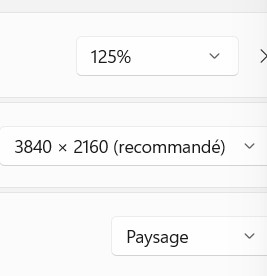
                    @VectorStyler Resolution: 3840 x 2160 (scaling 125%).

                    W11 Pro 25H2 - 12th Gen Intel(R) i7-12700K 3.61 GHz - RAM 64 Go - NVIDIA GF GTX 4070 Ti - Intuos - Dell UP3216Q / Eizo ColorEdge
                    W11 Pro 25H2 - 12th Gen Intel(R) i7-12700KF 3.60 GHz -RAM 64 Go - NVIDIA GF GTX 3080 - IntuosPro- ProArt PA329C

                    VectorStylerV 1 Reply Last reply Reply Quote 1
                    • B Offline
                      B-Vs-V @Harry
                      last edited by

                      @Harry I always get those artefacts and indeed, pdf export is fine.

                      0_1670778138301_rend.jpg

                      PDF:

                      0_1670778159255_rend_pdf.jpg

                      W11 Pro 25H2 - 12th Gen Intel(R) i7-12700K 3.61 GHz - RAM 64 Go - NVIDIA GF GTX 4070 Ti - Intuos - Dell UP3216Q / Eizo ColorEdge
                      W11 Pro 25H2 - 12th Gen Intel(R) i7-12700KF 3.60 GHz -RAM 64 Go - NVIDIA GF GTX 3080 - IntuosPro- ProArt PA329C

                      1 Reply Last reply Reply Quote 0
                      • VectorStylerV Offline
                        VectorStyler @B-Vs-V
                        last edited by

                        @Pat said in Rendering artifacts with VS:

                        (scaling 125%).

                        Does this refer to a Windows display settings?

                        B 1 Reply Last reply Reply Quote 0
                        • B Offline
                          B-Vs-V @VectorStyler
                          last edited by

                          @VectorStyler Yes & no other monitor on this pc.
                          0_1670778514921_Setup.jpg

                          W11 Pro 25H2 - 12th Gen Intel(R) i7-12700K 3.61 GHz - RAM 64 Go - NVIDIA GF GTX 4070 Ti - Intuos - Dell UP3216Q / Eizo ColorEdge
                          W11 Pro 25H2 - 12th Gen Intel(R) i7-12700KF 3.60 GHz -RAM 64 Go - NVIDIA GF GTX 3080 - IntuosPro- ProArt PA329C

                          VectorStylerV 1 Reply Last reply Reply Quote 0
                          • VectorStylerV Offline
                            VectorStyler @B-Vs-V
                            last edited by

                            @Pat said in Rendering artifacts with VS:

                            Yes & no other monitor on this pc.

                            Try with 100% scaling. This might be the issue.
                            And if it is, it is still a VS bug.

                            B 1 Reply Last reply Reply Quote 0
                            • B Offline
                              B-Vs-V @VectorStyler
                              last edited by

                              @VectorStyler No, I still get these rendering issues, more or less pronounced according to the zoom factor


                              0_1670778991024_rend2.jpg
                              0_1670778995621_rend3.jpg

                              W11 Pro 25H2 - 12th Gen Intel(R) i7-12700K 3.61 GHz - RAM 64 Go - NVIDIA GF GTX 4070 Ti - Intuos - Dell UP3216Q / Eizo ColorEdge
                              W11 Pro 25H2 - 12th Gen Intel(R) i7-12700KF 3.60 GHz -RAM 64 Go - NVIDIA GF GTX 3080 - IntuosPro- ProArt PA329C

                              1 Reply Last reply Reply Quote 0
                              • B Offline
                                B-Vs-V @VectorStyler
                                last edited by

                                @VectorStyler said in Rendering artifacts with VS:

                                @Harry I opened a bug on this one.

                                Thank you, it is rather annoying sometimes ☺

                                W11 Pro 25H2 - 12th Gen Intel(R) i7-12700K 3.61 GHz - RAM 64 Go - NVIDIA GF GTX 4070 Ti - Intuos - Dell UP3216Q / Eizo ColorEdge
                                W11 Pro 25H2 - 12th Gen Intel(R) i7-12700KF 3.60 GHz -RAM 64 Go - NVIDIA GF GTX 3080 - IntuosPro- ProArt PA329C

                                1 Reply Last reply Reply Quote 0
                                • H Offline
                                  Harry @VectorStyler
                                  last edited by

                                  @VectorStyler said in Rendering artifacts with VS:

                                  @Harry I opened a bug on this one.
                                  What is the screen resolution (size) in pixels, and is the VS window maximized?

                                  I tried the following:

                                  • newest Nvidia drivers
                                  • 100 and 125 % scaling in Windows
                                  • screen resolution 1920 x 1080
                                  • VS window maximized and not

                                  Artifacts still exist. The worst are by 100 % scaling in Windows and VS window maximized.

                                  Win 11, XP Pen Deco 01 V2 graphic tablet

                                  VectorStylerV 1 Reply Last reply Reply Quote 2
                                  • VectorStylerV Offline
                                    VectorStyler @Harry
                                    last edited by

                                    @Harry Can be replicated.

                                    1 Reply Last reply Reply Quote 1
                                    • First post
                                      Last post