VectorStyler
    • Categories
    • Unread
    • Recent
    • Tags
    • Popular
    • Register
    • Login

    WIP - Testing Blending: not yet a tutorial but soon for beginners


    Scheduled Pinned Locked Moved Tutorials
    123 Posts 7 Posters 474.5k Views 7 Watching
    Loading More Posts
    • Oldest to Newest
    • Newest to Oldest
    • Most Votes
    Reply
    • Reply as topic
    Log in to reply
    This topic has been deleted. Only users with topic management privileges can see it.
    • S Offline
      Subpath @STEVED
      last edited by Subpath

      @STEVED

      yes, I was kidding 🙂
      thanks for your kind words.
      Much appreciated

      Btw. this Part of the Tutorial are now online
      you found it here:
      https://www.vectorstyler.com/forum/topic/2534/creating-3d-templates-for-further-processing-in-vs-a-relative-easy-way/3?loggedin=true

      Win 11
      CPU: AMD Ryzen 5 9600X, 6-core.
      GPU: Nvidia Geforce RTX 5070.

      1 Reply Last reply Reply Quote 0
      • B Offline
        B-Vs-V
        last edited by

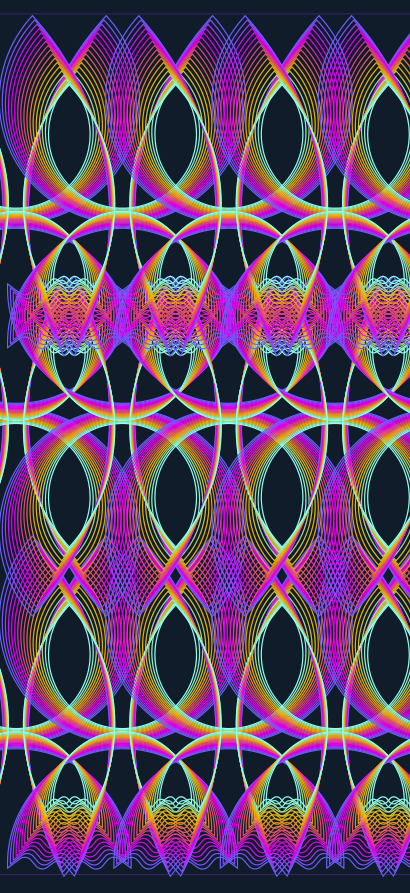
        Once a pattern of interest is designed, the 'Repeater' function can also create interesting patterns.
        0_1676045405250_5ee576cb-617e-45e7-854d-f4ab30a612f4-image.png

        W11 Pro 25H2 - 12th Gen Intel(R) i7-12700K 3.61 GHz - RAM 64 Go - NVIDIA GF GTX 4070 Ti - Intuos - Dell UP3216Q / Eizo ColorEdge
        W11 Pro 25H2 - 12th Gen Intel(R) i7-12700KF 3.60 GHz -RAM 64 Go - NVIDIA GF GTX 3080 - IntuosPro- ProArt PA329C

        S 1 Reply Last reply Reply Quote 2
        • S Offline
          Subpath @B-Vs-V
          last edited by

          @Pat

          looks great
          how did your computer deal with it ?

          Win 11
          CPU: AMD Ryzen 5 9600X, 6-core.
          GPU: Nvidia Geforce RTX 5070.

          B 1 Reply Last reply Reply Quote 1
          • B Offline
            B-Vs-V @Subpath
            last edited by

            @Subpath Thanks. Funny you asked me that question now. I just had a BSOD but it must not be related to VS. I just added RAM... and since then I have had BSOD after BSOD. I have a problem with this hardware. At this point, if I didn't depend so much on software for Windows, I would buy a Mac.
            I think I had some problems with the graphics card drivers too.

            W11 Pro 25H2 - 12th Gen Intel(R) i7-12700K 3.61 GHz - RAM 64 Go - NVIDIA GF GTX 4070 Ti - Intuos - Dell UP3216Q / Eizo ColorEdge
            W11 Pro 25H2 - 12th Gen Intel(R) i7-12700KF 3.60 GHz -RAM 64 Go - NVIDIA GF GTX 3080 - IntuosPro- ProArt PA329C

            S 1 Reply Last reply Reply Quote 0
            • S Offline
              Subpath @B-Vs-V
              last edited by Subpath

              @Pat

              Well, the repeater in VS demands in some cases
              a bit of computing power 🙂

              But that BSOD Problems are of course not so pretty.
              Have you checked whether the memory is the cause?
              I had such a case once. The desktop suddenly went crazy.
              Wish you that the cause will be found.

              Win 11
              CPU: AMD Ryzen 5 9600X, 6-core.
              GPU: Nvidia Geforce RTX 5070.

              B 1 Reply Last reply Reply Quote 0
              • B Offline
                B-Vs-V @Subpath
                last edited by

                @Subpath Thanks for your reply ☺

                VS is indeed quite demanding of computing power when we start to multiply complex designs with the 'repeater' or 'transform' features. As I use other softwares that are quite demanding in terms of computing power, I thought that increasing the ram was a good idea at low cost...

                I think I found the problem. The issue is more the motherboard that doesn't allow the optimal ram frequency... I absolutely dislike these hardware issues.

                W11 Pro 25H2 - 12th Gen Intel(R) i7-12700K 3.61 GHz - RAM 64 Go - NVIDIA GF GTX 4070 Ti - Intuos - Dell UP3216Q / Eizo ColorEdge
                W11 Pro 25H2 - 12th Gen Intel(R) i7-12700KF 3.60 GHz -RAM 64 Go - NVIDIA GF GTX 3080 - IntuosPro- ProArt PA329C

                S 1 Reply Last reply Reply Quote 1
                • S Offline
                  Subpath @B-Vs-V
                  last edited by

                  I think I found the problem

                  ok, then good luck

                  Win 11
                  CPU: AMD Ryzen 5 9600X, 6-core.
                  GPU: Nvidia Geforce RTX 5070.

                  B 1 Reply Last reply Reply Quote 1
                  • B Offline
                    B-Vs-V @Subpath
                    last edited by

                    @Subpath Issue solved (apparently), PC stable again.

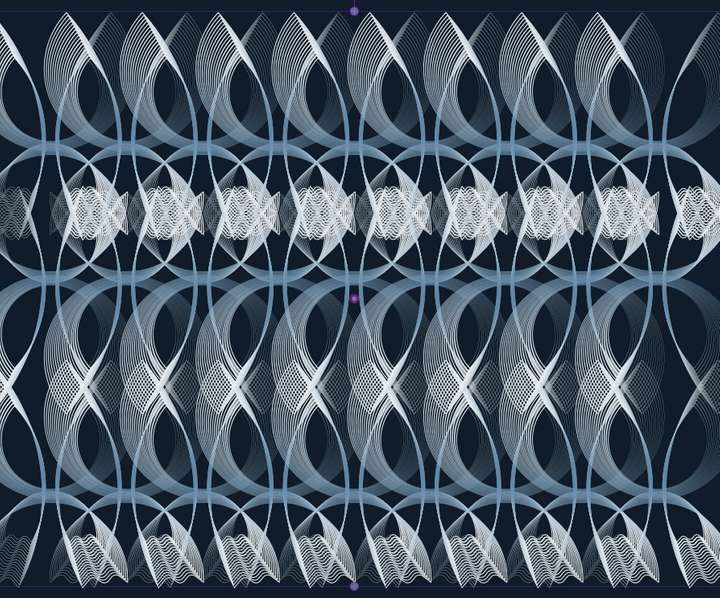
                    The 'Repeater' function is really interesting. A little gem from VS again 👍 It reminds me of a video I saw by chance on an AGraphics plugin (forgot which one?).
                    0_1676115349616_4b9e391d-23a9-4fcc-a41b-7a8b73534bb8-image.png

                    @VectorStyler This is very powerful... but I don't see how to select/change a colour/gradient/etc. from the Repeater panel.

                    W11 Pro 25H2 - 12th Gen Intel(R) i7-12700K 3.61 GHz - RAM 64 Go - NVIDIA GF GTX 4070 Ti - Intuos - Dell UP3216Q / Eizo ColorEdge
                    W11 Pro 25H2 - 12th Gen Intel(R) i7-12700KF 3.60 GHz -RAM 64 Go - NVIDIA GF GTX 3080 - IntuosPro- ProArt PA329C

                    VectorStylerV 1 Reply Last reply Reply Quote 1
                    • VectorStylerV Offline
                      VectorStyler @B-Vs-V
                      last edited by

                      @Pat said in WIP - Testing Blending: not yet a tutorial but soon for beginners:

                      but I don't see how to select/change a colour/gradient/etc. from the Repeater panel

                      The colour/gradient of what? The styles inside the repeated objects are not directly editable in the repeater panel.
                      For that use symbols (Symbol role on an object) and repeat the symbol, then changing the styles in the original object will update the repeated one also.

                      B 1 Reply Last reply Reply Quote 0
                      • S Offline
                        Subpath
                        last edited by Subpath

                        @Pat

                        can recommend to search the VS Forum
                        with the Topic "Repeater"

                        There are already some post with user cases and Tips
                        i think also how to use Symbols with it

                        Win 11
                        CPU: AMD Ryzen 5 9600X, 6-core.
                        GPU: Nvidia Geforce RTX 5070.

                        1 Reply Last reply Reply Quote 0
                        • B Offline
                          B-Vs-V @VectorStyler
                          last edited by B-Vs-V

                          @VectorStyler said in WIP - Testing Blending: not yet a tutorial but soon for beginners:

                          @Pat said in WIP - Testing Blending: not yet a tutorial but soon for beginners:

                          but I don't see how to select/change a colour/gradient/etc. from the Repeater panel

                          The colour/gradient of what?

                          Sorry if my question sounds stupid 😕

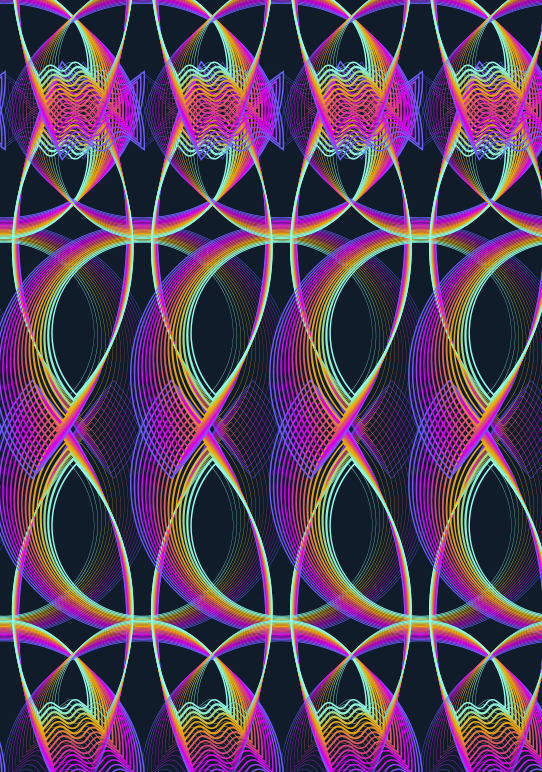
                          I'm designing a pattern with the repeater function, fine but:
                          0_1676120397721_e636543e-652c-4df7-803f-2f45c12ec410-image.png

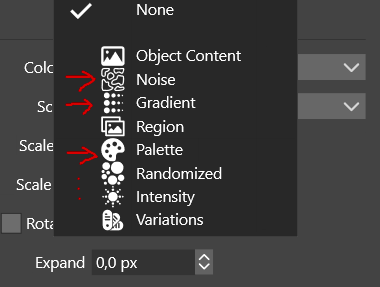
                          ...i n this panel, I see this:

                          0_1676120498160_7bac73dd-05e6-4fdc-8154-61a8a02fa086-image.png

                          ... so I think it's possible to add a gradient... I do have a gradient :

                          0_1676120594204_024e5d73-1af5-4b44-813d-5e507a5fba86-image.png

                          but I don't want a simple black-to-white. So, I wonder where I can change it? I can add noise, fine but what if I want to change it? and so on...

                          @Subpath Well, you may be right. I'll read first the topics of interest in this forum before posting again ☺

                          Edit : I can of course change the colorization via the Gradient panel, no problem but I don't understand the rationale of having these options in the 'Repeater' panel but I'll read the doc (without tuto, it's not easy) before posting.

                          W11 Pro 25H2 - 12th Gen Intel(R) i7-12700K 3.61 GHz - RAM 64 Go - NVIDIA GF GTX 4070 Ti - Intuos - Dell UP3216Q / Eizo ColorEdge
                          W11 Pro 25H2 - 12th Gen Intel(R) i7-12700KF 3.60 GHz -RAM 64 Go - NVIDIA GF GTX 3080 - IntuosPro- ProArt PA329C

                          VectorStylerV 1 Reply Last reply Reply Quote 0
                          • VectorStylerV Offline
                            VectorStyler @B-Vs-V
                            last edited by

                            @Pat Got it!

                            That is about the colorization of the repeated objects. It will replace the colors in the objects, according to some color source (like Gradient).

                            In the attached example we have a single (gray) circle repeated and the colorized using the Gradient colorizer.
                            This is done by first selecting Gradient in the Colorize drop down (which will apply a linear gradient), and then selecting Edit Colorizer (same drop down) to edit the gradient options.

                            This gradient cannot be edited interactively, only in a modal view.

                            0_1676121200871_repeater7.vstyler

                            1 Reply Last reply Reply Quote 0
                            • B Offline
                              B-Vs-V
                              last edited by B-Vs-V

                              I haven't had much time to test VS these last weeks but I'm working on a symmetry theme and I think I'll have a little fun with VS for some vector drawings.
                              Here is what I got in a few minutes:

                              0_1678985377218_Testing.jpg

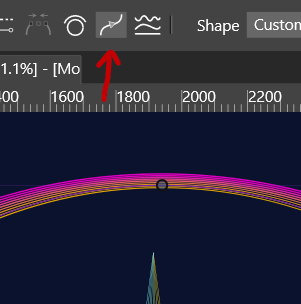
                              @VectorStyler I would like to change the profile of a stroke and I found the function:
                              0_1678982020940_a446ecbe-32e4-4cbd-8f92-f96890ff9cd7-image.png

                              but this is what I get...:

                              0_1678982168042_2a27cc10-3877-4e04-81ff-605ad534651f-image.png

                              W11 Pro 25H2 - 12th Gen Intel(R) i7-12700K 3.61 GHz - RAM 64 Go - NVIDIA GF GTX 4070 Ti - Intuos - Dell UP3216Q / Eizo ColorEdge
                              W11 Pro 25H2 - 12th Gen Intel(R) i7-12700KF 3.60 GHz -RAM 64 Go - NVIDIA GF GTX 3080 - IntuosPro- ProArt PA329C

                              VectorStylerV 1 Reply Last reply Reply Quote 2
                              • VectorStylerV Offline
                                VectorStyler @B-Vs-V
                                last edited by

                                @Pat That button changes the starting node of the selected path to the selected node.

                                Use the Stroke panel (or the Width panel) to change the profile.

                                B 1 Reply Last reply Reply Quote 0
                                • B Offline
                                  B-Vs-V @VectorStyler
                                  last edited by

                                  @VectorStyler Yes, I know that but when I change the profile, the thinner stroke starts where I don't want. I thought that changing the start of the stroke might help to have the profile as I want.

                                  W11 Pro 25H2 - 12th Gen Intel(R) i7-12700K 3.61 GHz - RAM 64 Go - NVIDIA GF GTX 4070 Ti - Intuos - Dell UP3216Q / Eizo ColorEdge
                                  W11 Pro 25H2 - 12th Gen Intel(R) i7-12700KF 3.60 GHz -RAM 64 Go - NVIDIA GF GTX 3080 - IntuosPro- ProArt PA329C

                                  VectorStylerV 2 Replies Last reply Reply Quote 0
                                  • VectorStylerV Offline
                                    VectorStyler @B-Vs-V
                                    last edited by

                                    @Pat said in WIP - Testing Blending: not yet a tutorial but soon for beginners:

                                    @VectorStyler Yes, I know that but when I change the profile, the thinner stroke starts where I don't want. I thought that changing the start of the stroke might help to have the profile as I want.

                                    Got it, that should work! But it might be that the blend behaves differently if the starting node is shifted.

                                    I will test this.

                                    B 2 Replies Last reply Reply Quote 0
                                    • VectorStylerV Offline
                                      VectorStyler @B-Vs-V
                                      last edited by

                                      @Pat BTW: there is also a Blend Mapping tool (next to the blend tool) that can be used to realign blend shapes.

                                      B 1 Reply Last reply Reply Quote 0
                                      • B Offline
                                        B-Vs-V @VectorStyler
                                        last edited by

                                        @VectorStyler yes, I thought of that and we should think about changing the starting point before blending.

                                        W11 Pro 25H2 - 12th Gen Intel(R) i7-12700K 3.61 GHz - RAM 64 Go - NVIDIA GF GTX 4070 Ti - Intuos - Dell UP3216Q / Eizo ColorEdge
                                        W11 Pro 25H2 - 12th Gen Intel(R) i7-12700KF 3.60 GHz -RAM 64 Go - NVIDIA GF GTX 3080 - IntuosPro- ProArt PA329C

                                        1 Reply Last reply Reply Quote 0
                                        • B Offline
                                          B-Vs-V @VectorStyler
                                          last edited by

                                          @VectorStyler Ok, I have to select two nodes of the two blended objects before changing the start of the strokes and it is fine ☺

                                          W11 Pro 25H2 - 12th Gen Intel(R) i7-12700K 3.61 GHz - RAM 64 Go - NVIDIA GF GTX 4070 Ti - Intuos - Dell UP3216Q / Eizo ColorEdge
                                          W11 Pro 25H2 - 12th Gen Intel(R) i7-12700KF 3.60 GHz -RAM 64 Go - NVIDIA GF GTX 3080 - IntuosPro- ProArt PA329C

                                          1 Reply Last reply Reply Quote 0
                                          • B Offline
                                            B-Vs-V @VectorStyler
                                            last edited by

                                            @VectorStyler said in WIP - Testing Blending: not yet a tutorial but soon for beginners:

                                            @Pat BTW: there is also a Blend Mapping tool (next to the blend tool) that can be used to realign blend shapes.

                                            I don't find the way to change the stroke start with any tool (from the panel, right ?).

                                            W11 Pro 25H2 - 12th Gen Intel(R) i7-12700K 3.61 GHz - RAM 64 Go - NVIDIA GF GTX 4070 Ti - Intuos - Dell UP3216Q / Eizo ColorEdge
                                            W11 Pro 25H2 - 12th Gen Intel(R) i7-12700KF 3.60 GHz -RAM 64 Go - NVIDIA GF GTX 3080 - IntuosPro- ProArt PA329C

                                            VectorStylerV 1 Reply Last reply Reply Quote 0
                                            • First post
                                              Last post